[Learing] Bypassing Security Cookie with SEH
Last Update:
Word Count:
Read Time:
Introduction
This article is part of my series: From Bug To Exploit.
In this article, I will explore how to bypass security cookie while performing a buffer overflow attack.

What Is Security Cookie?
A security cookie (a.k.a. **stack canary) is a random value placed on the stack by a compiler between local variable and critical data, such as the return address.
If a stack-based buffer overflow occurs, the overflow may overwrite the cookie. The program detects the change before returning and immediately terminates to prevent code execution.
In an x86 application, the return address is stored at EBP + 4, and in this example, the security cookie is stored at EBP - 4. When a buffer overflow occurs, it overwrites data from lower addresses to high addresses, potentially overwriting EBP + 4 (the return address). In other words, EBP - 4 will be overwritten as well.
The application then checks the value of the security cookie stored at EBP - 4. Since its value has been overwritten, it cannot pass the validation. Therefore, the system terminates the application by raising an exception.
Demonstration
How Security Cookie Works
In this section, I will demonstrate how security cookie prevents overwriting the return address by a buffer overflow attack.
Save the C++ code below as gs.cpp in Visual Studio (not Visual Studio Code):
1 | |
Configure the build mode as Release:
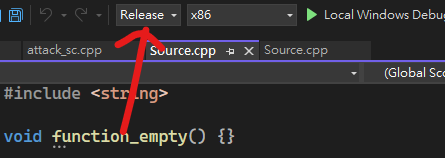
And then build the application.
Note: You can do this on your production machine.
Next, open gs.exe with WinDbg.
Run the command below to disassemble the function function_string:
1 | |

Here, the highlighed instructions in the picture above are related to the security cookie. We can see that this mechanism validates the cookie by performing an XOR operation. If the value is incorrect, the process terminates.
We can read the value of the security cookie with the command below:
1 | |
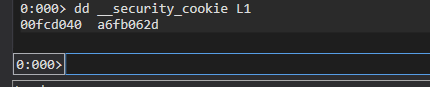
This value is not constant. Therefore, we cannot predict its value in advance in order to bypass the protection.
Let’s disassemble the function function_empty:
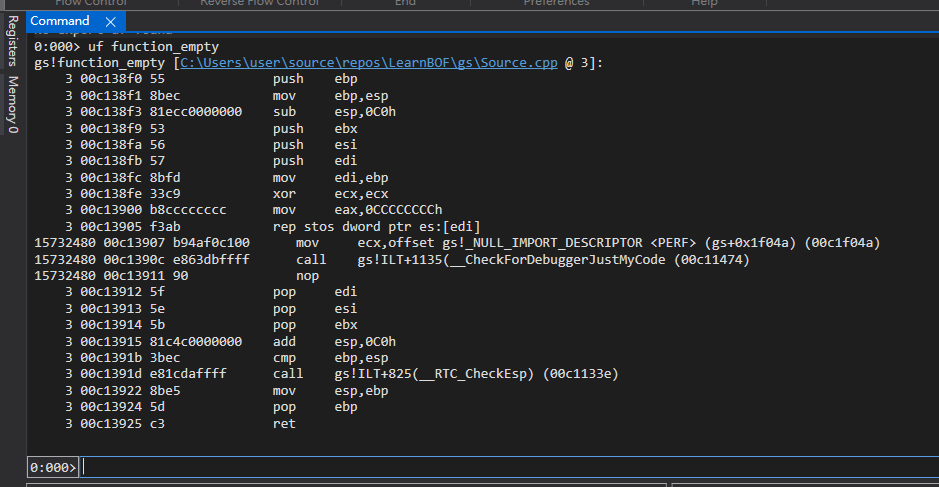
As we can see in the picture, there is no security cookie protection. Therefore, we can infer that compilers do not always add protection to every function. In this case, Visual Studio did not add one because the function is completely empty.
How about other functions? Let’s disassemble function_int_2 and function_int_3:
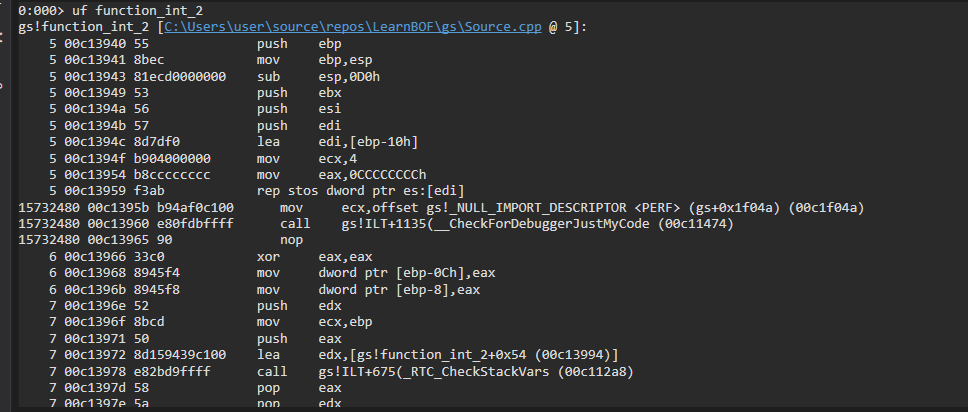
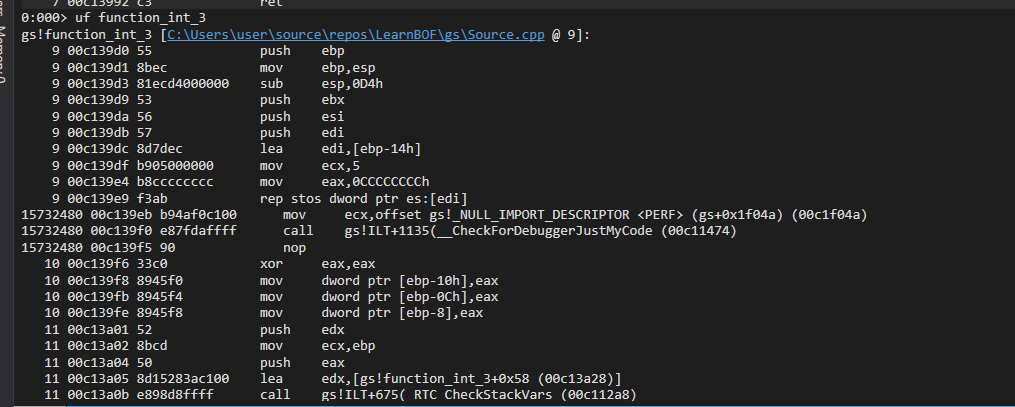
Visual Studio did not add any protection. Therefore, we can presume that if the buffer is too small to perform a buffer overflow attack, the compiler may not add security cookie protection to the function.
Lastly, let’s disassemble function_char_4. We can see that this function has security cookie protection:
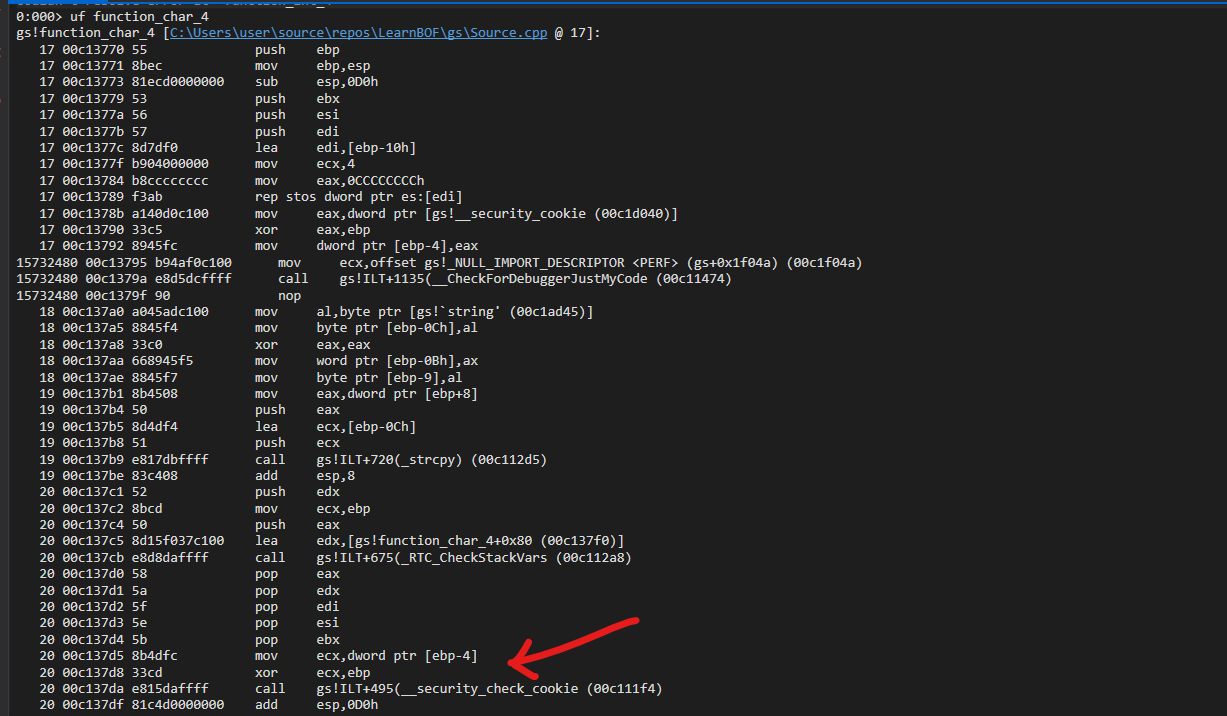
Next, let’s try to run the application by entering the command g. Our application will then terminate with an exception: “Security check failure or stack buffer overrun”:

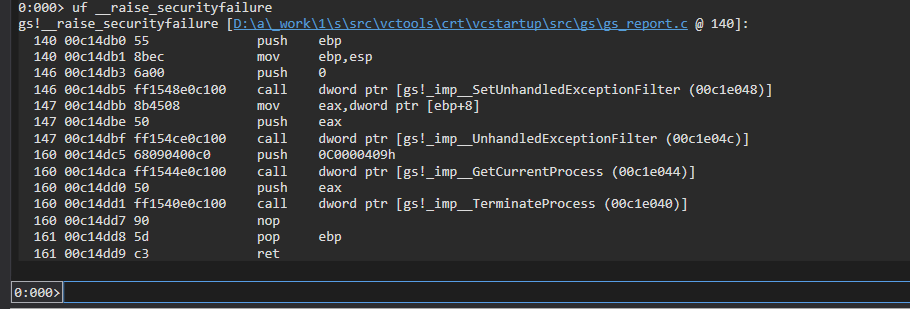
Let’s look inside the function __security_check_cookie:
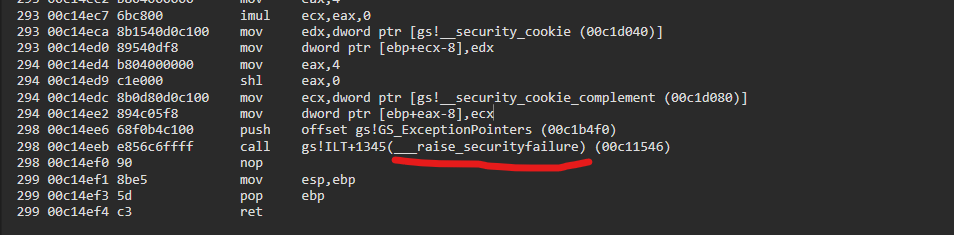
We can see that if the value doesn’t match, the function calls another function, __raise_securityfailure, and therefore terminates the process.
Without Security Cookie
In this section, I will show what happends when the security cookie is disabled.
Configure Visual Studio by going to Options -> Code Generation. Set Basic Runtime Checks to Default and Security Check to Disable Security Check (/GS).
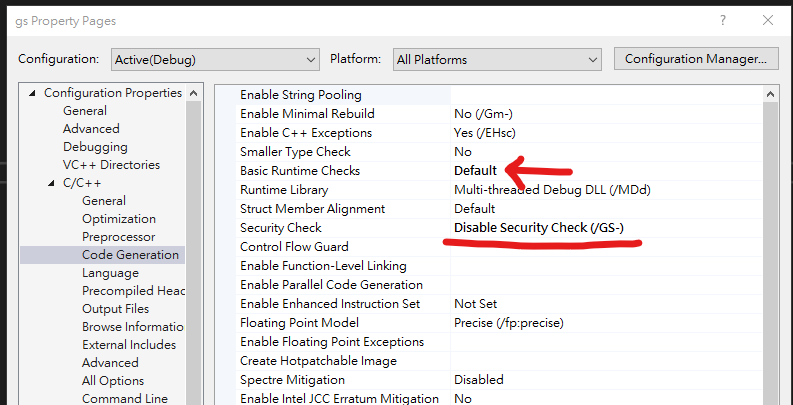
Then, compile gs.exe again.
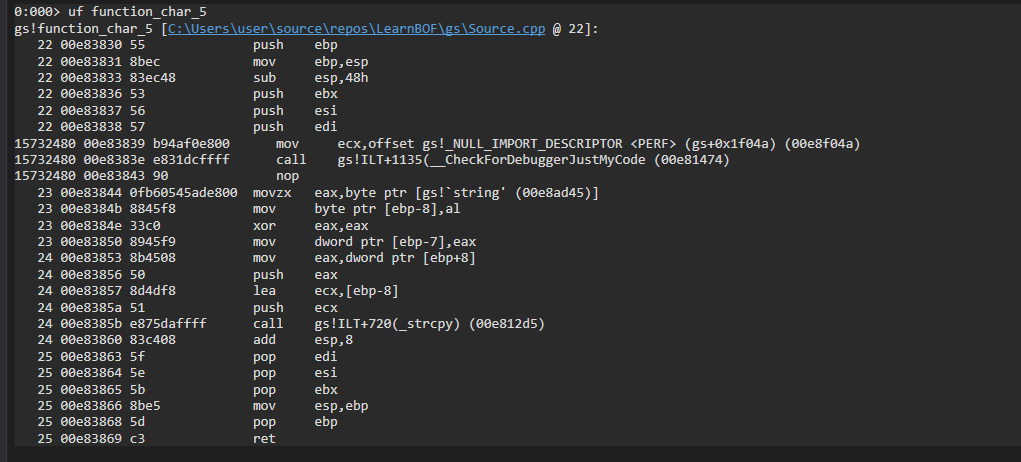
This time, as shown in WinDbg, we can see that security cookie protection no longer exists:
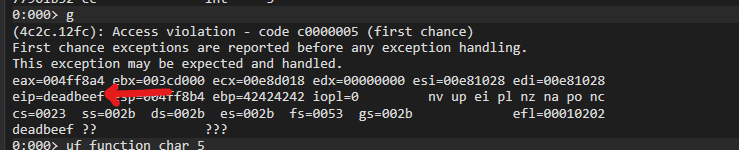
Run the application by entering the command g, and EIP is overwritten with DEADBEEF:
Bypassing Security Cookie
In this section, I will show how to bypass the security cookie.
The first method is to overflow a virtual function. Before 2008, this method could bypass the protection. One day, however, a researcher introduced this technique at Black Hat. This vulnerability was then quickly patched by Microsoft.
Note: In case you’re wondering, the paper is Bypassing Browser Memory Protection, on page 18.
In other words, this method is no longer exploitable. Therefore, I will introduce the second method: bypassing the security cookie with SEH.
Note: I will discuss the first method in a future post!
Now we know the principle of the security cookie and understand how it protects the stack.
However, it cannot prevent a buffer overflow through an SEH overflow.
Now, enable the security cookie again and compile the application.
This time, we are going to exploit it on Windows XP (since I only installed Immunity Debugger on it…).
If you compile your C++ application directly using the latest version of Visual Studio, the executable probably cannot run on Windows XP.
In this case, open Options -> Linker -> System. Set Minimum Required Version to 5.01.
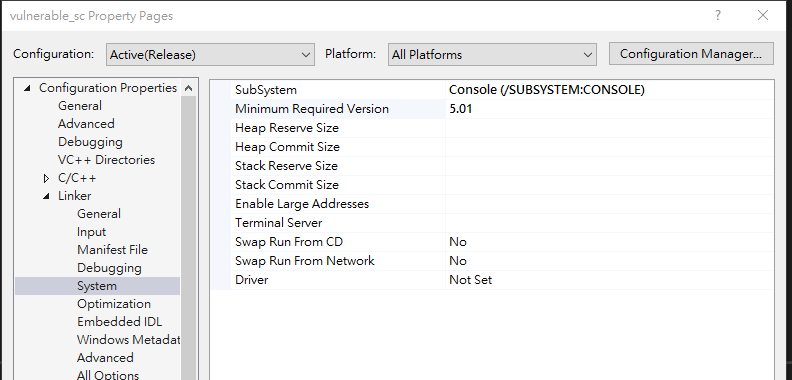
Note: Here,
5and1represent the Major ID and Minor ID, respectively. The version number5.01represents Windows XP.
Save the code below as vulnerable_sc.cpp and compile it:
1 | |
Overflow the application with the Python script below:
1 | |
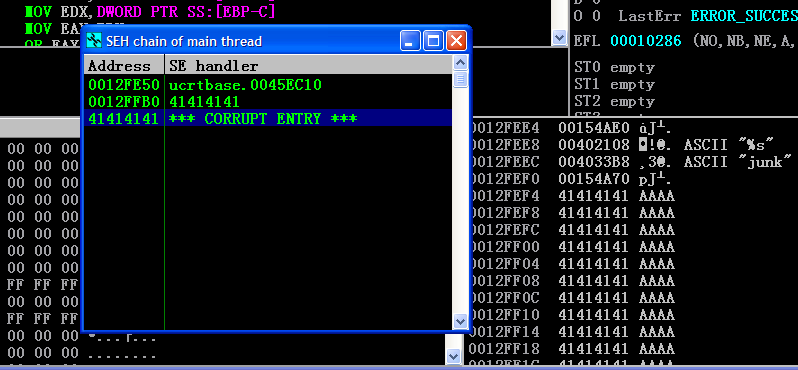
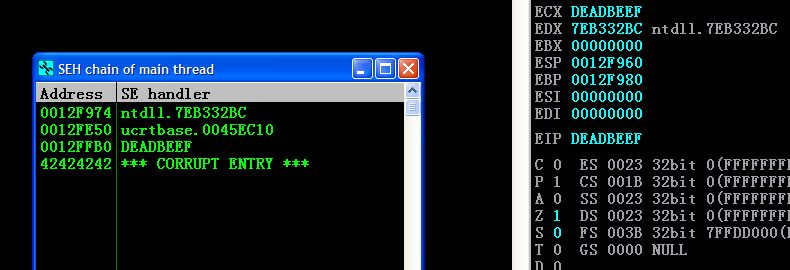
We can see that the values of SEH and NSEH have been overwritten. Therefore, the remaining task is to find the exact offset with mona:
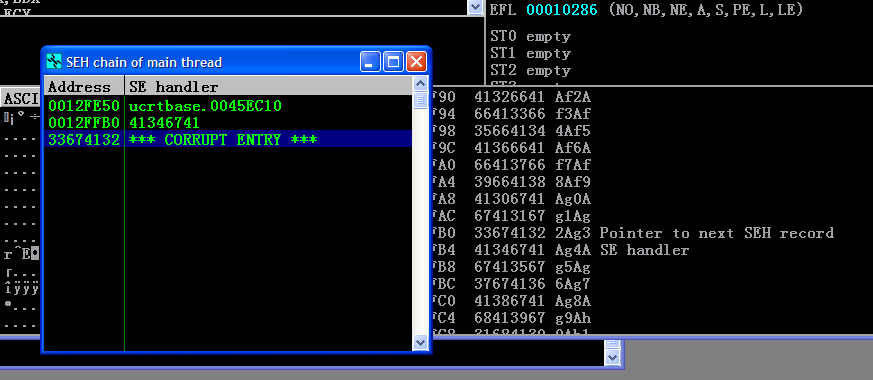
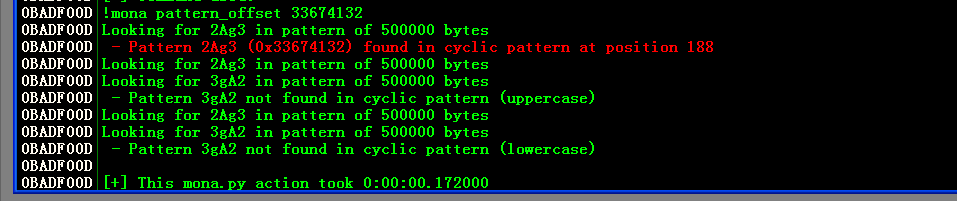
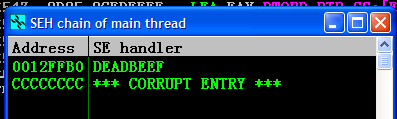
Lastly, the DEADBEEF PoC can be implemented as follows:
1 | |
Then we can overwrite EIP with DEADBEEF!
Conclusion
In this article, I learned how the security cookie works and how it protects the stack from buffer overflow attacks. I also learned how an SEH overflow can be used to bypass this protection.
To be honest, the bypass itself was not particularly difficult for me. Since I had already learned and practiced SEH overflows before, I was already familiar with the basic principle. The most difficult part was actually setting up the environment.
The textbook uses old versions of WinDbg and Visual Studio, which are quite difficult to find nowadays. Therefore, if you also want to practice these techniques, you should not blindly follow the exact values shown in this article. The addresses, offsets, and other values can be different depending on your environment.
As for the virtual function technique I mentioned earlier, unless you are specifically targeting applications released before 2008, it is generally no longer useful because the relevant protection has already been patched.
However, I will spend some time studying this technique in the future and write another blog post about it as well!
This is the end of the article. If you have any comments or suggestions, please feel free to leave them below!
THANKS FOR READING!
I drew a new drawing!