[Book] Windows Internal Part 1
Last Update:
Word Count:
Read Time:
El libro
Introduction
This article is used to keep notes and summaries of the book “Windows Internal Part 1”.
The content will be continuously updated as I read through the book.
Reflection
Chapter 1 - Concepts and Tools
Fundation concepts and terms
Windows API
The Windows application programming interface (API) is the user-mode system programming interface to the Windows OS family. Prior to the introduction of 64-bit versions of Windows, the API to the 32-bit versions of the Windows OS was called the Win32 API to distinguish it from the original 16-bit Windows API.
The term Windows API refers to both the 32-bit and 64-bit API to Windows.
Windows API flavors
COM was originally created to enable Microsoft Office applications to communicate and exchange data between documents (such as embedding an Excel chart inside a Word document or a PowerPoint presentation). This ability is called Object Linking and Embedding (OLE). OLE was originally implemented using an old Windows messaging mechanism called Dynamic Data Exchange (DDE).
COM is baed on two foundational principles. First, client communicate with objects (sometimes called COM server object) through interfaces——well-defined contracts with a set of logically related methods grouped under the virtual table dispatch mechanism, wich is also a common way for C++ compilers to implement virtual functions dispatch.
The second principle is that component implementation is loaded dynamically rather than being statically linked to the client.
The term COM server typically refers to a Dynamic Link Library (DLL) or an executable (EXE) where the COM classes are implemented.
The Windows Runtime
Windows 8 introduced a new API and supporting runtime called Windows Runtime (sometimes abbreviated WinRT, not to be confused with Windows RT, the discontinued ARM-based Windows OS version).
From an API perspective, WInRT is built on top of COM, adding various extensions to the base COM infrastructure.
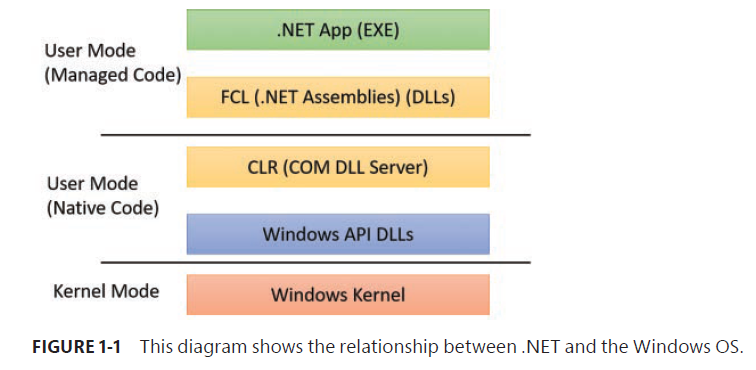
The .NET Framework
The .NET Framework is part of Windows.
| Windows Version | .NET Framework Version |
|---|---|
| Windows 8 | 4.5 |
| Windows 8.1 | 4.5.1 |
| Windows 10 | 4.6 |
| Windows 10 version 1511 | 4.6.1 |
| Windows 10 version 1607 | 4.6.2 |
The .NET Framework consists of two major components:
- The Common Language Runtime (CLT)
- The .NET Framework Class Library (FCL)
Services, functions, and routines
- Windows API functions
- Native system service (or system calls)
- Kernel support functions (or routines)
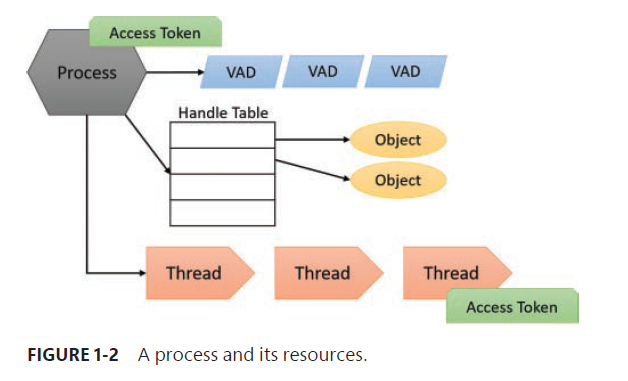
Processes
Although programs and process appear similar on the surface, they are fundamentally different.
A program is a static sequence of instructions, whereas a process is a container for a set of resources used when executing the instance of the program.
- A private virtual address space
- An executable program
- A list of open handles
- A security context
- A process ID
- At least one thread of execution
Threads
A thread is an entity within a process that Windows schedules for execution. Without it, the process’s program can’t run. A thread includes the follow essential components:
- The contents of a set of CPU registers representing the state of the processor
- Two stacks——one for the thread to use while executing in kernel mode and one for executing in user mode.
- A private storage area called thread-lcoal storage (TLS)* for use by subsystems, run-time libraries, and DLLs.
- A unique identifier called a thread ID (part of an internal structure called a client ID; process IDs and thread IDs are generated out of the same namespace, so they never overlap)
The threads of a 32-bit application running on a 64-bit version of WIndows will contain both 32-bit and 64-bit context, which Wow64 will use to switch the applicaion from running in 32-bit to 64-bit mode when required. These threads will have two user stacks and two CONTEXT blocks, and the usual Windows API functions will return the 64-bit context instead. The Wow64GetThreadContext function, however, will return the 32-bit context.
Fibers
Fibers allow an application to schedule its own threads of execution rather than rely on the priority-based scheduling mechanism built into Windows. Fibers are often called lightweight threads. In terms of scheduling, they are invisible to the kernel because they are implementeed in user mode in kernel32.dll. To use fibers, you first make a call to the Windows ConvertThreadToFiber function. This function converts the thread to a running fiber. Afterward, the newly converted fiber can create additonal fibers via the CreateFiber function (Each fiber can have its own set of fibers).
User-mode scheduling threads
User-mode schedulnig (UMS) threads, which are available only on 64-bit versions of Windows, provide the same basic advantages as fibers——and only a few of the disadvantages. UMS threads have their own kernel thread stat and are therefore visible to the kernel, which allows multiple UMS threads to issue blocking system calls and share and contend on resources.
Jobs
Windows provides an extension to the process model called a job. A job object’s main function is to allow the management and manipulation of groups of processes as a unit.
A job object allows control of certain attributes and provides limits for the process or processes associated with the job.
Virtual Memory
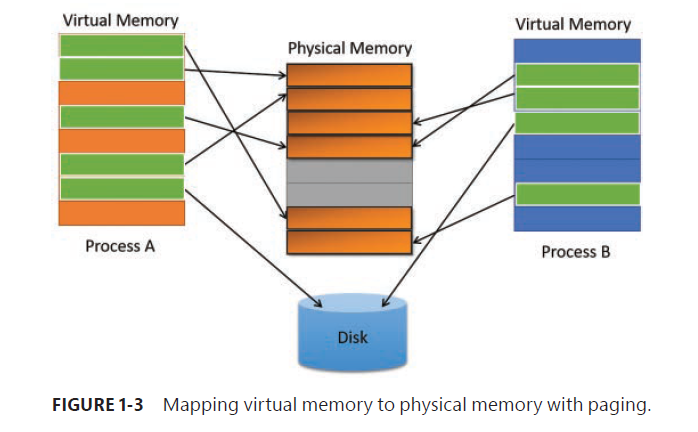
Windows implements a virtual memory system based on a flat (linear) address space that provides each process with the illusion of having its own large, private address space.
Virtual memory provides a logical view of memory that might not correspond to its physical layout.
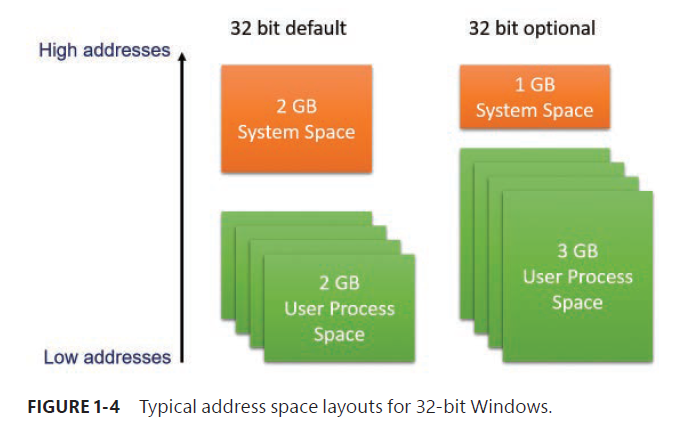
Kernel mode vs. user mode
To protect user applications from accessing and/or modifying critical OS data, Windows uses two processor access modes (even if the processor on which Windows is running supports more than two): user mode and kernel mode. User application code runs in user mode, whereas OS code (such as system services and device drivers) runs in kernel mode.
Kernel mode refers to a mode of execution in a processor that grants access to all system memory and all CPU instructions.
Although each Windows process has its own private memory space, the kernel-mode OS and device-driver code share a single virtual address space. Each page in virtual memory is tagged to indicate what access mode the processor must be in to read and/or write the page.
Pages in system space can be accessed only from kernel mode, whereas all pages in the user address space are accessible from user mode and kernel mode.
Windows 10 drivers must be signed by only two of the accepted certification authorities with a SHA-2 Extended Validation (EV) Hwardware certificate instead of the regular file-based SHA-1 certiicate and its 20 authorities.
Hypervisor
The need for fast, efficient, and secure virtualization has driven new models of computing and reasoning about software.
To provide such virtualization services, almost all modern solutions employ the use of a hypervisor, which is a specialized and highly privileged component that allows for the virtualization and isolation of all resources on the machine, from virtual to physical memory, to device interrupts, and even to PCI and USB devices.
In Windows 10, Microsoft now leverages the Hyper-V hypervisor to provide a new set of services known as virtualization-based security (VBS):
- Device Guard: This provides Hypervisor Code Integrity (HVCI) for stronger code-signing guaratees over KMCS alone, and allows for the custumization of the signature policy of the Windows OS, for both user-mode and kernel mode code.
- Hyper Guard: This protects key kernel-related and hypervisor-related data structures and code.
- Credential Guard: This prevents unauthorized access to domain account credentials and secrets, combined with secure biometrics.
- Application Guard: This provides an even stronger sandbox for the Microsoft Edge browser.
- Host Guardian and Shielded Fabric: These leverage a virtual TPM (v-TPM) to protect a virtual machine from the infrastructure it’s running on.
Additionally, the Hyper-V hypervisor enables certain key kernel mitigations against exploits and other attackers.
Firmware
Terminal Services and multiple sessions
Terminal Services refers to the support in Windows for multiple interactive user sessions on a single systerm.
With Windows Terminal Services, a remote user can establish a session on another machine, log in, and run applications on the server.
The first session is considered the services session, or session zero, and contains system service hosing processes.
Objects and handles
In the Windows OS, a kernel object is a single, run-time instance of a statically defined object type. An object type comprises a system-defined data type, functions that operate on instances of the data type, and a set of object attributes.
The most fundamental difference between an object and an ordinary data structure is that the internal structure of an object is opaque. You must call an object service to get data out of or put data into an object. You can’t directly read or change data in side an object.
Objects, through the help of a kernel component called the object manager.
Not all data structures in the Windows OS are objects. Only data that needs to be shared, protected, named, or made visible to user-mode programs (via system services) is placed in objects. Structures used by only one component of the OS to implement internal functions are not objects.
Security
Windows has three forms of access control over objects:
- Discretionary access control: It’s the method by which owners of objects (such as files or printers) grant or deny access to others. With Windows Server 2012 and Windows 8, this form of discretionary control is further improved by implementing attribute-based access control (also called Dynamic Access Control).
- Privileged access control: This is necessary for those times when discretionary access control is not enough. It’s a method of ensuring that someone can get to protected objects if the owner isn’t available.
- Mandatory integrity control: This is required when an additional level of security control is needed to protect objects that are being accessed from within the same user account.
Starting with Windows 8, a sandbox called an AppContainer is used to host Windows Apps, which provides isolation with relation to other AppContainers and non-Windows Apps processes.
Registry
Unicode
Chapter 2 - System architecture
Operating system model
Architecture overview
Despite its pervasive use of objects to represent shared system resources, Windows is not an object-oriented system in the strict sense. Most of the kernel-mdoe OS code is written in C for portability. The C programming language doesn’t directly support object-oriented constructs such as polymorphic functions or class inheritance. Therefore, the C-based implementation of objects in Windows borrows from, but doesn’t depend on, features of particular object-oriented languages.
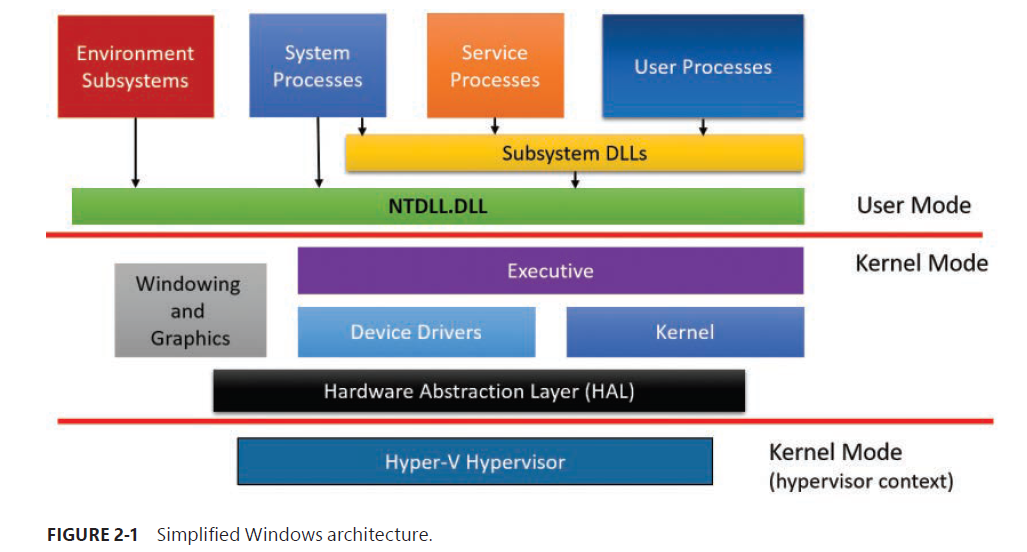
The boexes above the line represent user-mode processes, and the components below the line are kernel-mode OS services.
A second dividing line between kernel-mode parts of Windwos and the hypervisor is also visible. The hypervisor still runs with the same CPU privilege level (0) as the kernel, but because it uses specialized CPU instructions (VT-x on Intel, SVM on AMD), it can both isolate itself from the kernel while also monitoring it (and applications). Some people may call it ring -1, which is INACCURATE.
Four basic types of user-mode processes:
- User processes
- Service processes
- System processes
- Environment sybsystem server processes
Windows 10 Version 1607 includes a Windows Sybsystem for Linux (WSL) in beta state for developers only. However, this is not a true subsystem as described in this section.
Notice the Sybsystem DLLs blox below the Service Processes and User Processes boxes. Under Windows, user applications don’t call the native Windows OS services directly. Rather, they go through on or more subsystem dynamic-link libraries (DLLs). The role of subsystem DLLs is to translate a documented function into the appropriate internal (and generally undocumented) native system service calls implemented mostly in Ntdll.dll.
The kernel-mode components of Windows include the following:
- Executive: The Windows executive contains the base OS services, such as memory management, process and thread management, security, I/O, networking, and inter-process communication.
- The Windows kernel
- Device drivers: This includes both hardware device drivers, and non-hardware device drivers.
- The Hardware Abstraction Layer (HAL)
- The windowing and graphics system
- The hypervisor layer: This is composed of the hypervisor itself. There are no drivers or other modules in this environment. The hypervisor is itself composed of multiple internal layers and services, such as its own memory manager, virtual processor scheduler, interrupt and timer management, synchronization routines, partitions, IPC and more.
Core Windows System Files:
| File Name | Components |
|---|---|
| Ntoskrnl.exe | Executive and kernel |
| Hal.dll | HAL |
| Win32.sys | Kernel-mode part of the Windows subsystem (GUI) |
| Hvix64.exe (Intel), Hvax64.exe (AMD) | Hypervisor |
| .sys file in \SystemRoot\System32\Drivers | Core driver files, such as Direct X, Volume Manager, TCP/IP, TPM, andACPI supprot. |
| Ntdll.dll | Internal support functions and system service dispatch stubs to executive functions |
| Kernel32.dll, Advapi32.dll, User32.dll, Gdi32.dll | Core Windows subsystem DLLs. |
Portability
Windows archives portability accross hardware architectures and platforms in two primary ways:
- By using layered design
- By using C
Symmetric multiprocessing
Windows is a symmetric multiprocessing (SMP) OS. There is no master processor——the OS as well as user threads can be scheduled to run on any processor. Also, all the processors share just one memory space. This module contrasts with asymmetric multiprocessing (ASMP), in which the OS typically selects one processor to execute OS kernel code while other processors run only user code.
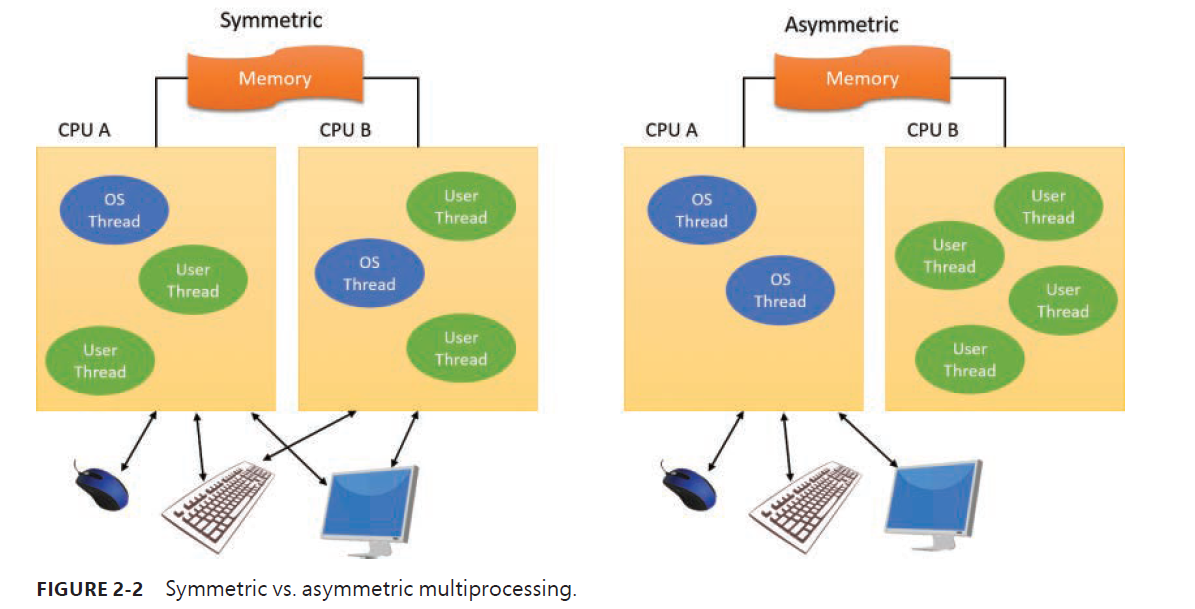
Windows also supports four modern types of multiprocessor system: multicore, simultaneous multi-threaded (SMT), heterogeneous, and non-uniform memory access (NUMA).
Scalability
Differences between client and server versions
Checked build
Virtualization-based security architecture overview
The separation between user mode and kernel mode provides protection for the OS from user-mode code, whether malicious or not.
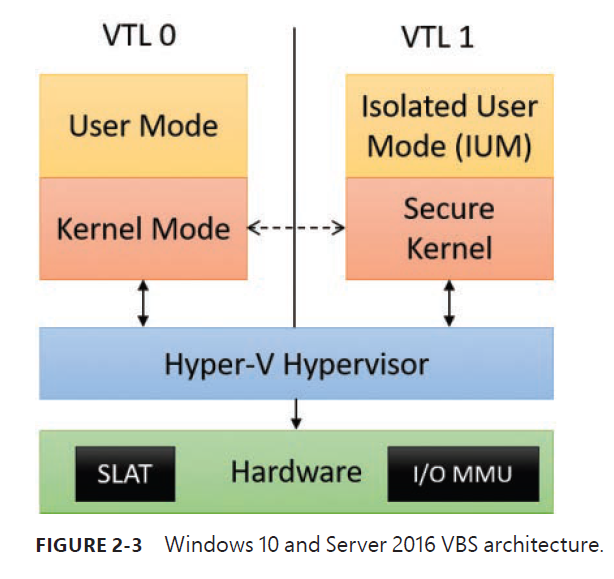
Here VBS stands for Virtualization-Based Security. VTL stands for Virtual Trust Levels.
The user/kernel code is running on top of a Hyper-V hypervisor. The difference is that with VBS enabled, a VTL of 1 is now present, which contains its own secure kernel running in the privileged processor mode (that is, ring 0 on x86/x64).
Similarly, a run-time user environment mode, called the Isolated User Mode (IUM), now exists, which runs in unprivileged mode (that is, ring 3).
Key system components
The role of an environment subsystem is to expose some subset of the base Windows executive system services to application programs.
User applications don’t call Windows system services directly. Instead, they go through one or more subsystem DLLs. These libraries export the documented interface that the programs linked to that subsystem can called.
Executive
The executive includes the following types of functions:
- Functions that are exported and callable from user mode: These functions are called system services and are exported via Ntdll.dll
- Device driver functions that are called through the DeviceIoControl function
- Functions that can be called only from kernel mode that are exported and documented in the WDK
- Functions that are defined as global symbols but are not exported
- Functions that are internal to a module that are not defined as global symbols
Kernel
The kernel consists of a set of functions in Ntoskrnl.exe that provides fundamental mechanisms. THese include thread-scheduling and synchronization services, used by the executive components, and low-level hardware architecture——dependent support, such as interrupt and exception dispatching, which is different on each processor architecture.
The kernel provides a low-level based of well-defined, predictable OS primitives and mechanisms that allow higher-level components of the executive to do what they need to do.
HAL
Device Drivers
System Processes
Chapter 3 - Processes and jobs
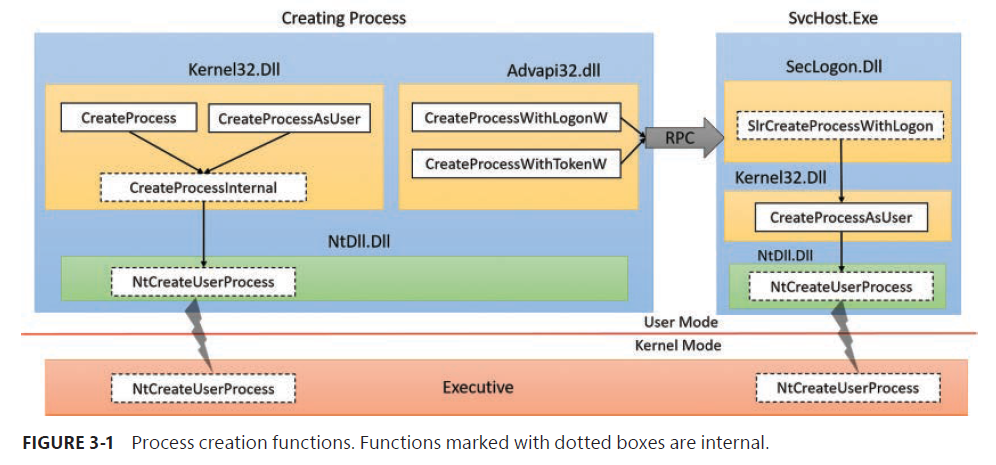
- CreateProcess
- CreateProcessAsUser: If a different token is required.
- CreateProcessWithTokenW (advapi32.dll)
- CreateProcessWithLogonW (advapi32.dll)
- SlrCreateProcessWithLogon