[Book] Reverse Engineering Core (리버스 엔지니어링 핵심 원리)
Last Update:
Word Count:
Read Time:
El libro

Introduction
This article is used to keep notes and summaries of the book “Reverse Engineering Core”.
The content will be continuously updated as I read through the book.
Reflection
Finally, I have completed this book.

I had always wanted to read this book. Unfortunately, due to personal issues, I was unable to do so for a long time. Therefore, I am glad that I finally finished it.
This book was originally written in Korean. It also has a Simplified Chinese translation. Unfortunately, I have not found an English version. Perhaps this is because there are already many books on reverse engineering written in English.
This book describes the underlying principles of reverse engineering in both theoretical and practical ways.
It introduces how to perform software reverse engineering on the Windows platform using tools such as OllyDbg, WinDbg, and PEView. IDA is rarely discussed. Therefore, this book is especially suitable for readers who want to master OllyDbg.
This book DOES NOT cover kernel debugging.

The book also provides both source code and compiled PE files for all chapters. This is a significant advantage for hands-on practice, because compiling the code yourself may produce different results depending on the environment. In addition, some of the provided code examples are difficult to find on the internet.
This book includes:
- Reverse engineering on Windows
- OllyDbg
- WinDbg
- PE file format
- Windows API
- Techniques for improving reverse engineering skills
- The author’s experience (the author previously worked for an enterprise developing anti-virus software)
- Advanced debugging
- Anti-debugging
- Advanced anti-debugging
- Anti-anti-debugging
- Code injection
- DLL injection
- Application patching
- etc.
This book does not include:
- Kernel debugging
- IDA Pro
- Ghidra
- Reverse engineering on Linux
- Reverse engineering of Android APKs
- Reverse engineering of iOS applications
Prerequisites (Recommended):
- Basic knowledge of C/C++
- Basic knowledge of the Win32 API
- Basic understanding of Windows
- Passion, patience, and the ability to use Google
You may feel frustrated during the process of reverse engineering. However, the author also mentioned that he experienced similar frustration.

Chapter 1 - Reverse Engineering
Murmur….
Blahblahblah….
This chapter introduces the background and basic knowledge of reverse engineering.
Chapter 2 - Hello World!
2.2 - Debugging
Basic commands of OllyDbg:
| Command | Hotkey | Description |
|---|---|---|
| Restart | Ctrl+F2 | Restart debugging. |
| Step Into | F7 | Execute an OP code. If the OP code is CALL, then go into the called code. |
| Step Over | F8 | Execute an OP code. If the OP code is CALL, then just execute the code rather then go into the called code. |
| Execute till Return | Ctrl+F9 | Keep executing code until it reached RETN |
1 | |

This is the main() function of HelloWorld.exe
2.3 - Getting Familar with Debugger
| Command | Hotkey | Description |
|---|---|---|
| Go to | Ctrl+G | |
| Execute till Cursor | F4 | |
| Comment | ; | |
| User-defined comment | ||
| Label | : | |
| User-defined label | ||
| Set/Reset breakpoint | F2 | |
| Run | F9 | |
| Show the current EPI | * | |
| Show the previous Cursor | - | |
| Preview CALL/JMP address | Enter |
2.4 - Find a Specific Code
- Executing Code
- Searching with Text: Right click -> Search for -> All referenced text strings
- Searching with used APIs: Right click -> Search for -> All intermodular calls
2.5 - Patching the Code
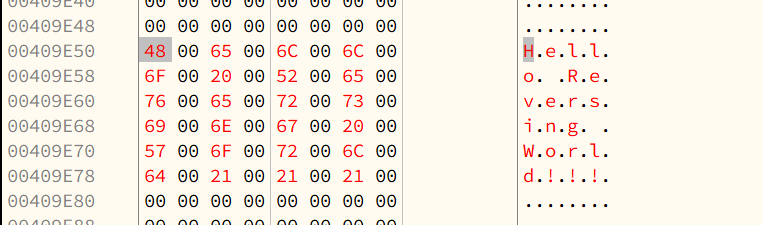
Modifying the Buffer
Hexdump: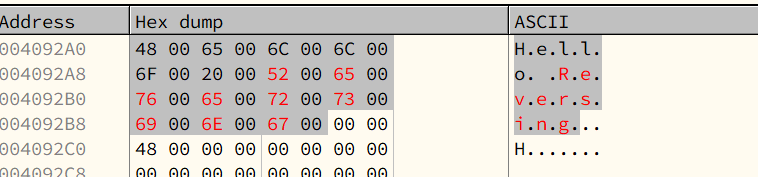
Modifying, notice that we have to append a null char(
00 00) at the end of a string.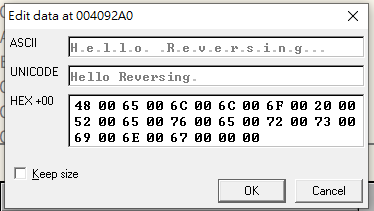
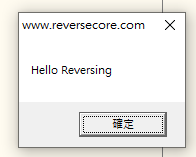
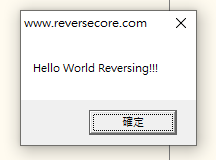
Patched code:
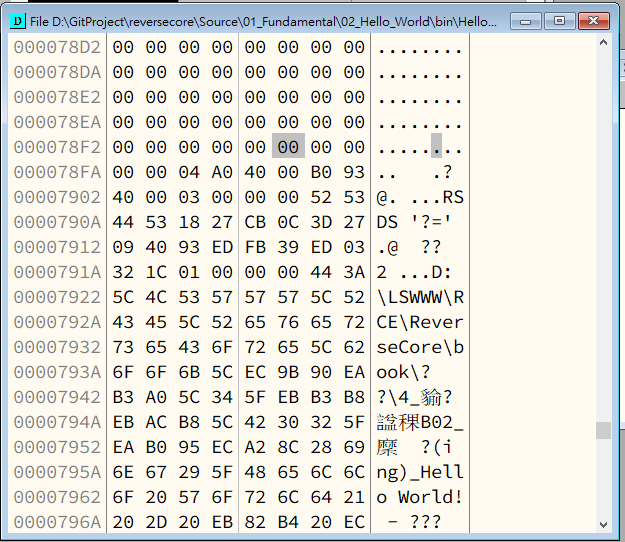
Save code:
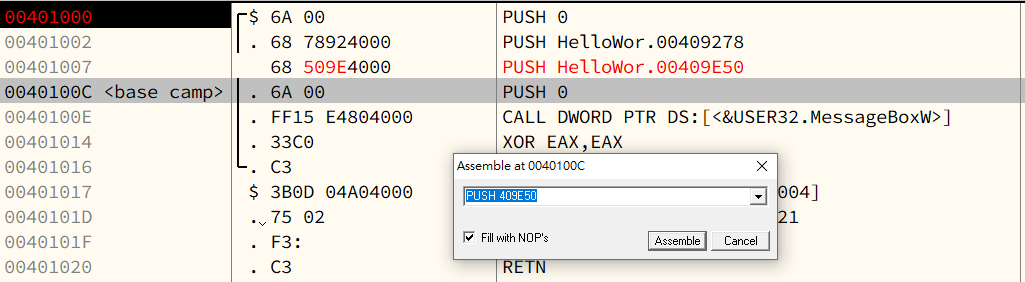
Adding a new string in memory
Insert a string int memory
Modify the assembly code
Patched code:
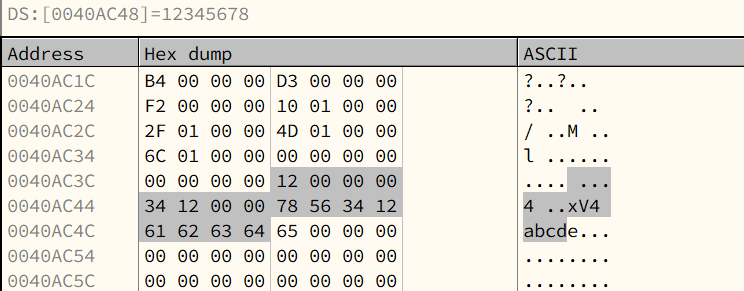
Chapter 3 - Little Endian
1 | |
| TYPE | Name | SIZE | Big-Endian | Little-Endian |
|---|---|---|---|---|
| BYTE | b | 1 | [12] | [12] |
| WORD | w | 2 | [12][34] | [34][12] |
| DWORD | dw | 3 | [12][34][56][78] | [78][56][34][12] |
| char[] | str | 4 | [61][62][63][64][65][00] | [65][64][63][62][61][00] |
main() function:
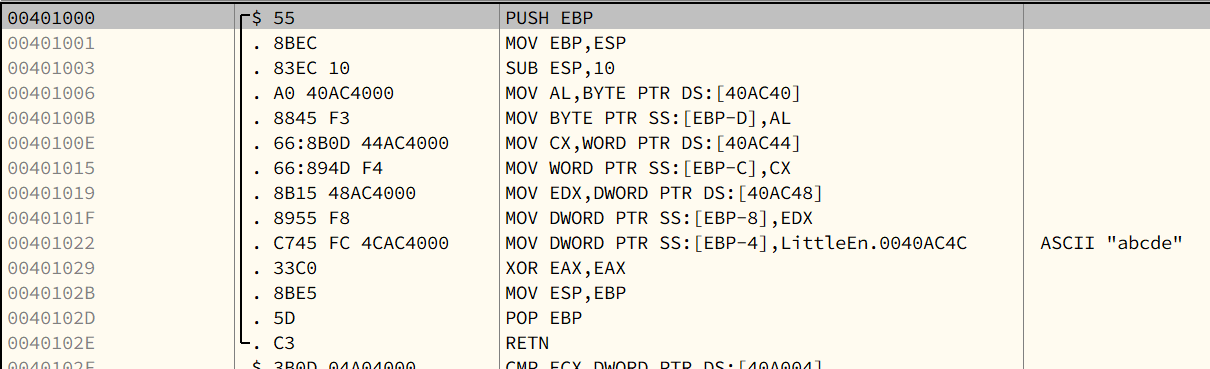
Hexdump:
Chapter 4 - IA-32 Registers
4.2 - IA-32 Registers
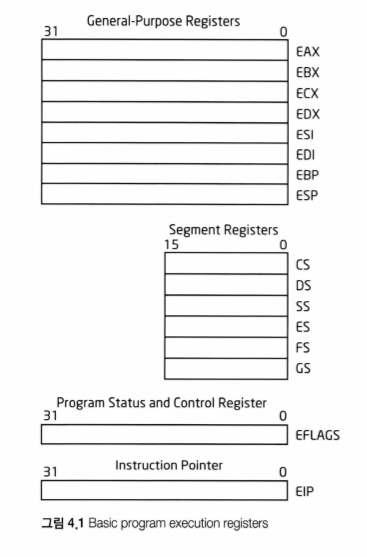
- General Purpose Registers(32-bit), x8
- Segment Registers(16-bit), x6
- Program Status and Control Register(32-bit), x1
- Instruction Pointer(32-bit), x1
General Purpose Registers
These type of registers are used for temporary storage, also can be used for arthimetic calculation. Usually, they are used for storing addresses and constants.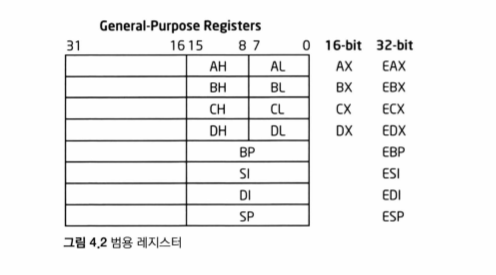
- EAX:
- EBX:
- ECX:
- EDX:
Segment Registers
Segment is a protection technique in IA-32. The IA-32 architecture divides memory into multiple segments, and allocates start address, range, accessing privilege, etc to them. It also provides paging technique.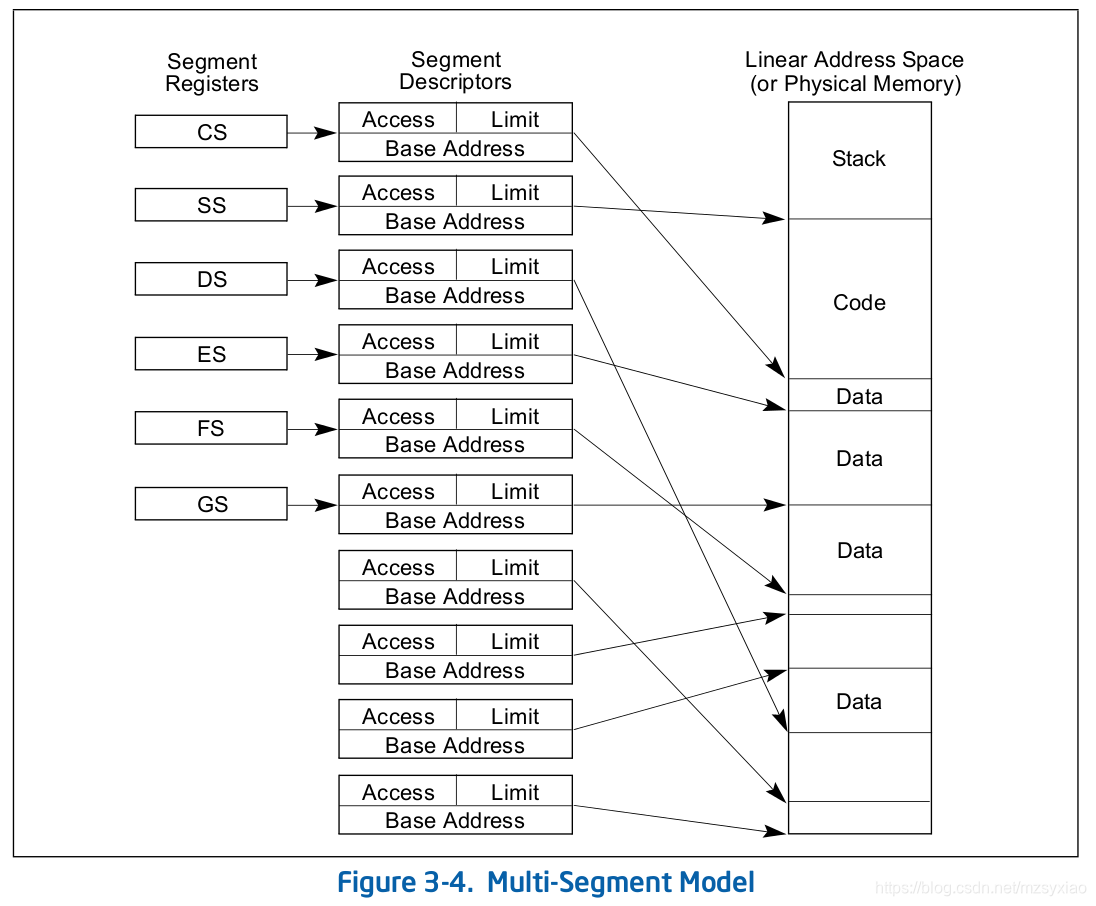
- CS: Code Segment
- SS: Stack Segment
- DS: Data Segment
- ES: Extra (Data) Segment
- FS: Data Segment
- GS: Data Segment
Program Status and Control Register
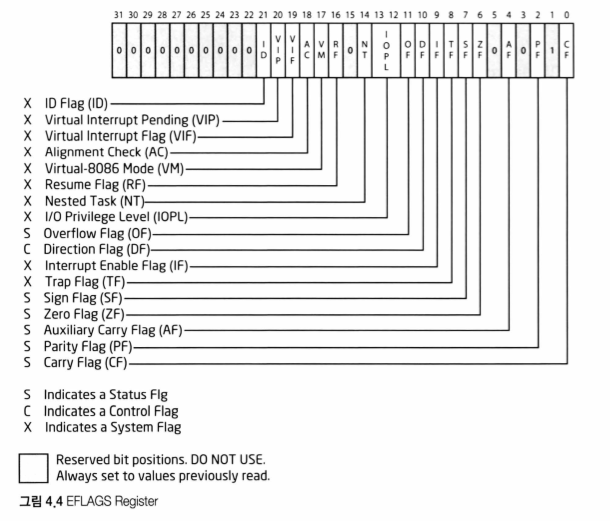
EFLAGS
Instruction Pointer
- EIP
Chapter 5 - Stack
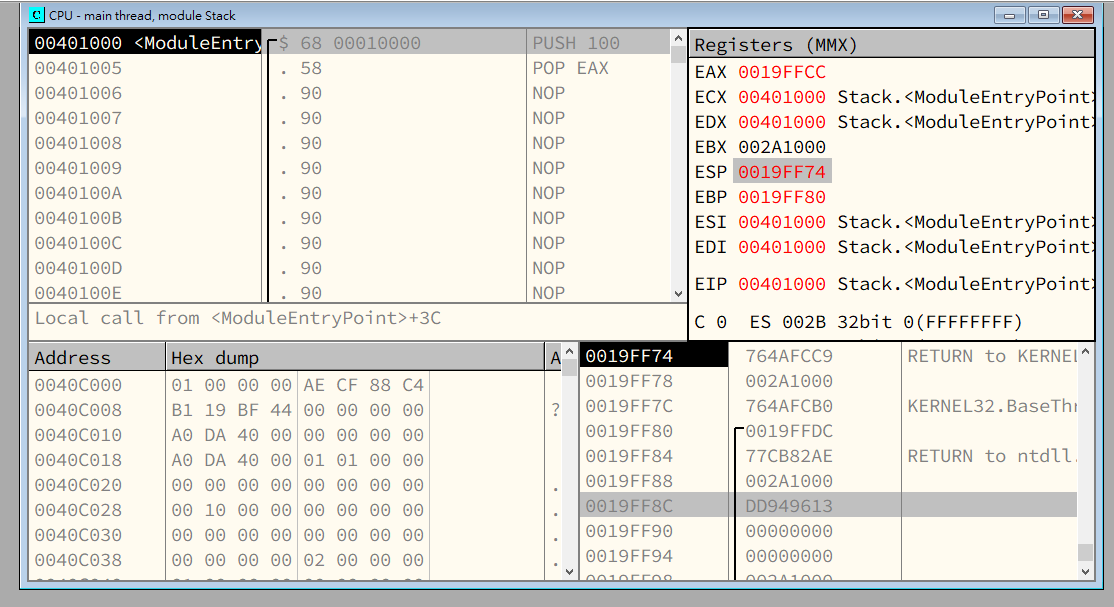
After the PUSH instruction is executed, ESP moves upward ,and its value decreases by 4 bytes.
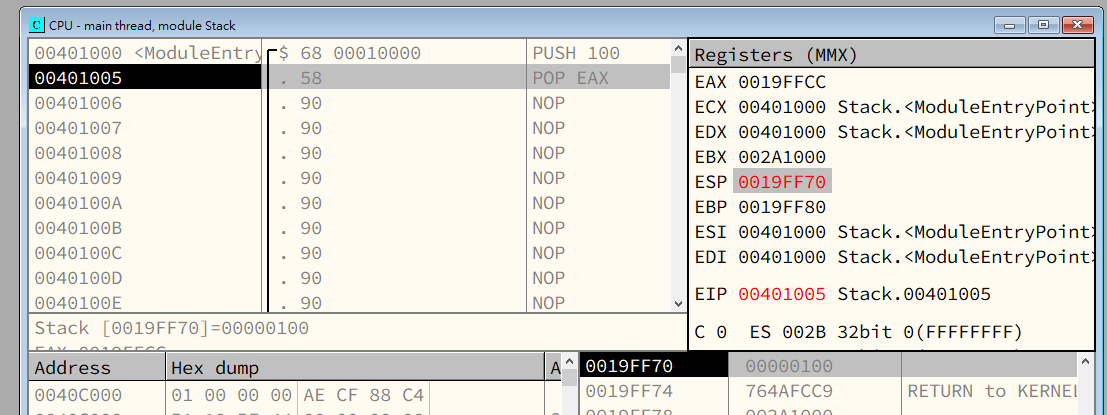
After the POP EAX instruction is executed, ESP moves downward, and its value increases by 4 bytes.
Thus, we can conclude that:
When data is pushed onto the stack, the value of the stack pointer decreases and it moves upward.\
When data is popped from the stack, the value of the stack pointer increases and it moves downward.
Initially, the stack pointer points to the top of the stack.
Chapter 6 - Analyzing abex’ crackme#1
Patching (Cracking)
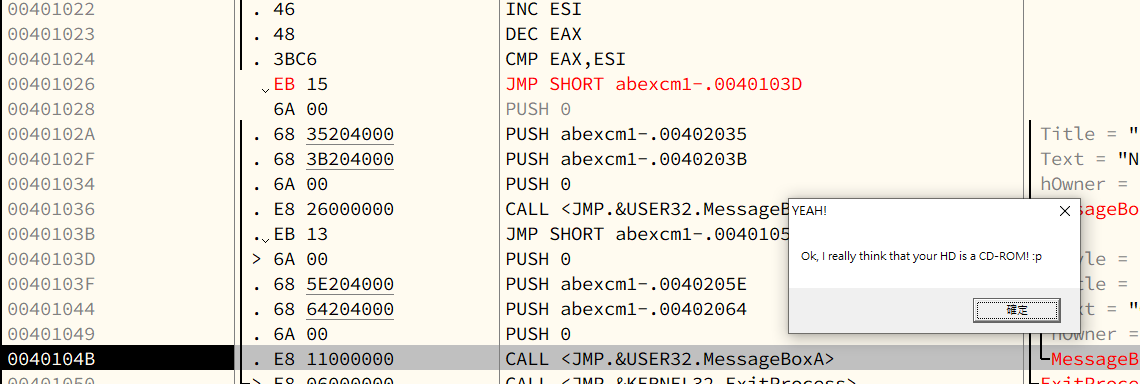
Modify the assembly code:
Original1
JE SHORT 0040103D
Modified1
JMP 0040103D
Chapter 7 - Stack Frame
7.1 - Stack Frame
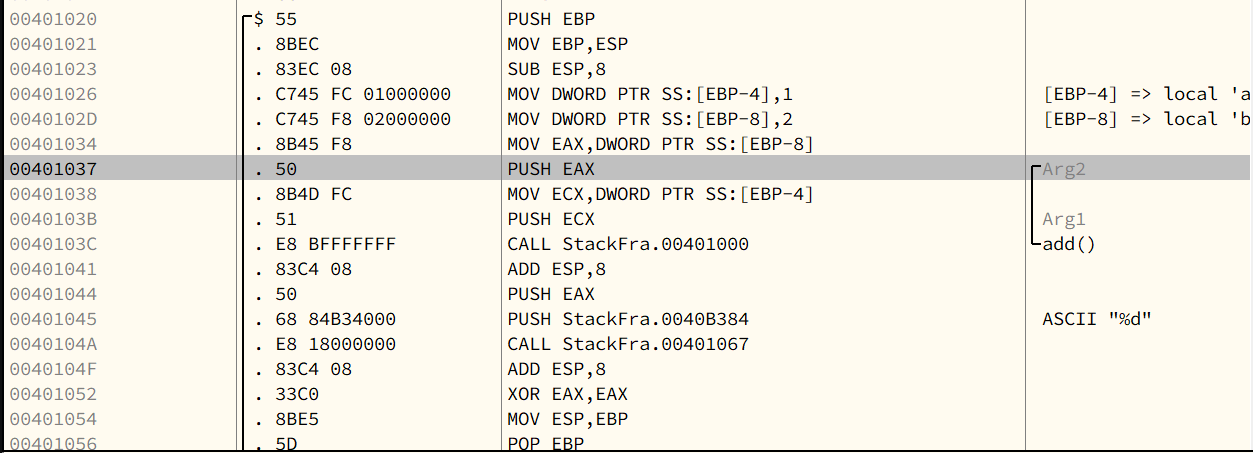
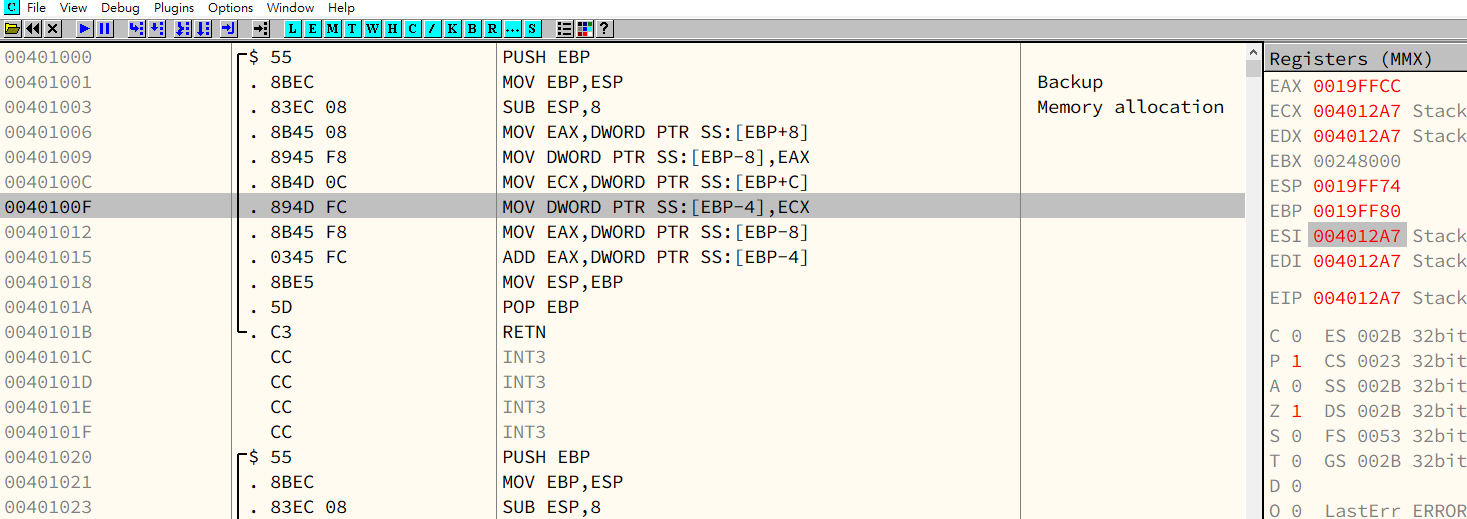
A stack frame is a structure used to organize a function’s local variables, parameters, and return address.\
It is accessed using EBP as the base pointer (NOT ESP).
| Assembly | C Language | Type conversion |
|---|---|---|
| DWORD PTR SS:[EBP-4] | *(DWORD*)(EBP-4) | DWORD (4 bytes) |
| WORD PTR SS:[EBP-4] | *(WORD*)(EBP-4) | WORD (2 bytes) |
| BYTE PTR SS:[EBP-4] | *(BYTE*)(EBP-4) | BYTE |
The symbol SS in DWORD PTR SS:\[EBP-4\] stands for Stack Segment.
Although x86 architecture supports segmented memory, modern Windows uses a flat memory model. Therefore, assembly instructions still syntactically specify a segment register, such as SS, DS, or ES.
On 32-bit x86 Windows, these segment registers all refer to the same flat segment, which makes the explicit segment specification effectively meaningless in this context.
Since EBP and ESP are registers that reference the stack, OllyDbg automatically appends the SS segment prefix when displaying stack-based memory operands.
Chapter 8 - abex’ crackme#2
8.2 - VB Engine
abex’ crackme is written in VB (Visual Basic).
A VB (Visual Basic) application is executed by an engine named MSVBVM60.dll (Microsoft Visual Basic Virtual Machine 6.0).
A VB application can be compiled into Native Code (N Code) or Pseudo Code (P Code, or The Thunder Runtime Engine).
All components of a VB application—such as dialogs, controls, forms, modules, and functions—are stored in the form of internal data structures. However, Microsoft has never publicly documented these structures, which makes debugging VB applications more difficult.
8.3 - Debugging
Stub Code:

Indirect Call
1 | |
The instruction at 0040123D is used to call the ThunRTMain() function. Instead of calling the function directly, it performs an indirect call through the jump instruction at 00401232.
This is a well-known indirect call technique commonly used by VC++ and the VB compiler.
RT_MainStruct
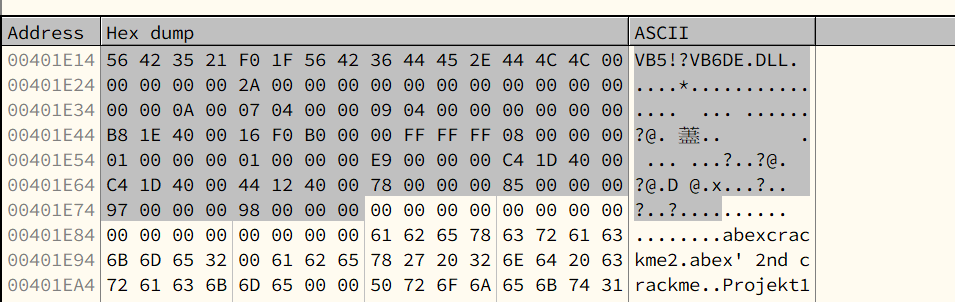
Microsoft has never publicly documented the RT_MainStruct. However, some experts have fully reverse-engineered it and published their findings online.
ThunRTMain()
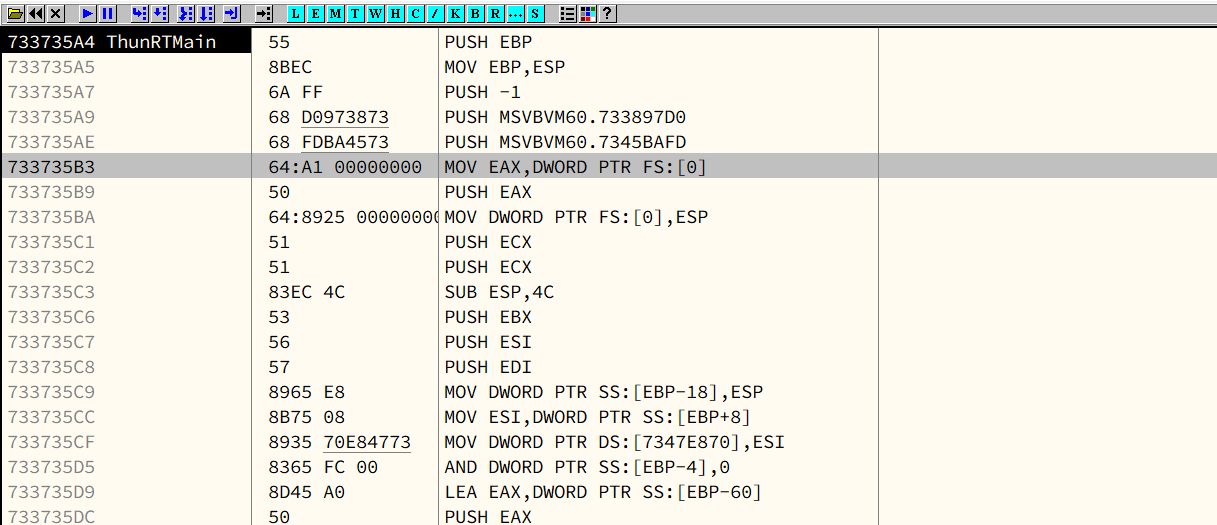
Notice that the memory addresses are completely different. This region is inside MSVBVM60.dll
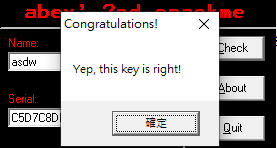
8.4 - Analyzing crackme
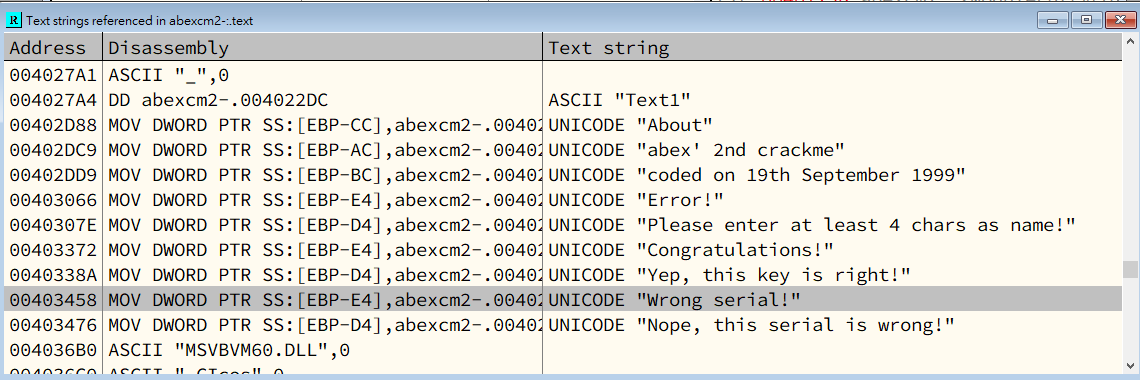
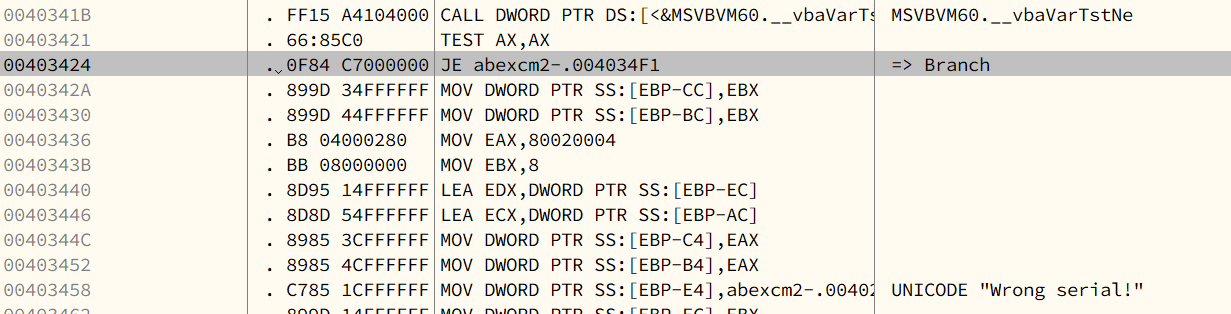
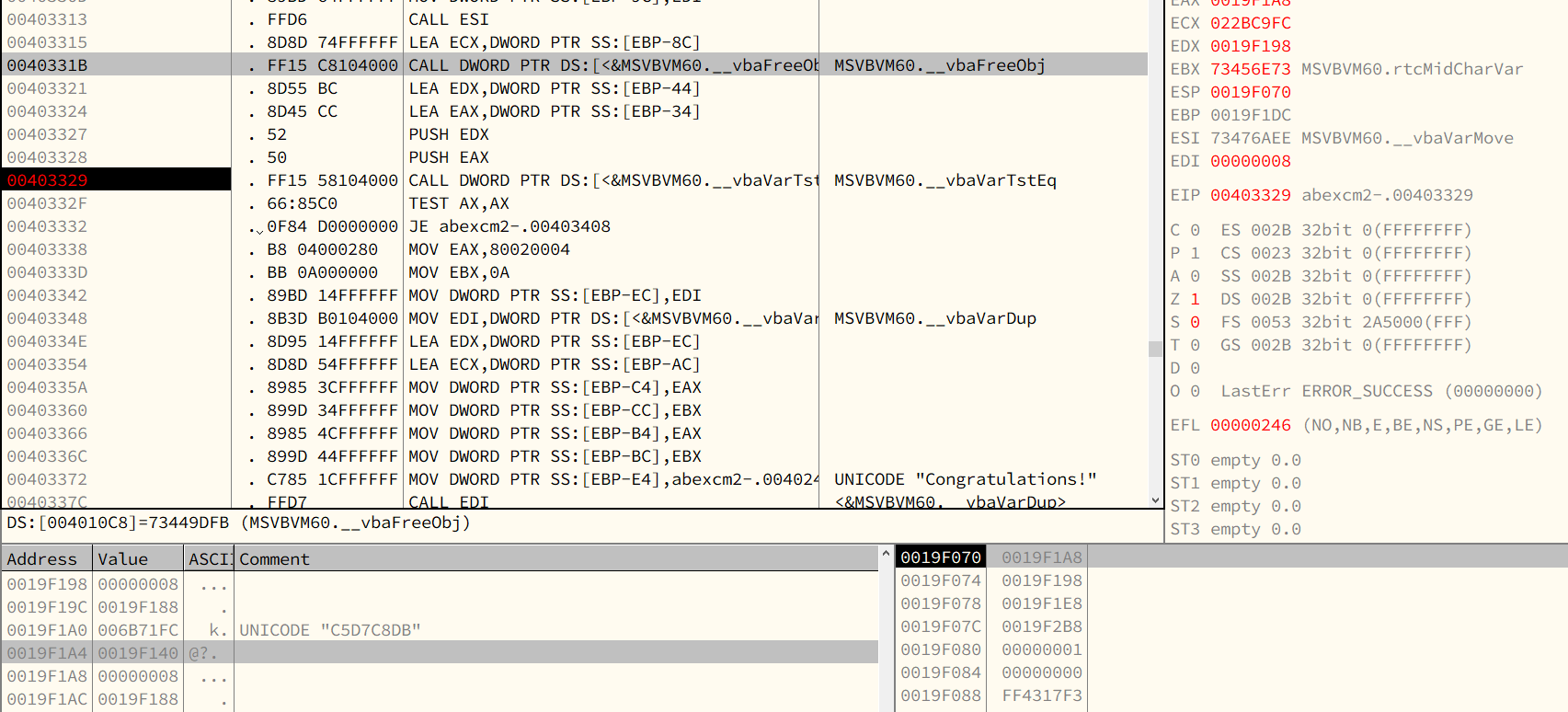
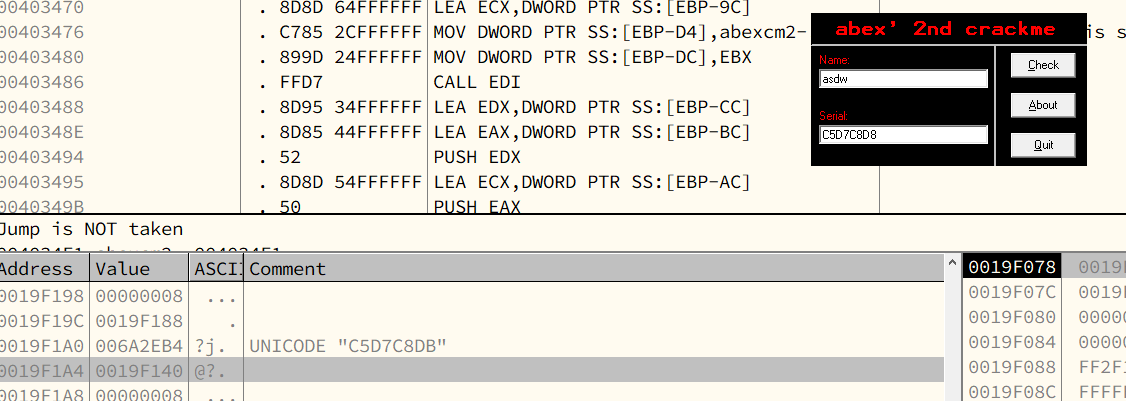
Assembly code that it used:
- TEST: Logical Compare, it is same as
AND. However,TESTonly changes the values inEFLAGSregister. - JE: Jump if equal (ZF = 1).
Chapter 9 - Process Explorer
https://learn.microsoft.com/en-us/sysinternals/downloads/process-explorer
Chapter 10 - Calling Convention
- cdecl
- stdcall
- fastcall
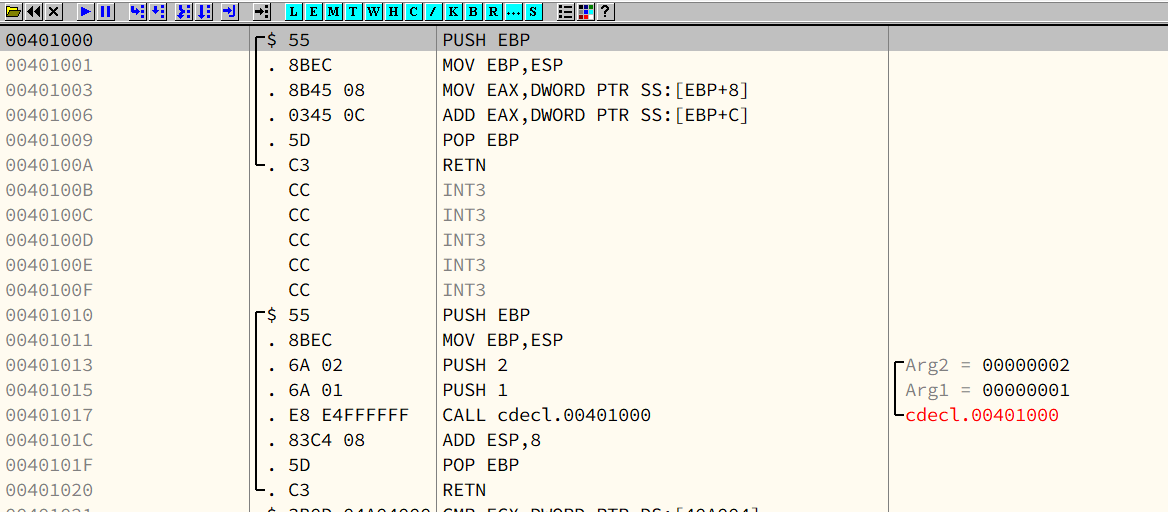
cdecl is the default method used in C language.1
2
3
4
5
6
7
8
9
10
11#include "stdio.h"
int add(int a, int b)
{
return a + b;
}
int main(int argc, char* argv[])
{
return add(1, 2);
}
cdecl
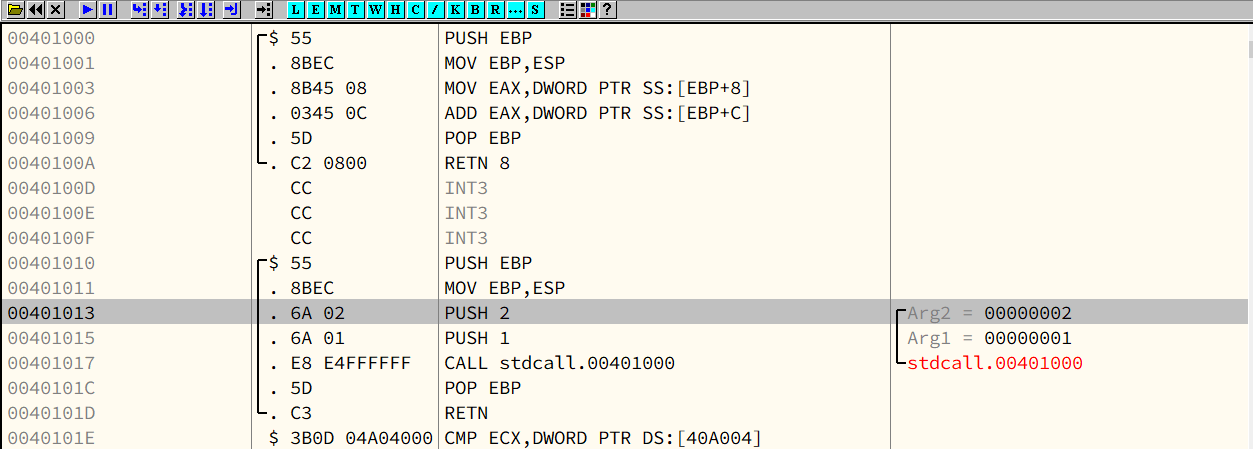
stdcall is commonly used in Win32 API, this is used for clearing the stack by the function caller.1
2
3
4
5
6
7
8
9
10#include "stdio.h"
int __stdcall add(int a, int b)
{
return a + b;
}
int main(int argc, char* argv[])
{
return add(1, 2);
}
stdcall
fastcall
Chapter 11 - Lenas Reversing for Newbies
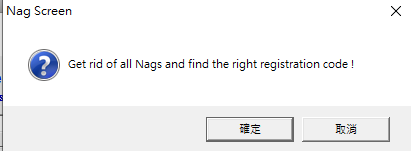
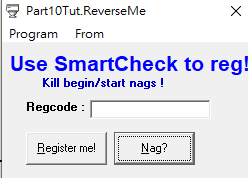

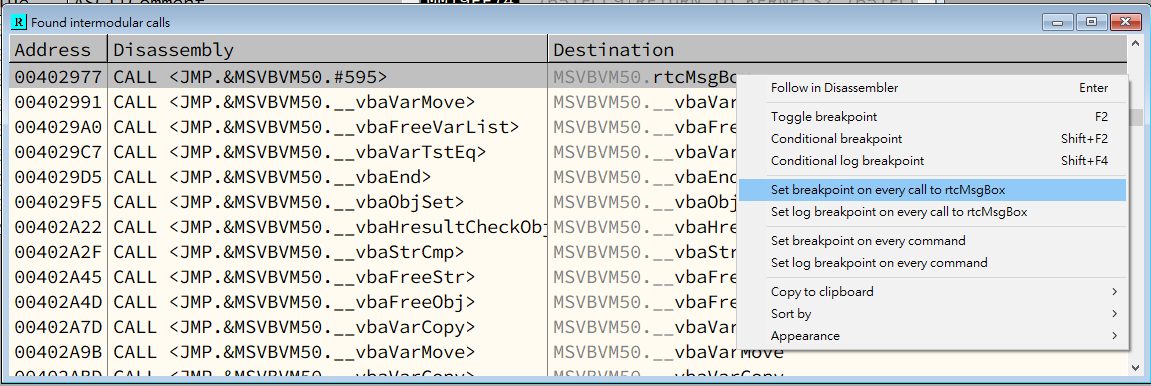
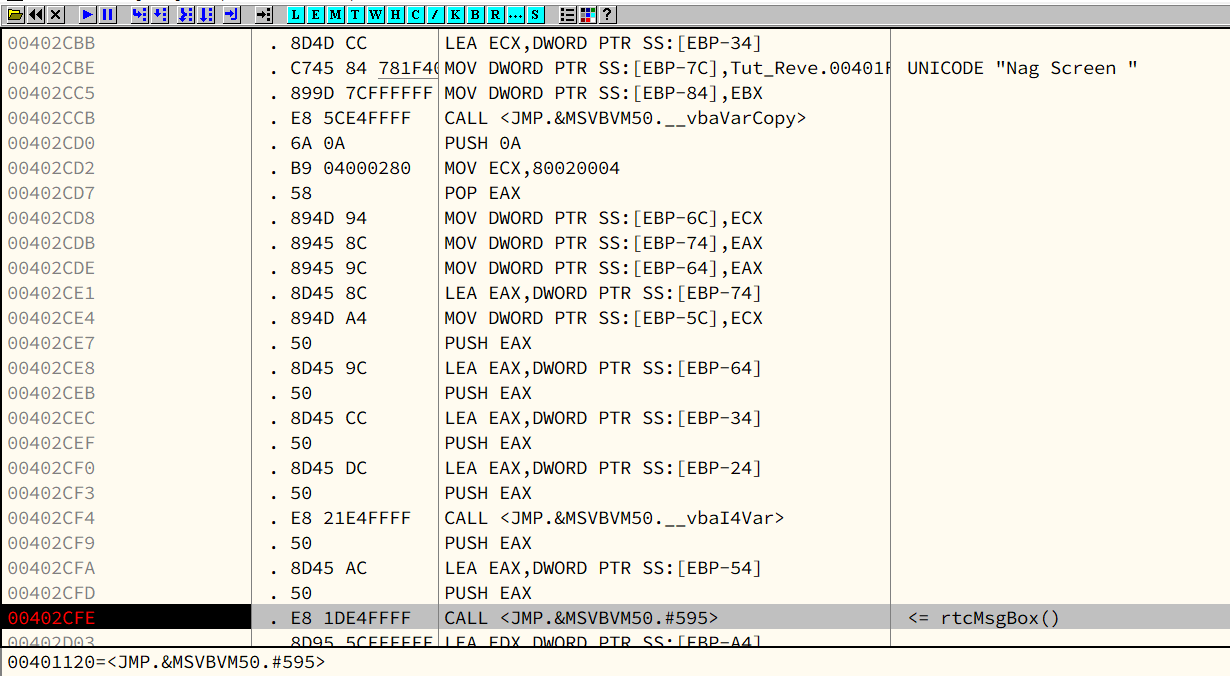
Modify the instruction at 00402FE

Chapter 12 - How to Learn Reverse Engineering
Blah blah blah…
I will write some of the content with my personal idea in “Reflection”
Chapter 13 - PE File Format
13.2 - PE File Format
PE stands for Portable Executable.
A PE file is an executable under x32 platform, it is also know as PE32. A PE+ (or PE32+) is an executable under x64 platform (NOT PE64).
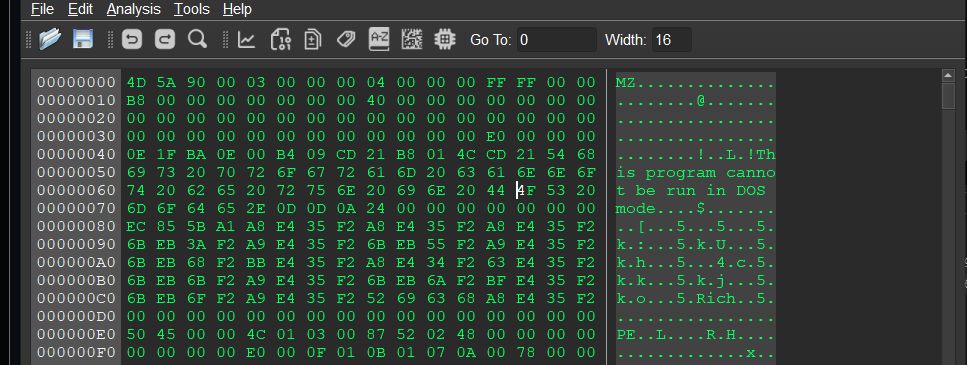
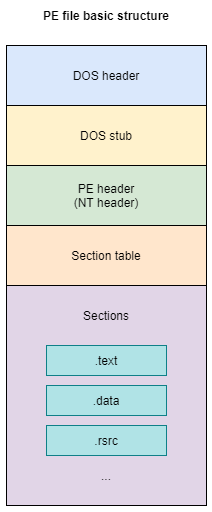
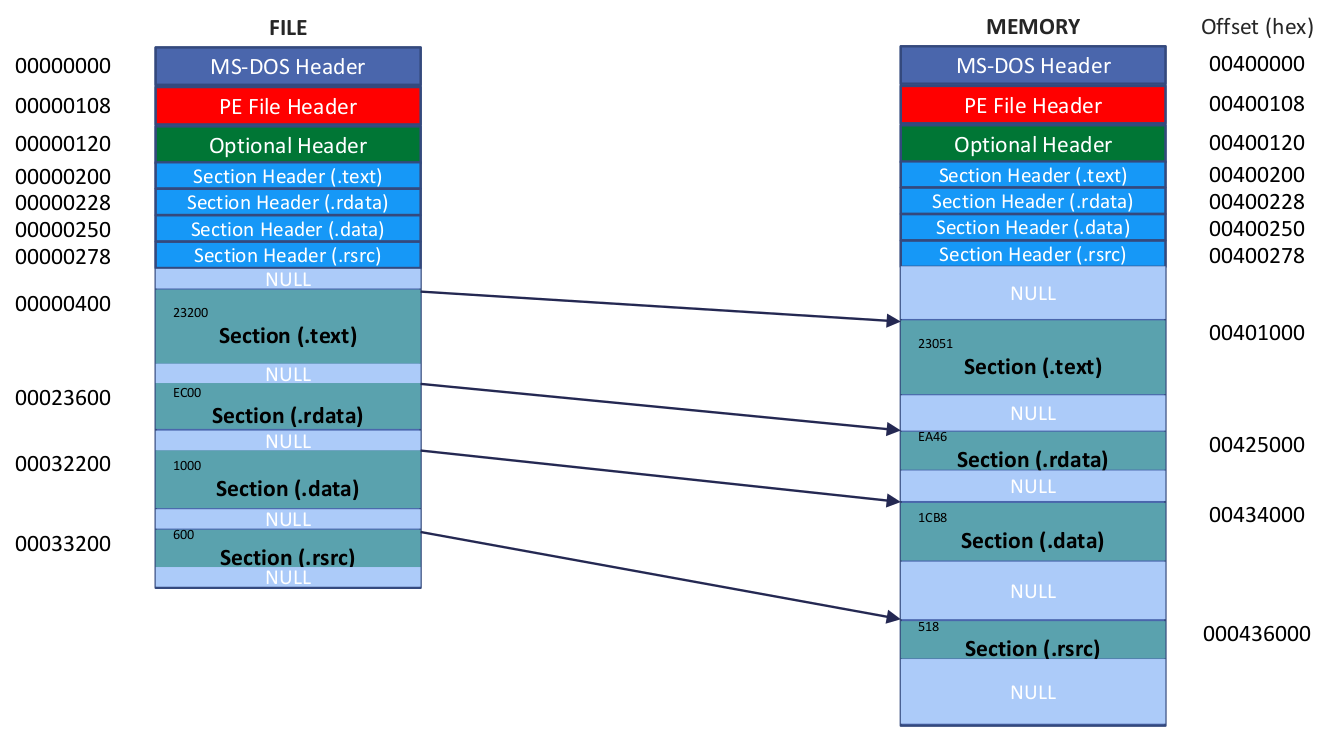
VA & RVA
13.3 - PE Header
DOS Header
1 | |
- e_magic: DOS signature, 4D5A => ASCII: MZ
- e_lfanew: Offset of NT header.
Here MZ stands for Mark Zbikowski, the engineer who designed DOS executable.
DOS Stub
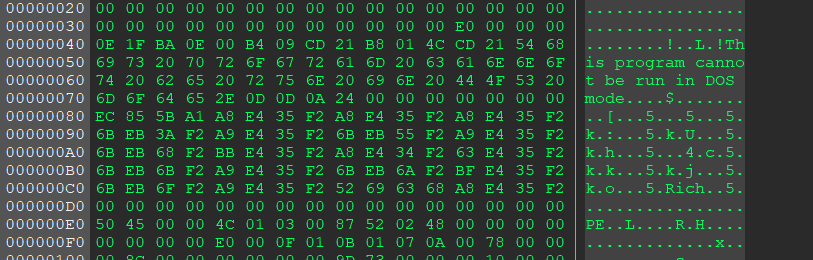
Run the following command on Windows XP:1
> debug C:\WINDOWS\NOTEPAD.exe
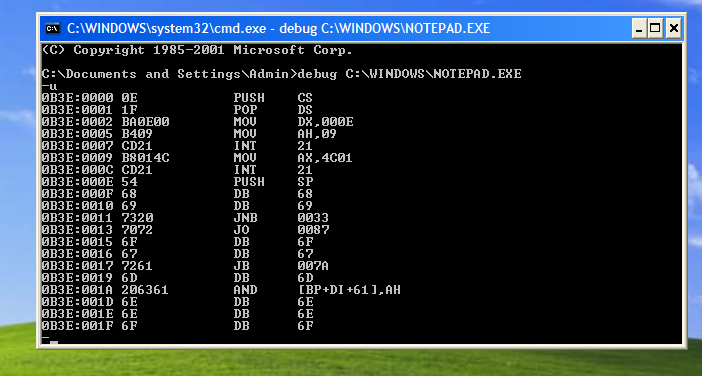
Although the sentence in the DOS stub states that “This program cannot be run in DOS mode”, notepad.exe can still be executed in a DOS environment. In practice, the DOS loader executes the DOS stub code, which prints the message above and then exits.
The DOS stub is optional in a PE file, but modern development tools usually include it by default. Compilers such as VB, VC++, and Delphi all generate PE files with a DOS stub.
NT Header
1 | |
NT Header: File Header
1 | |
There are four important members; file cannot be executed if they are misconfigured.
- Machine:\
Every CPU architecture has its own machine ID.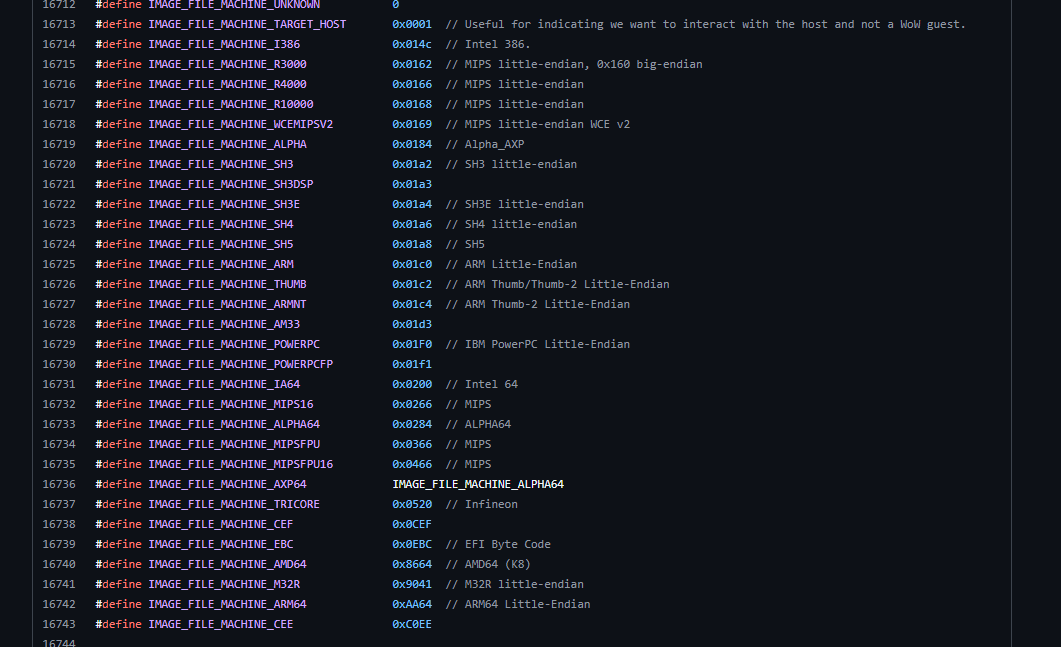
- NumberOfSections:\
PE file stores code, data and resources in different sections, each with its own attributes. NumberOfSections indicates the total number of sections in the file. This value MUST BE GREATER THAN ZERO.\
In addition, an executable cannot be loaded if the number of sections does not match the actual section table. - SizeOfOptionalHeader:\
The last member of structure IMAGE_NT_HEADERS is IMAGE_OPTIONAL_HEADER32. SizeOfOptionalHeader indicates the size of the IMAGE_OPTIONAL_HEADER32 structure.\
Although IMAGE_OPTIONAL_HEADER is defined as a C structure, the Windows PE loader must still rely on the value of SizeOfOptionalHeader to determine its actual size.\
In PE32+ files, IMAGE_OPTIONAL_HEADER64 is used instead of IMAGE_OPTIONAL_HEADER32. Since these two structures have different sizes, SizeOfOptionalHeader must explicitly specify the correct size. Characteristics:\
This field is used to describe the attributes of the file.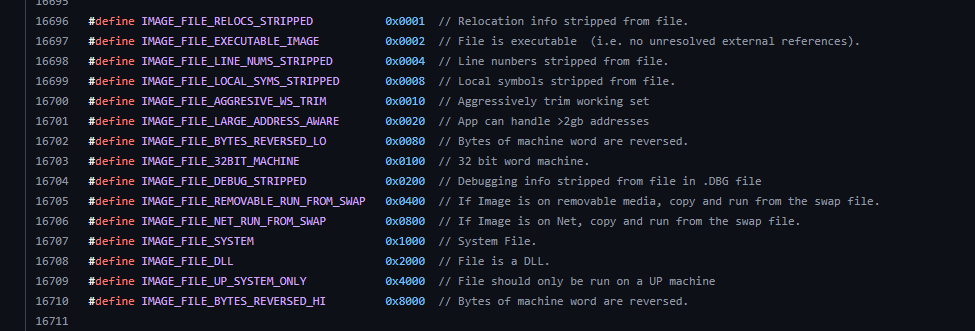
This value might not contain the
0x0002(IMAGE_FILE_EXECUTABLE_IMAGE) flags for the files such as*.objand*.dll.
NT Header: Optional Header
1 | |
The following members are important. An executable cannot not be loaded if they are misconfigured.
- Magic:\
IMAGE_OPTIONAL_HEADER32 has this value by10B; IMAGE_OPTIONAL_HEADER64 has this value by20B. - AddressOfEntry:\
This field has the RVA value of EP. RVA value indicates the code which is the first priority of executing. - ImageBase:\
The address range of virtual memory is 0~FFFFFFFF on x32 platform. ImageBase indicates first loaded address of the file. SectionAlignment, FileAlignment:\
SizeOfImage
- SizeOfHeaders
- Subsystem
- NumberOfRvaAndSizes
- DataDirectory
Section Header
13.4 - RVA to RAW
Quiz
Given the following figure, answer the following questions:
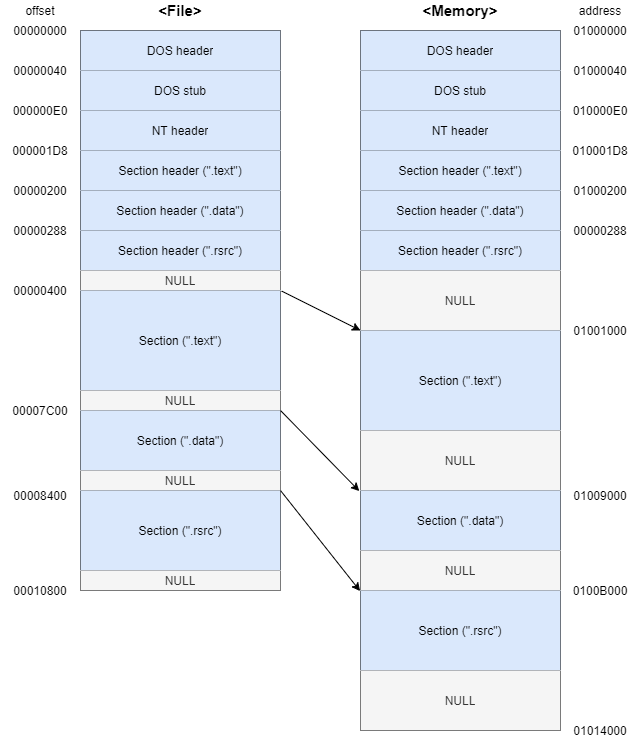
- RVA = 5000, File Offset = ?\
Here we assume the ImageBase is 01000000.
It is located in the first section (.text) sinceThe range of the first section (.text) is: 01001000 ~ 01009000.\
Thus, - RVA = 13314, File Offset = ?
RVA = 13314 is located in the third section (.rsrc).\
Thus, - RVA = ABA8, File Offset = ?
RVA = ABA8 is located in the second section (.data).\However, RAW address 97A8 is located in the third section. Thus, the given value of RAW by ABA8 is invalid for defining its RAW value. When VirtualSize is larger than SizeOfRawData, the extra region is zero-initialized at load time and does not have a valid file offset.
13.5 - IAT
DLL
Before studying the Import Address Table (IAT), we need to understand DLLs (Dynamic Link Libraries).
In the era of 16-bit DOS, the concept of DLLs did not exist. Instead, applications relied on static libraries, which were linked into the executable at compile time. This approach significantly increased both memory usage and disk space consumption, which was a serious limitation when hardware resources were expensive.
To solve this problem, Windows introduced the concept of DLLs:
- Instead of embedding library code into the executable, applications import DLLs when needed.
- Code and resources can be shared among multiple applications through memory mapping.
- Updating a library only requires replacing the corresponding DLL file.
There are two primary ways to load DLLs:
Explicit Linking:
The application loads the DLL at runtime using functions such as LoadLibrary, and resolves function addresses manually using GetProcAddress. The DLL can be unloaded explicitly when it is no longer needed.
Implicit Linking:
The DLL is loaded automatically by the Windows loader when the application starts, and it remains loaded until the process terminates.
These mechanisms are closely related to the Import Address Table (IAT), which plays a critical role during DLL loading and function resolution.
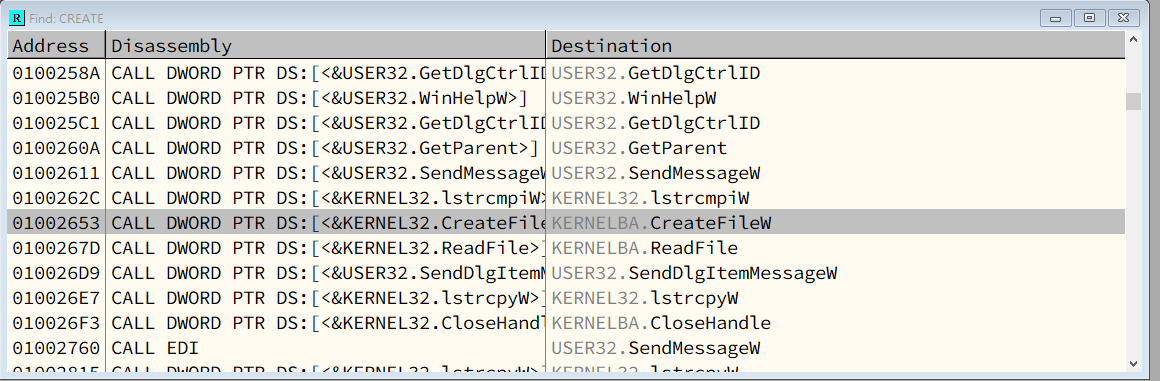
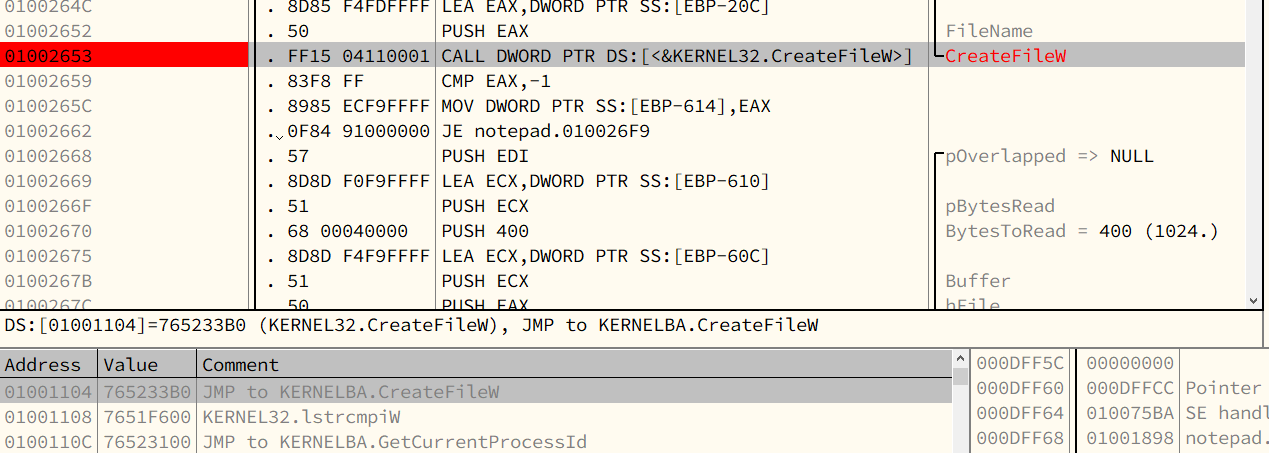
Notice that the loader calls the API function CreateFileW() via an indirect call rather than a direct call.
The loader obtains the address of the API function from memory address 0x01001104.
The loader calls API functions using this method consistently.
The reason the loader does not call the API function directly (for example, using the instruction CALL 765233B0) is that the author of notepad.exe did not know in advance which platform the program would run on.
This design allows the executable to support multiple platforms and environments.
Another reason is DLL relocation.
Usually, the default ImageBase of a DLL is 0x10000000.
If this address is already occupied by a.dll, then b.dll cannot be loaded at the same ImageBase and must be relocated, for example, to 0x3E000000.
In practice, it cannot be guaranteed that a DLL can be loaded at its preferred ImageBase, because the PE header uses RVAs instead of absolute virtual addresses (VAs).
In contrast, an executable can usually be loaded at its specified ImageBase because it has its own virtual address space.
IMAGE_IMPORT_DESCRIPTOR
1 | |
The number of imported libraries is equal to the number of IMAGE_IMPORT_DESCRIPTOR
| Field | Meaning |
|---|---|
| OriginalFirstThunk | Address of INT (RVA) |
| Name | Address of library string name (RVA) |
| FirstThunk | Address of IAT (RVA) |
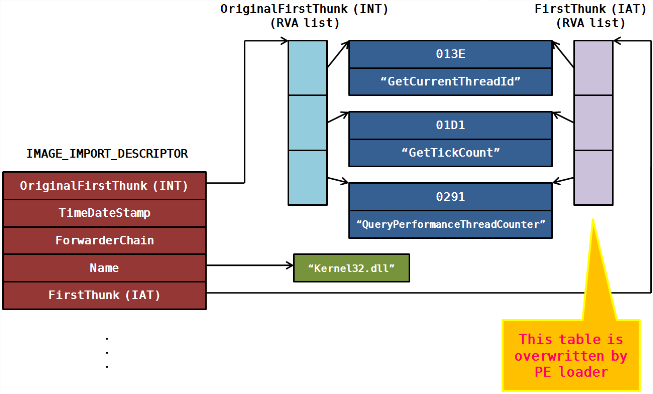
Load into IAT
- Obtain the name of the library (for example: “kernel32.dll”) from IID (“IMAGE_IMPORT_DESCRIPTOR”)
LoadLibrary("kernel32.dll)- Read OriginalFirstThunk member from IID, and then obtain the addressof INT (Import Name Table).
- Read the values from the array in INT consecutively. Subsequently, obtain the RVA (Relative Virtual Address) of IMAGE_IMPORT_BY_NAME.
Practice
Where is IMAGE_IMPORT_DESCRIPTOR? It is not located in PE header. Instead, it locates in PE body, but its location is stored in PE header.
The value of IMAGE_OPTIONAL_HEADER32.DataDirectory[1].VirtualAddress is the AddressOfEntryPoint (RVA value). IMAGE_IMPORT_DESCRIPTOR is also know as IMAGE_DIRECTORY_TABLE.

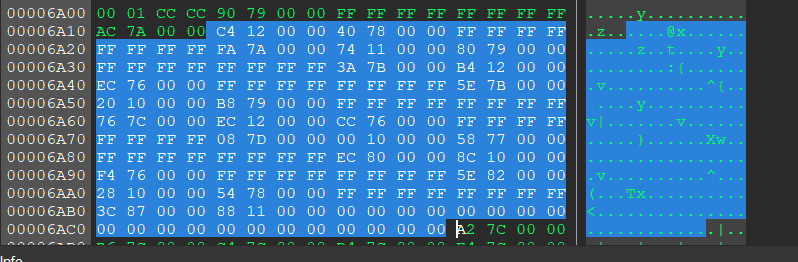
- Name (Library Name)

- OriginalFirstThunk——INT
- IMAGE_IMPORT_BY_NAME
- FirstThunk——IAT (Import Address Table)
13.6 - EAT
The value of IMAGE_OPTIONAL_HEADER32.DataDirectory[0].VirtualAddress is the RVA value of IMAGE_EXPORT_DIRECTORY
1 | |
Important fields:
| Field | Meaning |
| —- | —- |
| NumberOfFunctions | The total number of exported functions
| NumberOfNames |
| AddressOfFunctions |
| AddressOfNames |
| AddressOfNameOrdinals |
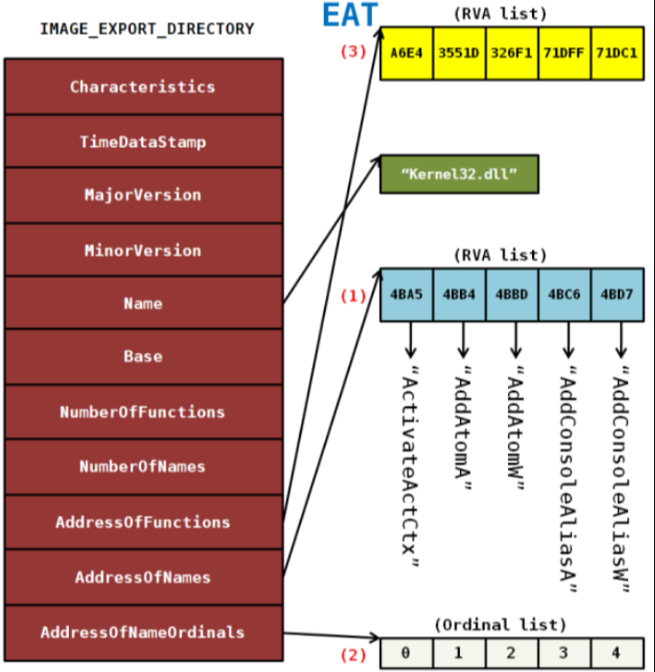
A PE file obtains the function address from libraries via an API——GetProcAddress()
Chapter 16 - Base Relocation Table
16.1 - PE Relocation
Microsoft introduced ASLR technique since Windows Vista. This technique can improve security of Windows systems.
16.2 - The Operations of PE Relocation
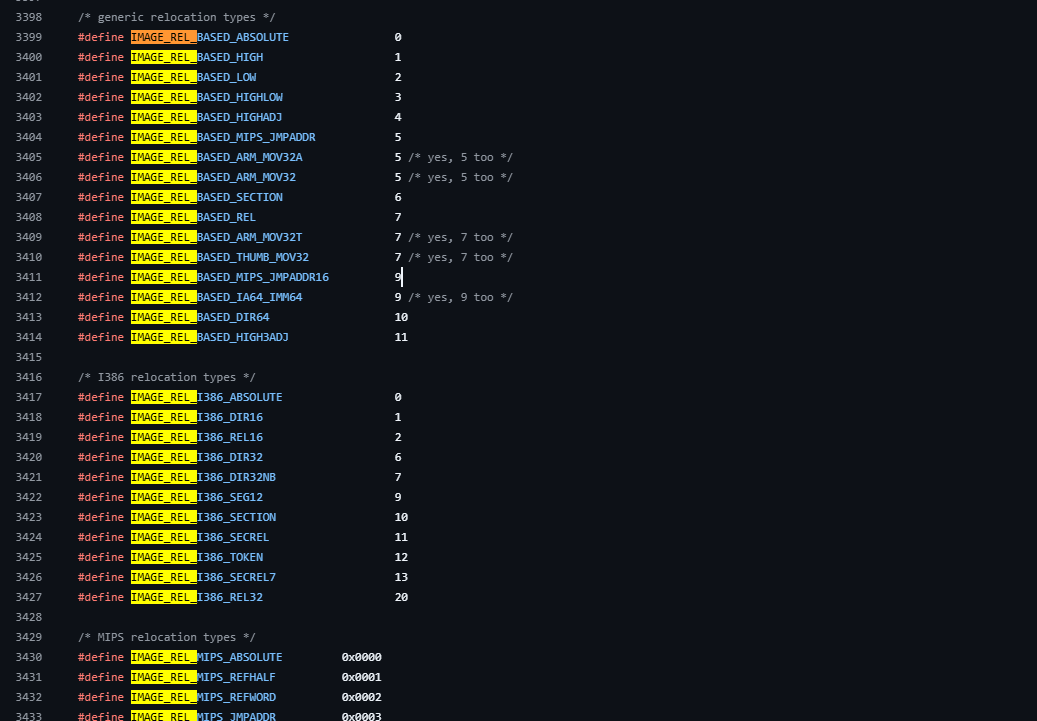
16.3 - The Principles of PE Relocation
1 | |
Chapter 17 - Remove .reloc Section from Executable
Chapter 18 - Analyzing UPackPE Header
Chapter 19 - UPackPE Debugging - Find the OEP
Chapter 20 - Patching
Chapter 21 - Windows Message Hooking
21.2 - Message Hooking
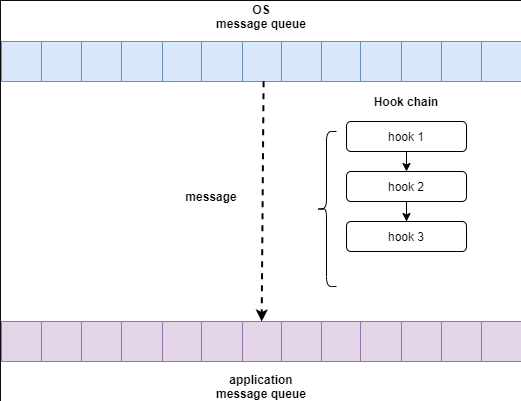
21.3 - SetWindowsHookEx()
1 | |
21.4 - Code
1 | |
1 | |
1 | |
Chapter 23 - DLL Injection
1 | |
23.1 - Implementation of DLL Injection
Usually, there are three methods to implement DLL injection:
- Create remote thread via
CreateRemoteThread()API - Using registry with modifying the value of AppInit_DLLs
- SetWindowsHookEx() API
CreateRemoteThread()
1 | |
Once the DLL is loaded, it prints "myhack.dll Injection!!!". It then calls the function by creating a thread (ThreadProc).
ThreadProc downloads the specified HTML document with the API urlmon!URLDownloadToFile() and saves it as index.html.
Notice that once the DLL file is loaded, DllMain will be called automatically. Hence, once the DLL file above is loaded, the function ThreadProc() will eventually be executed.
1 | |
CreateRemoteThread is used to create a thread in a remote process.
In DLL injection, it is commonly used to make the remote process call LoadLibraryW() so that the DLL is loaded into that process.
1 | |
AppInit_DLLs
The principle of this method is that user32.dll automatically loads the DLLs specified in the AppInit_DLLs registry value whenever user32.dll is loaded into a process.
To enable this feature, you need to set LoadAppInit_DLLs to 1 and restart the system.
Warning: This method is powerful because it allows a DLL to be loaded into all processes that load user32.dll. You must be careful with your DLL code; otherwise, your system may become unstable.
1 | |
1 | |
SetWindowsHookEx()
Chapter 24 - DLL Ejection
This technique is similar to DLL injection. Instead of using LoadLibrary() to load a DLL, we use FreeLibrary() to unload a DLL via CreateRemoteThread().
Every Windows kernel object has a reference count, which indicates how many references to the object currently exist. For example, the reference count of a.dll becomes 10 if LoadLibrary("a.dll") is called 10 times. Accordingly, FreeLibrary() must be called 10 times to fully unload a.dll.
The reference count is decreased by 1 whenever FreeLibrary() is called. Therefore, we need to pay attention to the value of the reference count.
Chapter 25 - Load DLL File by Modifying the PE File
1 | |
1 | |
Chapter 26 - PE Tools
Chapter 27 - Code Injection
27.4 - CodeInjection.cpp
MsgBox()1
2
3
4
5
6
7
8
9
10
11
12
13
14
15
16
17
18
19
20
21
22//MsgBox.cpp
#include "windows.h"
DWORD WINAPI ThreadProc(LPVOID lParam)
{
MessageBoxA(NULL, "www.reversecore.com", "ReverseCore", MB_OK);
return 0;
}
BOOL WINAPI DllMain(HINSTANCE hinstDLL, DWORD fdwReason, LPVOID lpvReserved)
{
switch( fdwReason )
{
case DLL_PROCESS_ATTACH :
CreateThread(NULL, 0, ThreadProc, NULL, 0, NULL);
break;
}
return TRUE;
}
main()1
2
3
4
5
6
7
8
9
10
11
12
13
14
15
16
17
18
19
20int main(int argc, char *argv[])
{
DWORD dwPID = 0;
if( argc != 2 )
{
printf("\n USAGE : %s <pid>\n", argv[0]);
return 1;
}
// change privilege
if( !SetPrivilege(SE_DEBUG_NAME, TRUE) )
return 1;
// code injection
dwPID = (DWORD)atol(argv[1]);
InjectCode(dwPID);
return 0;
}
ThreadProc()1
2
3
4
5
6
7
8
9
10
11
12
13
14
15
16
17
18
19
20
21
22
23
24
25
26
27
28
29
30
31
32
33
34
35
36
37
38
39
40
41
42
43
44
45
46typedef struct _THREAD_PARAM
{
FARPROC pFunc[2]; // LoadLibraryA(), GetProcAddress()
char szBuf[4][128]; // "user32.dll", "MessageBoxA", "www.reversecore.com", "ReverseCore"
} THREAD_PARAM, *PTHREAD_PARAM;
typedef HMODULE (WINAPI *PFLOADLIBRARYA)
(
LPCSTR lpLibFileName
);
typedef FARPROC (WINAPI *PFGETPROCADDRESS)
(
HMODULE hModule,
LPCSTR lpProcName
);
typedef int (WINAPI *PFMESSAGEBOXA)
(
HWND hWnd,
LPCSTR lpText,
LPCSTR lpCaption,
UINT uType
);
DWORD WINAPI ThreadProc(LPVOID lParam)
{
PTHREAD_PARAM pParam = (PTHREAD_PARAM)lParam;
HMODULE hMod = NULL;
FARPROC pFunc = NULL;
// LoadLibrary()
hMod = ((PFLOADLIBRARYA)pParam->pFunc[0])(pParam->szBuf[0]); // "user32.dll"
if( !hMod )
return 1;
// GetProcAddress()
pFunc = (FARPROC)((PFGETPROCADDRESS)pParam->pFunc[1])(hMod, pParam->szBuf[1]); // "MessageBoxA"
if( !pFunc )
return 1;
// MessageBoxA()
((PFMESSAGEBOXA)pFunc)(NULL, pParam->szBuf[2], pParam->szBuf[3], MB_OK);
return 0;
}
InjectCode()1
2
3
4
5
6
7
8
9
10
11
12
13
14
15
16
17
18
19
20
21
22
23
24
25
26
27
28
29
30
31
32
33
34
35
36
37
38
39
40
41
42
43
44
45
46
47
48
49
50
51
52
53
54
55
56
57
58
59
60
61
62
63
64
65
66
67
68
69
70
71
72
73
74
75
76
77
78
79
80
81
82
83
84
85
86
87
88
89
90
91
92
93
94
95
96
97
98
99
100
101
102
103
104
105
106
107
108
109
110
111
112
113
114
115
116
117
118
119
120
121
122
123
124
125
126
127
128
129
130
131
132
133
134
135
136
137
138
139
140
141BOOL InjectCode(DWORD dwPID)
{
HMODULE hMod = NULL;
THREAD_PARAM param = {0,};
HANDLE hProcess = NULL;
HANDLE hThread = NULL;
LPVOID pRemoteBuf[2] = {0,};
DWORD dwSize = 0;
hMod = GetModuleHandleA("kernel32.dll");
// set THREAD_PARAM
param.pFunc[0] = GetProcAddress(hMod, "LoadLibraryA");
param.pFunc[1] = GetProcAddress(hMod, "GetProcAddress");
strcpy_s(param.szBuf[0], "user32.dll");
strcpy_s(param.szBuf[1], "MessageBoxA");
strcpy_s(param.szBuf[2], "www.reversecore.com");
strcpy_s(param.szBuf[3], "ReverseCore");
// Open Process
if ( !(hProcess = OpenProcess(PROCESS_ALL_ACCESS, // dwDesiredAccess
FALSE, // bInheritHandle
dwPID)) ) // dwProcessId
{
printf("OpenProcess() fail : err_code = %d\n", GetLastError());
return FALSE;
}
// Allocation for THREAD_PARAM
dwSize = sizeof(THREAD_PARAM);
if( !(pRemoteBuf[0] = VirtualAllocEx(hProcess, // hProcess
NULL, // lpAddress
dwSize, // dwSize
MEM_COMMIT, // flAllocationType
PAGE_READWRITE)) ) // flProtect
{
printf("VirtualAllocEx() fail : err_code = %d\n", GetLastError());
return FALSE;
}
if( !WriteProcessMemory(hProcess, // hProcess
pRemoteBuf[0], // lpBaseAddress
(LPVOID)¶m, // lpBuffer
dwSize, // nSize
NULL) ) // [out] lpNumberOfBytesWritten
{
printf("WriteProcessMemory() fail : err_code = %d\n", GetLastError());
return FALSE;
}
// Allocation for ThreadProc()
dwSize = (DWORD)InjectCode - (DWORD)ThreadProc;
if( !(pRemoteBuf[1] = VirtualAllocEx(hProcess, // hProcess
NULL, // lpAddress
dwSize, // dwSize
MEM_COMMIT, // flAllocationType
PAGE_EXECUTE_READWRITE)) ) // flProtect
{
printf("VirtualAllocEx() fail : err_code = %d\n", GetLastError());
return FALSE;
}
if( !WriteProcessMemory(hProcess, // hProcess
pRemoteBuf[1], // lpBaseAddress
(LPVOID)ThreadProc, // lpBuffer
dwSize, // nSize
NULL) ) // [out] lpNumberOfBytesWritten
{
printf("WriteProcessMemory() fail : err_code = %d\n", GetLastError());
return FALSE;
}
if( !(hThread = CreateRemoteThread(hProcess, // hProcess
NULL, // lpThreadAttributes
0, // dwStackSize
(LPTHREAD_START_ROUTINE)pRemoteBuf[1], // dwStackSize
pRemoteBuf[0], // lpParameter
0, // dwCreationFlags
NULL)) ) // lpThreadId
{
printf("CreateRemoteThread() fail : err_code = %d\n", GetLastError());
return FALSE;
}
WaitForSingleObject(hThread, INFINITE);
CloseHandle(hThread);
CloseHandle(hProcess);
return TRUE;
}
BOOL SetPrivilege(LPCTSTR lpszPrivilege, BOOL bEnablePrivilege)
{
TOKEN_PRIVILEGES tp;
HANDLE hToken;
LUID luid;
if( !OpenProcessToken(GetCurrentProcess(),
TOKEN_ADJUST_PRIVILEGES | TOKEN_QUERY,
&hToken) )
{
printf("OpenProcessToken error: %u\n", GetLastError());
return FALSE;
}
if( !LookupPrivilegeValue(NULL, // lookup privilege on local system
lpszPrivilege, // privilege to lookup
&luid) ) // receives LUID of privilege
{
printf("LookupPrivilegeValue error: %u\n", GetLastError() );
return FALSE;
}
tp.PrivilegeCount = 1;
tp.Privileges[0].Luid = luid;
if( bEnablePrivilege )
tp.Privileges[0].Attributes = SE_PRIVILEGE_ENABLED;
else
tp.Privileges[0].Attributes = 0;
// Enable the privilege or disable all privileges.
if( !AdjustTokenPrivileges(hToken,
FALSE,
&tp,
sizeof(TOKEN_PRIVILEGES),
(PTOKEN_PRIVILEGES) NULL,
(PDWORD) NULL) )
{
printf("AdjustTokenPrivileges error: %u\n", GetLastError() );
return FALSE;
}
if( GetLastError() == ERROR_NOT_ALL_ASSIGNED )
{
printf("The token does not have the specified privilege. \n");
return FALSE;
}
return TRUE;
}
Chapter 28 - Code Injection via Assembly Code
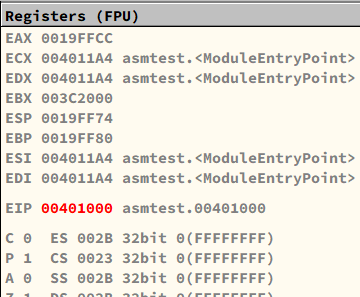
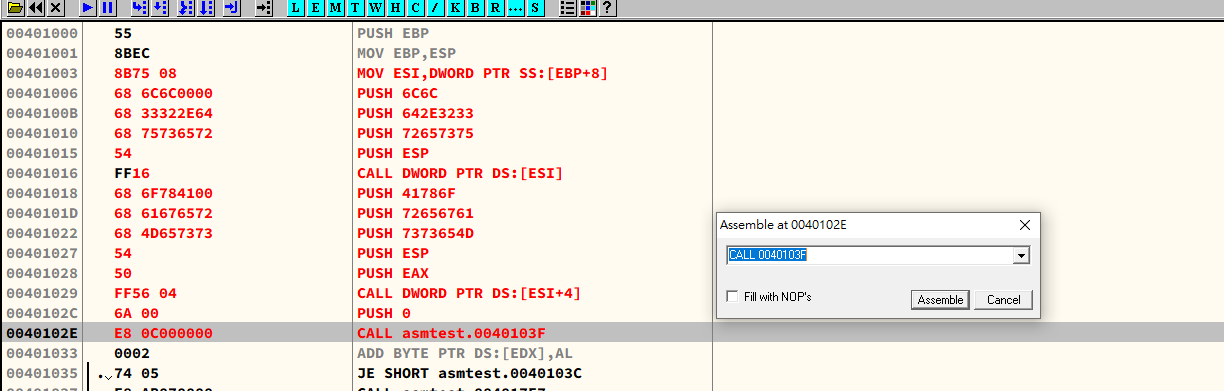
Chapter 29 - API Hooking
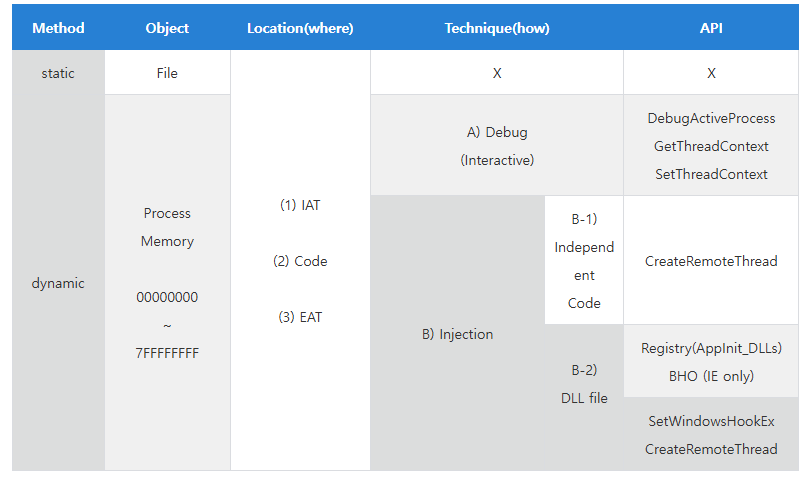
Chapter 30 - API Hooking of Notepad.exe WriteFile()
Debug Events
- EXCEPTION_DEBUG_EVENT
- CREATE_THREAD_DEBUG_EVENT
- CREATE_PROCESS_DEBUG_EVENT
- EXIT_THREAD_DEBUG_EVENT
- EXIT_PROCESS_DEBUG_EVENT
- LOAD_DLL_DEBUG_EVENT
- UNLOAD_DLL_DEBUG_EVENT
- OUTPUT_DEBUT_STRING_EVENT
- RIP_EVENT
EXCEPTION_DEBUG_EVENT
- EXCEPTION_ACCESS_VIOLATION
- EXCEPTION_ARRAY_BOUNDS_EXCEEDED
- EXCEPTION_BREAKPOINT
- EXCEPTION_DATATYPE_MISALIGNMENT
- EXCEPTION_FLT_DENORMAL_OPERAND
- EXCEPTION_FLT_DIVIDE_BY_ZERO
- EXCEPTION_FLT_INEXACT_RESULT
- EXCEPTION_FLT_INVALID_OPERATION
- EXCEPTION_FLT_OVERFLOW
- EXCEPTION_FLT_STACK_CHECK
- EXCEPTION_FLT_UNDERFLOW
- EXCEPTION_FLT_ILLEGAL_INSTRUCTIOIN
- EXCEPTION_IN_PAGE_ERROR
- EXCEPTION_INT_DIVIDE_BY_ZERO
- EXCEPTION_INT_OVERFLOW
- EXCEPTION_INVALID_DISPOSITION
- EXCEPTION_NONCONTINUABLE_EXCEPTION
- EXCEPTION_PRIV_INSTRUCTION
- EXCEPTION_SINGLE_STEP
- EXCEPTION_STACK_OVERFLOW
30.4 - Practice
30.5 - Principle
WriteFile()1
2
3
4
5
6
7BOOL WriteFile(
[in] HANDLE hFile,
[in] LPCVOID lpBuffer,
[in] DWORD nNumberOfBytesToWrite,
[out, optional] LPDWORD lpNumberOfBytesWritten,
[in, out, optional] LPOVERLAPPED lpOverlapped
);
main()1
2
3
4
5
6
7
8
9
10
11
12
13
14
15
16
17
18
19
20
21
22
23
24int main(int argc, char* argv[])
{
DWORD dwPID;
if( argc != 2 )
{
printf("\nUSAGE : hookdbg.exe <pid>\n");
return 1;
}
//Attach Process
dwPID = atoi(argv[1]);
if( !DebugActiveProcess(dwPID) )
{
printf("DebugActiveProcess(%d) failed!!!\n"
"Error Code = %d\n", dwPID, GetLastError());
return 1;
}
//Debugger loop
DebugLoop();
return 0;
}
DebugLoop()1
2
3
4
5
6
7
8
9
10
11
12
13
14
15
16
17
18
19
20
21
22
23
24
25
26
27
28
29
30
31
32void DebugLoop()
{
DEBUG_EVENT de;
DWORD dwContinueStatus;
//Waiting for debuggee event.
while( WaitForDebugEvent(&de, INFINITE) )
{
dwContinueStatus = DBG_CONTINUE;
//Debuggee process is created or attached.
if( CREATE_PROCESS_DEBUG_EVENT == de.dwDebugEventCode )
{
OnCreateProcessDebugEvent(&de);
}
//Exception
else if( EXCEPTION_DEBUG_EVENT == de.dwDebugEventCode )
{
if( OnExceptionDebugEvent(&de) )
continue;
}
//Event of debuggee is terminated.
else if( EXIT_PROCESS_DEBUG_EVENT == de.dwDebugEventCode )
{
// debuggee 종료 -> debugger 종료
break;
}
//Continue debuggee.
ContinueDebugEvent(de.dwProcessId, de.dwThreadId, dwContinueStatus);
}
}
DEBUG_EVENT structure1
2
3
4
5
6
7
8
9
10
11
12
13
14
15
16
17
18typedef struct _DEBUG_EVENT {
DWORD dwDebugEventCode;
DWORD dwProcessId;
DWORD dwThreadId;
union {
EXCEPTION_DEBUG_INFO Exception;
CREATE_THREAD_DEBUG_INFO CreateThread;
CREATE_PROCESS_DEBUG_INFO CreateProcessInfo;
EXIT_THREAD_DEBUG_INFO ExitThread;
EXIT_PROCESS_DEBUG_INFO ExitProcess;
LOAD_DLL_DEBUG_INFO LoadDll;
UNLOAD_DLL_DEBUG_INFO UnloadDll;
OUTPUT_DEBUG_STRING_INFO DebugString;
RIP_INFO RipInfo;
} u;
} DEBUG_EVENT, *LPDEBUG_EVENT;
//Source: https://learn.microsoft.com/en-us/windows/win32/api/minwinbase/ns-minwinbase-debug_event
OnCreateProcessDebugEvent()1
2
3
4
5
6
7
8
9
10
11
12
13
14
15
16BOOL OnCreateProcessDebugEvent(LPDEBUG_EVENT pde)
{
// WriteFile() API 주소 구하기
g_pfWriteFile = GetProcAddress(GetModuleHandleA("kernel32.dll"), "WriteFile");
// API Hook - WriteFile()
// 첫 번째 byte 를 0xCC (INT 3) 으로 변경
// (orginal byte 는 백업)
memcpy(&g_cpdi, &pde->u.CreateProcessInfo, sizeof(CREATE_PROCESS_DEBUG_INFO));
ReadProcessMemory(g_cpdi.hProcess, g_pfWriteFile,
&g_chOrgByte, sizeof(BYTE), NULL);
WriteProcessMemory(g_cpdi.hProcess, g_pfWriteFile,
&g_chINT3, sizeof(BYTE), NULL);
return TRUE;
}
OnExceptionDebugEvent()1
2
3
4
5
6
7
8
9
10
11
12
13
14
15
16
17
18
19
20
21
22
23
24
25
26
27
28
29
30
31
32
33
34
35
36
37
38
39
40
41
42
43
44
45
46
47
48
49
50
51
52
53
54
55
56
57
58
59
60
61
62
63
64
65
66
67
68
69
70
71
72
73
74
75BOOL OnExceptionDebugEvent(LPDEBUG_EVENT pde)
{
CONTEXT ctx;
PBYTE lpBuffer = NULL;
DWORD dwNumOfBytesToWrite, dwAddrOfBuffer, i;
PEXCEPTION_RECORD per = &pde->u.Exception.ExceptionRecord;
//BreakPoint exception (INT 3)
if( EXCEPTION_BREAKPOINT == per->ExceptionCode )
{
//if BP address is the address of WriteFile()
if( g_pfWriteFile == per->ExceptionAddress )
{
// #1. Unhook
//0xCC -> original byte
WriteProcessMemory(g_cpdi.hProcess, g_pfWriteFile,
&g_chOrgByte, sizeof(BYTE), NULL);
// #2. Thread Context
ctx.ContextFlags = CONTEXT_CONTROL;
GetThreadContext(g_cpdi.hThread, &ctx);
// #3. WriteFile(), param 2, 3
// 함수의 파라미터는 해당 프로세스의 스택에 존재함
// param 2 : ESP + 0x8
// param 3 : ESP + 0xC
ReadProcessMemory(g_cpdi.hProcess, (LPVOID)(ctx.Esp + 0x8),
&dwAddrOfBuffer, sizeof(DWORD), NULL);
ReadProcessMemory(g_cpdi.hProcess, (LPVOID)(ctx.Esp + 0xC),
&dwNumOfBytesToWrite, sizeof(DWORD), NULL);
// #4. 임시 버퍼 할당
lpBuffer = (PBYTE)malloc(dwNumOfBytesToWrite+1);
memset(lpBuffer, 0, dwNumOfBytesToWrite+1);
// #5. WriteFile() 의 버퍼를 임시 버퍼에 복사
ReadProcessMemory(g_cpdi.hProcess, (LPVOID)dwAddrOfBuffer,
lpBuffer, dwNumOfBytesToWrite, NULL);
printf("\n### original string ###\n%s\n", lpBuffer);
// #6. 소문자 -> 대문자 변환
for( i = 0; i < dwNumOfBytesToWrite; i++ )
{
if( 0x61 <= lpBuffer[i] && lpBuffer[i] <= 0x7A )
lpBuffer[i] -= 0x20;
}
printf("\n### converted string ###\n%s\n", lpBuffer);
// #7. 변환된 버퍼를 WriteFile() 버퍼로 복사
WriteProcessMemory(g_cpdi.hProcess, (LPVOID)dwAddrOfBuffer,
lpBuffer, dwNumOfBytesToWrite, NULL);
// #8. 임시 버퍼 해제
free(lpBuffer);
// #9. Thread Context 의 EIP 를 WriteFile() 시작으로 변경
// (현재는 WriteFile() + 1 만큼 지나왔음)
ctx.Eip = (DWORD)g_pfWriteFile;
SetThreadContext(g_cpdi.hThread, &ctx);
// #10. Debuggee 프로세스를 진행시킴
ContinueDebugEvent(pde->dwProcessId, pde->dwThreadId, DBG_CONTINUE);
Sleep(0);
// #11. API Hook
WriteProcessMemory(g_cpdi.hProcess, g_pfWriteFile,
&g_chINT3, sizeof(BYTE), NULL);
return TRUE;
}
}
return FALSE;
}
CONTEXT (x86 32-bit)1
2
3
4
5
6
7
8
9
10
11
12
13
14
15
16
17
18
19
20
21
22
23
24
25
26
27typedef struct _CONTEXT {
DWORD ContextFlags;
DWORD Dr0;
DWORD Dr1;
DWORD Dr2;
DWORD Dr3;
DWORD Dr6;
DWORD Dr7;
FLOATING_SAVE_AREA FloatSave;
DWORD SegGs;
DWORD SegFs;
DWORD SegEs;
DWORD SegDs;
DWORD Edi;
DWORD Esi;
DWORD Ebx;
DWORD Edx;
DWORD Ecx;
DWORD Eax;
DWORD Ebp;
DWORD Eip;
DWORD SegCs;
DWORD EFlags;
DWORD Esp;
DWORD SegSs;
BYTE ExtendedRegisters[MAXIMUM_SUPPORTED_EXTENSION];
} CONTEXT;
Chapter 31 - Debugger
OllyDbg
IDA Pro
WinDbg
Chapter 32 - Displaying Korean in calc.exe
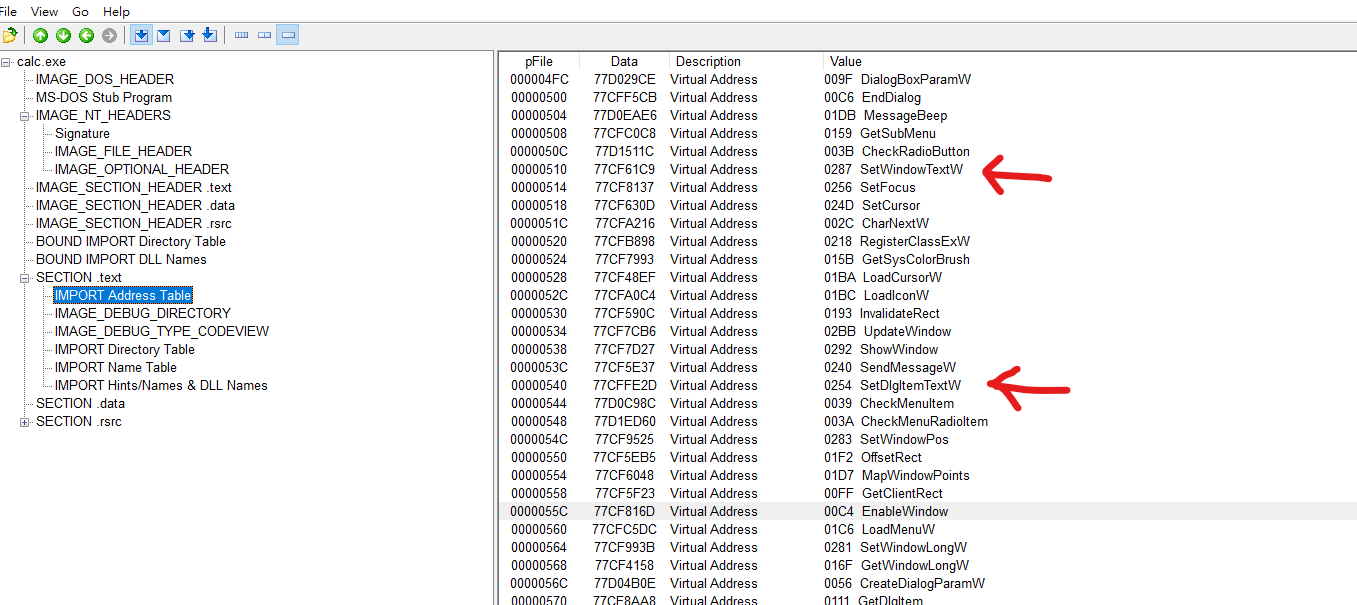
1 | |
Here W stands for Wide Character version. A stands for ASCII version.
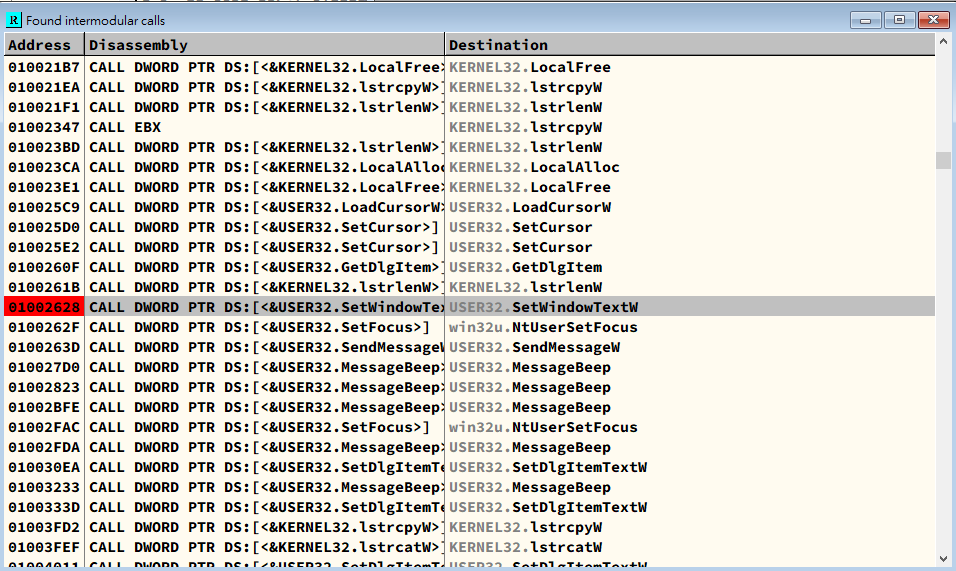
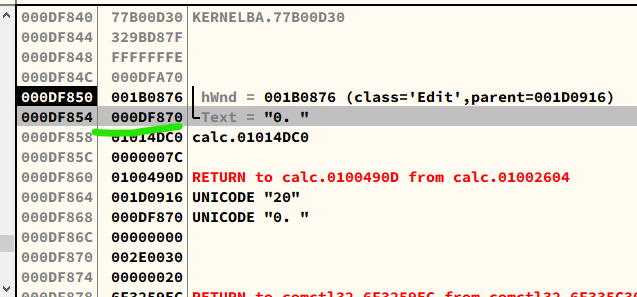
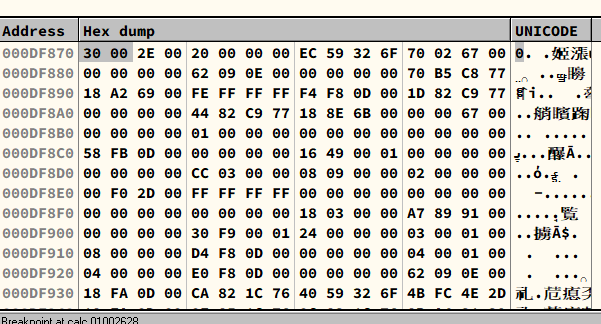
Important: Notice that Little-endian is used on x32 platform. Thus, you must enter the hexadecimal unicode in reversed. In addition, Unicode is constituted by 2 bytes (16 bits).
32.4 - Practice
1 | |
32.5 - Code
DllMain()1
2
3
4
5
6
7
8
9
10
11
12
13
14
15
16
17
18
19
20
21
22
23BOOL WINAPI DllMain(HINSTANCE hinstDLL, DWORD fdwReason, LPVOID lpvReserved)
{
switch( fdwReason )
{
case DLL_PROCESS_ATTACH :
// original API 주소 저장
g_pOrgFunc = GetProcAddress(GetModuleHandle(L"user32.dll"),
"SetWindowTextW");
// # hook
// user32!SetWindowTextW() 를 hookiat!MySetWindowText() 로 후킹
hook_iat("user32.dll", g_pOrgFunc, (PROC)MySetWindowTextW);
break;
case DLL_PROCESS_DETACH :
// # unhook
// calc.exe 의 IAT 를 원래대로 복원
hook_iat("user32.dll", (PROC)MySetWindowTextW, g_pOrgFunc);
break;
}
return TRUE;
}
MySetWindowTextW()1
2
3
4
5
6
7
8
9
10
11
12
13
14
15
16
17
18
19
20
21
22
23BOOL WINAPI MySetWindowTextW(HWND hWnd, LPWSTR lpString)
{
wchar_t* pNum = L"영일이삼사오육칠팔구"; //0123456789 or 零一二三四五六七八九
wchar_t temp[2] = {0,};
int i = 0, nLen = 0, nIndex = 0;
nLen = wcslen(lpString);
for(i = 0; i < nLen; i++)
{
// '수'문자를 '한글'문자로 변환
// lpString 은 wide-character (2 byte) 문자열
if( L'0' <= lpString[i] && lpString[i] <= L'9' )
{
temp[0] = lpString[i];
nIndex = _wtoi(temp);
lpString[i] = pNum[nIndex];
}
}
// user32!SetWindowTextW() API 호출
// (위에서 lpString 버퍼 내용을 변경하였음)
return ((PFSETWINDOWTEXTW)g_pOrgFunc)(hWnd, lpString);
}
hook_iat()1
2
3
4
5
6
7
8
9
10
11
12
13
14
15
16
17
18
19
20
21
22
23
24
25
26
27
28
29
30
31
32
33
34
35
36
37
38
39
40
41
42
43
44
45
46
47
48
49
50
51
52
53
54
55
56
57
58
59
60
61
62
63BOOL hook_iat(LPCSTR szDllName, PROC pfnOrg, PROC pfnNew)
{
HMODULE hMod;
LPCSTR szLibName;
PIMAGE_IMPORT_DESCRIPTOR pImportDesc;
PIMAGE_THUNK_DATA pThunk;
DWORD dwOldProtect, dwRVA;
PBYTE pAddr;
// hMod, pAddr = ImageBase of calc.exe
// = VA to MZ signature (IMAGE_DOS_HEADER)
hMod = GetModuleHandle(NULL);
pAddr = (PBYTE)hMod;
// pAddr = VA to PE signature (IMAGE_NT_HEADERS)
pAddr += *((DWORD*)&pAddr[0x3C]);
// dwRVA = RVA to IMAGE_IMPORT_DESCRIPTOR Table
dwRVA = *((DWORD*)&pAddr[0x80]);
// pImportDesc = VA to IMAGE_IMPORT_DESCRIPTOR Table
pImportDesc = (PIMAGE_IMPORT_DESCRIPTOR)((DWORD)hMod+dwRVA);
for( ; pImportDesc->Name; pImportDesc++ )
{
// szLibName = VA to IMAGE_IMPORT_DESCRIPTOR.Name
szLibName = (LPCSTR)((DWORD)hMod + pImportDesc->Name);
if( !_stricmp(szLibName, szDllName) )
{
// pThunk = IMAGE_IMPORT_DESCRIPTOR.FirstThunk
// = VA to IAT(Import Address Table)
pThunk = (PIMAGE_THUNK_DATA)((DWORD)hMod +
pImportDesc->FirstThunk);
// pThunk->u1.Function = VA to API
for( ; pThunk->u1.Function; pThunk++ )
{
if( pThunk->u1.Function == (DWORD)pfnOrg )
{
//Modify the attribute of memory to E/R/W
VirtualProtect((LPVOID)&pThunk->u1.Function,
4,
PAGE_EXECUTE_READWRITE,
&dwOldProtect);
//Modify IAT value (Hooking).
pThunk->u1.Function = (DWORD)pfnNew;
//Redo modification.
VirtualProtect((LPVOID)&pThunk->u1.Function,
4,
dwOldProtect,
&dwOldProtect);
return TRUE;
}
}
}
}
return FALSE;
}
IAT structure1
2
3
4
5
6hMod = GetModuleHandle(NULL); // hMod = ImageBase
pAddr = (PBYTE)hMod; // pAddr = ImageBase
pAddr += *((DWORD*)&pAddr[0x3C]); // pAddr = "PE" signature
dwRVA = *((DWORD*)&pAddr[0x80]); // dwRVA = RVA of IMAGE_IMPORT_DESCRIPTOR
pImportDesc = (PIMAGE_IMPORT_DESCRIPTOR)((DWORD)hMod+dwRVA);
Chapter 33 - Hidden Process
33.3 - Hidden Process
CreateToolhelp32Snapshot()1
2
3
4
5
6HANDLE CreateToolhelp32Snapshot(
[in] DWORD dwFlags,
[in] DWORD th32ProcessID
);
//Source: https://learn.microsoft.com/en-us/windows/win32/api/tlhelp32/nf-tlhelp32-createtoolhelp32snapshot
EnumProcess()
1
2
3
4
5
6
7
BOOL EnumProcesses(
  [out] DWORD   *lpidProcess,
  [in]  DWORD   cb,
  [out] LPDWORD lpcbNeeded
);

//Source: https://learn.microsoft.com/en-us/windows/win32/api/psapi/nf-psapi-enumprocesses
1 | |
ZwQuerySystemInformation()1
2
3
4
5
6
7
8NTSTATUS WINAPI ZwQuerySystemInformation(
_In_ SYSTEM_INFORMATION_CLASS SystemInformationClass,
_Inout_ PVOID SystemInformation,
_In_ ULONG SystemInformationLength,
_Out_opt_ PULONG ReturnLength
);
//Source: https://learn.microsoft.com/en-us/windows/win32/sysinfo/zwquerysysteminformation
33.4 - Practice
1 | |
33.5 - HideProc
Chapter 34 - Global API Hooking
Chapter 35 - How to Choose Your Tools
Chapter 36 - 64-bit
36.1 - 64-bit Processing
| Terminology | Meaning |
|---|---|
| AMB64 | 64-bit processors developed by AMD. |
| EM64T | 64-bit processors developed by Intel. They support AMD64. |
| Intel64 | New name of EM64T. |
| IA-64 | 64-bit CPUs developed by Intel and HP. |
| x86 | CPUs of Intel IA-32, IA-16 and IA-8. |
| x64 | AMD64 & Intel64 |
Chapter 37 - x64 Processor
Chapter 38 - PE32+
IMAGE_NT_HEADERS1
2
3
4
5
6
7
8
9
10
11
12
13
14
15
16
17
18
19
20
21typedef struct _IMAGE_NT_HEADERS64 {
DWORD Signature;
IMAGE_FILE_HEADER FileHeader;
IMAGE_OPTIONAL_HEADER64 OptionalHeader;
} IMAGE_NT_HEADERS64, *PIMAGE_NT_HEADERS64;
typedef struct _IMAGE_NT_HEADERS {
DWORD Signature; /* "PE"\0\0 */ /* 0x00 */
IMAGE_FILE_HEADER FileHeader; /* 0x04 */
IMAGE_OPTIONAL_HEADER32 OptionalHeader; /* 0x18 */
} IMAGE_NT_HEADERS32, *PIMAGE_NT_HEADERS32;
#ifdef _WIN64
typedef IMAGE_NT_HEADERS64 IMAGE_NT_HEADERS;
typedef PIMAGE_NT_HEADERS64 PIMAGE_NT_HEADERS;
#else
typedef IMAGE_NT_HEADERS32 IMAGE_NT_HEADERS;
typedef PIMAGE_NT_HEADERS32 PIMAGE_NT_HEADERS;
#endif
//Source: https://github.com/wine-mirror/wine/blob/master/include/winnt.h
IMAGE_FILE_HEADER1
2
3
4
5
6
7
8
9
10
11
12
13
14
15
16
17
18
19
20
21
22
23
24
25
26
27
28
29
30
31
32
33
34
35
36
37
38
39
40
41
42
43#define IMAGE_FILE_MACHINE_UNKNOWN 0
#define IMAGE_FILE_MACHINE_TARGET_HOST 0x0001
#define IMAGE_FILE_MACHINE_I386 0x014c
#define IMAGE_FILE_MACHINE_R3000 0x0162
#define IMAGE_FILE_MACHINE_R4000 0x0166
#define IMAGE_FILE_MACHINE_R10000 0x0168
#define IMAGE_FILE_MACHINE_WCEMIPSV2 0x0169
#define IMAGE_FILE_MACHINE_ALPHA 0x0184
#define IMAGE_FILE_MACHINE_SH3 0x01a2
#define IMAGE_FILE_MACHINE_SH3DSP 0x01a3
#define IMAGE_FILE_MACHINE_SH3E 0x01a4
#define IMAGE_FILE_MACHINE_SH4 0x01a6
#define IMAGE_FILE_MACHINE_SH5 0x01a8
#define IMAGE_FILE_MACHINE_ARM 0x01c0
#define IMAGE_FILE_MACHINE_THUMB 0x01c2
#define IMAGE_FILE_MACHINE_ARMNT 0x01c4
#define IMAGE_FILE_MACHINE_AM33 0x01d3
#define IMAGE_FILE_MACHINE_POWERPC 0x01f0
#define IMAGE_FILE_MACHINE_POWERPCFP 0x01f1
#define IMAGE_FILE_MACHINE_IA64 0x0200
#define IMAGE_FILE_MACHINE_MIPS16 0x0266
#define IMAGE_FILE_MACHINE_ALPHA64 0x0284
#define IMAGE_FILE_MACHINE_AXP64 IMAGE_FILE_MACHINE_ALPHA64
#define IMAGE_FILE_MACHINE_MIPSFPU 0x0366
#define IMAGE_FILE_MACHINE_MIPSFPU16 0x0466
#define IMAGE_FILE_MACHINE_TRICORE 0x0520
#define IMAGE_FILE_MACHINE_CEF 0x0cef
#define IMAGE_FILE_MACHINE_EBC 0x0ebc
#define IMAGE_FILE_MACHINE_CHPE_X86 0x3a64
#define IMAGE_FILE_MACHINE_AMD64 0x8664
#define IMAGE_FILE_MACHINE_M32R 0x9041
#define IMAGE_FILE_MACHINE_ARM64EC 0xa641
#define IMAGE_FILE_MACHINE_ARM64X 0xa64e
#define IMAGE_FILE_MACHINE_ARM64 0xaa64
#define IMAGE_FILE_MACHINE_RISCV32 0x5032
#define IMAGE_FILE_MACHINE_RISCV64 0x5064
#define IMAGE_FILE_MACHINE_RISCV128 0x5128
#define IMAGE_FILE_MACHINE_CEE 0xc0ee
//Source: //Source: https://github.com/wine-mirror/wine/blob/master/include/winnt.h
IMAGE_OPTIONAL_HEADER1
2
3
4
5
6
7
8
9
10
11
12
13
14
15
16
17
18
19
20
21
22
23
24
25
26
27
28
29
30
31
32
33
34
35
36
37
38
39
40
41
42
43
44
45
46
47
48
49
50
51
52
53
54
55
56
57
58
59
60
61
62
63
64
65
66
67
68
69
70
71
72
73
74
75
76
77
78
79
80
81
82
83
84
85
86
87
88typedef struct _IMAGE_OPTIONAL_HEADER {
/* Standard fields */
WORD Magic; /* 0x10b or 0x107 */ /* 0x00 */
BYTE MajorLinkerVersion;
BYTE MinorLinkerVersion;
DWORD SizeOfCode;
DWORD SizeOfInitializedData;
DWORD SizeOfUninitializedData;
DWORD AddressOfEntryPoint; /* 0x10 */
DWORD BaseOfCode;
DWORD BaseOfData;
/* NT additional fields */
DWORD ImageBase;
DWORD SectionAlignment; /* 0x20 */
DWORD FileAlignment;
WORD MajorOperatingSystemVersion;
WORD MinorOperatingSystemVersion;
WORD MajorImageVersion;
WORD MinorImageVersion;
WORD MajorSubsystemVersion; /* 0x30 */
WORD MinorSubsystemVersion;
DWORD Win32VersionValue;
DWORD SizeOfImage;
DWORD SizeOfHeaders;
DWORD CheckSum; /* 0x40 */
WORD Subsystem;
WORD DllCharacteristics;
DWORD SizeOfStackReserve;
DWORD SizeOfStackCommit;
DWORD SizeOfHeapReserve; /* 0x50 */
DWORD SizeOfHeapCommit;
DWORD LoaderFlags;
DWORD NumberOfRvaAndSizes;
IMAGE_DATA_DIRECTORY DataDirectory[IMAGE_NUMBEROF_DIRECTORY_ENTRIES]; /* 0x60 */
/* 0xE0 */
} IMAGE_OPTIONAL_HEADER32, *PIMAGE_OPTIONAL_HEADER32;
typedef struct _IMAGE_OPTIONAL_HEADER64 {
WORD Magic; /* 0x20b */
BYTE MajorLinkerVersion;
BYTE MinorLinkerVersion;
DWORD SizeOfCode;
DWORD SizeOfInitializedData;
DWORD SizeOfUninitializedData;
DWORD AddressOfEntryPoint;
DWORD BaseOfCode;
ULONGLONG ImageBase;
DWORD SectionAlignment;
DWORD FileAlignment;
WORD MajorOperatingSystemVersion;
WORD MinorOperatingSystemVersion;
WORD MajorImageVersion;
WORD MinorImageVersion;
WORD MajorSubsystemVersion;
WORD MinorSubsystemVersion;
DWORD Win32VersionValue;
DWORD SizeOfImage;
DWORD SizeOfHeaders;
DWORD CheckSum;
WORD Subsystem;
WORD DllCharacteristics;
ULONGLONG SizeOfStackReserve;
ULONGLONG SizeOfStackCommit;
ULONGLONG SizeOfHeapReserve;
ULONGLONG SizeOfHeapCommit;
DWORD LoaderFlags;
DWORD NumberOfRvaAndSizes;
IMAGE_DATA_DIRECTORY DataDirectory[IMAGE_NUMBEROF_DIRECTORY_ENTRIES];
} IMAGE_OPTIONAL_HEADER64, *PIMAGE_OPTIONAL_HEADER64;
/* Possible Magic values */
#define IMAGE_NT_OPTIONAL_HDR32_MAGIC 0x10b
#define IMAGE_NT_OPTIONAL_HDR64_MAGIC 0x20b
#define IMAGE_ROM_OPTIONAL_HDR_MAGIC 0x107
#ifdef _WIN64
#define IMAGE_SIZEOF_NT_OPTIONAL_HEADER IMAGE_SIZEOF_NT_OPTIONAL64_HEADER
#define IMAGE_NT_OPTIONAL_HDR_MAGIC IMAGE_NT_OPTIONAL_HDR64_MAGIC
#else
#define IMAGE_SIZEOF_NT_OPTIONAL_HEADER IMAGE_SIZEOF_NT_OPTIONAL32_HEADER
#define IMAGE_NT_OPTIONAL_HDR_MAGIC IMAGE_NT_OPTIONAL_HDR32_MAGIC
#endif
//Source: https://github.com/wine-mirror/wine/blob/master/include/winnt.h
Stack & Heap1
2
3
4
5
6
7
8
9
10
11
12
13
14
15
16
17
18
19
20typedef struct _IMAGE_THUNK_DATA64 {
union {
ULONGLONG ForwarderString;
ULONGLONG Function;
ULONGLONG Ordinal;
ULONGLONG AddressOfData;
} u1;
} IMAGE_THUNK_DATA64,*PIMAGE_THUNK_DATA64;
#pragma pack(pop)
typedef struct _IMAGE_THUNK_DATA32 {
union {
DWORD ForwarderString;
DWORD Function;
DWORD Ordinal;
DWORD AddressOfData;
} u1;
} IMAGE_THUNK_DATA32,*PIMAGE_THUNK_DATA32;
//Source: https://github.com/wine-mirror/wine/blob/master/include/winnt.h
IMAGE_IMPORT_DESCRIPTOR1
2
3
4
5
6
7
8
9
10
11
12
13
14
15
16
17typedef struct _IMAGE_IMPORT_DESCRIPTOR {
union {
DWORD Characteristics; /* 0 for terminating null import descriptor */
DWORD OriginalFirstThunk; /* RVA to original unbound IAT */
} DUMMYUNIONNAME;
DWORD TimeDateStamp; /* 0 if not bound,
* -1 if bound, and real date\time stamp
* in IMAGE_DIRECTORY_ENTRY_BOUND_IMPORT
* (new BIND)
* otherwise date/time stamp of DLL bound to
* (Old BIND)
*/
DWORD ForwarderChain; /* -1 if no forwarders */
DWORD Name;
/* RVA to IAT (if bound this IAT has actual addresses) */
DWORD FirstThunk;
} IMAGE_IMPORT_DESCRIPTOR,*PIMAGE_IMPORT_DESCRIPTOR;
Chapter 39 - WinDbg
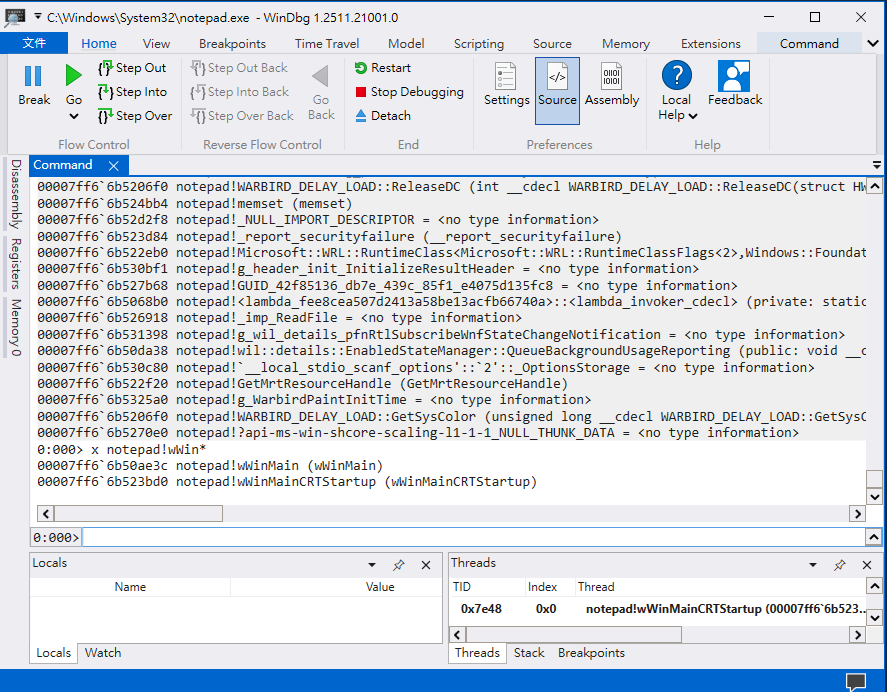
Chapter 40 - 64-bit Debugging
40.1 - Debugger on x64 Platform
| OS | PE32 | PE32+ |
|---|---|---|
| 32-bit | OllyDbg, IDA Pro, WinDbg | IDA Pro (Disassemble only) |
| 64-bit | OllyDbg, IDA Pro, WinDbg | IDA Pro, WinDbg |
40.2 - x64 Debugging
WOW64Test1
2
3
4
5
6
7
8
9
10
11
12
13
14
15
16
17
18
19
20
21
22
23
24
25
26
27
28
29
30
31
32
33
34
35
36
37
38
39
40
41
42
43
44
45
46
47
48
49
50
51#include "stdio.h"
#include "windows.h"
#include "Shlobj.h"
#include "tchar.h"
#pragma comment(lib, "Shell32.lib")
int _tmain(int argc, TCHAR* argv[])
{
HKEY hKey = NULL;
HANDLE hFile = INVALID_HANDLE_VALUE;
TCHAR szPath[MAX_PATH] = {0,};
////////////////
// system32 folder
if( GetSystemDirectory(szPath, MAX_PATH) )
{
_tprintf(L"1) system32 path = %s\n", szPath);
}
////////////////
// File size
_tcscat_s(szPath, L"\\kernel32.dll");
hFile = CreateFile(szPath, GENERIC_READ, FILE_SHARE_READ, NULL,
OPEN_EXISTING, FILE_ATTRIBUTE_NORMAL, NULL);
if( hFile != INVALID_HANDLE_VALUE )
{
_tprintf(L"2) File size of \"%s\" = %d\n",
szPath, GetFileSize(hFile, NULL));
CloseHandle(hFile);
}
////////////////
// Program Files
if( SHGetSpecialFolderPath(NULL, szPath,
CSIDL_PROGRAM_FILES, FALSE) )
{
_tprintf(L"3) Program Files path = %s\n", szPath);
}
////////////////
// Registry
if( ERROR_SUCCESS == RegCreateKey(HKEY_LOCAL_MACHINE,
L"SOFTWARE\\ReverseCore", &hKey) )
{
RegCloseKey(hKey);
_tprintf(L"4) Create Registry Key : HKLM\\SOFTWARE\\ReverseCore\n");
}
return 0;
}
40.3 - WOW64Test_x86.exe
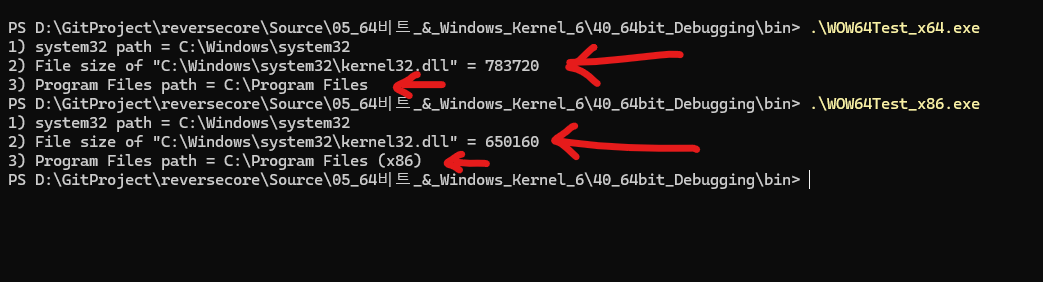
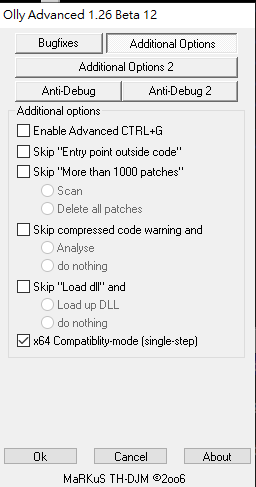
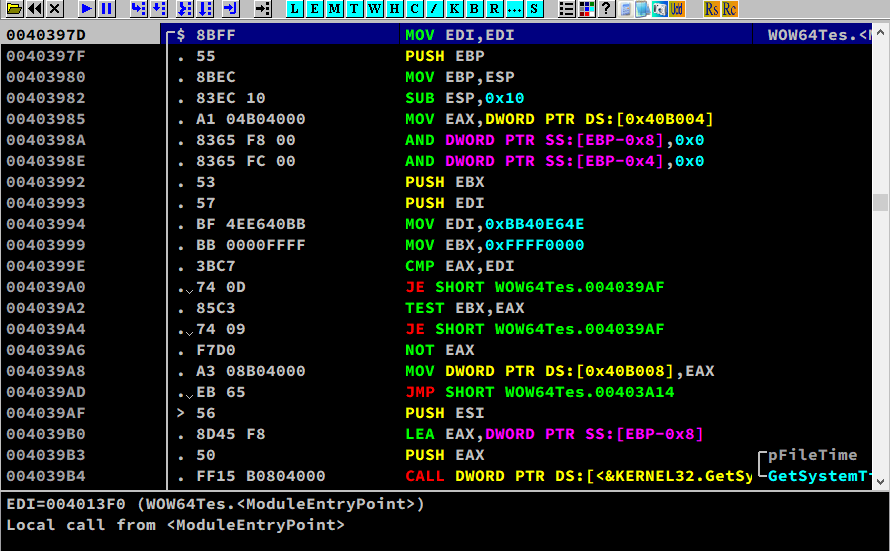
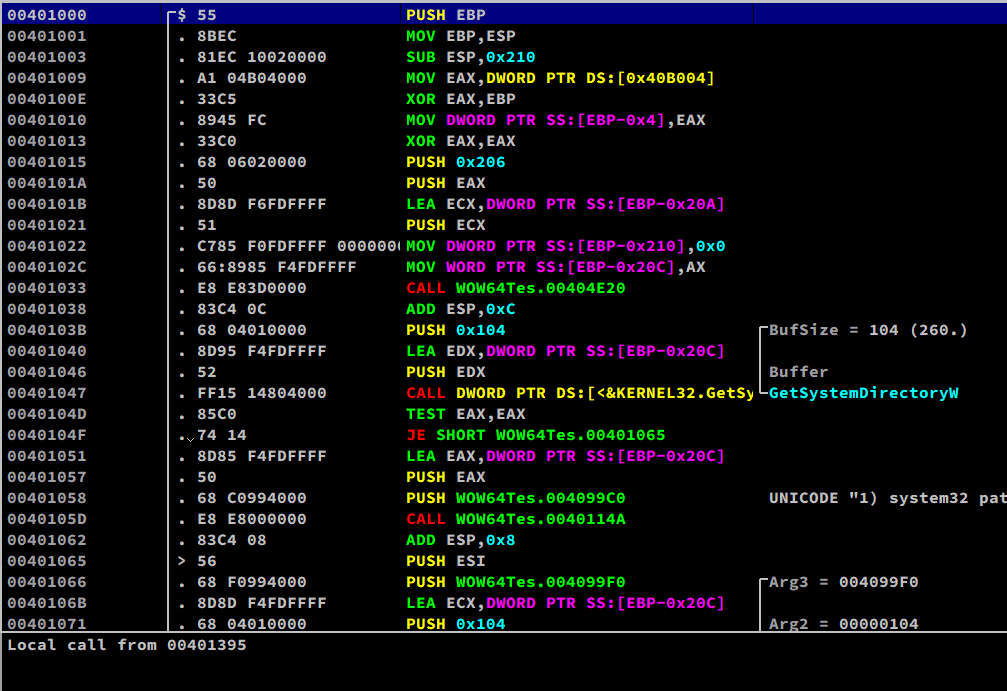
40.4 - WOW64Test_x64.exe
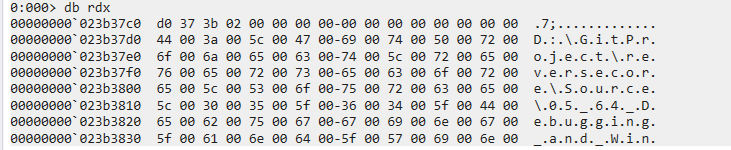
We use WinDbg to debug this executable
File -> Launch Executable
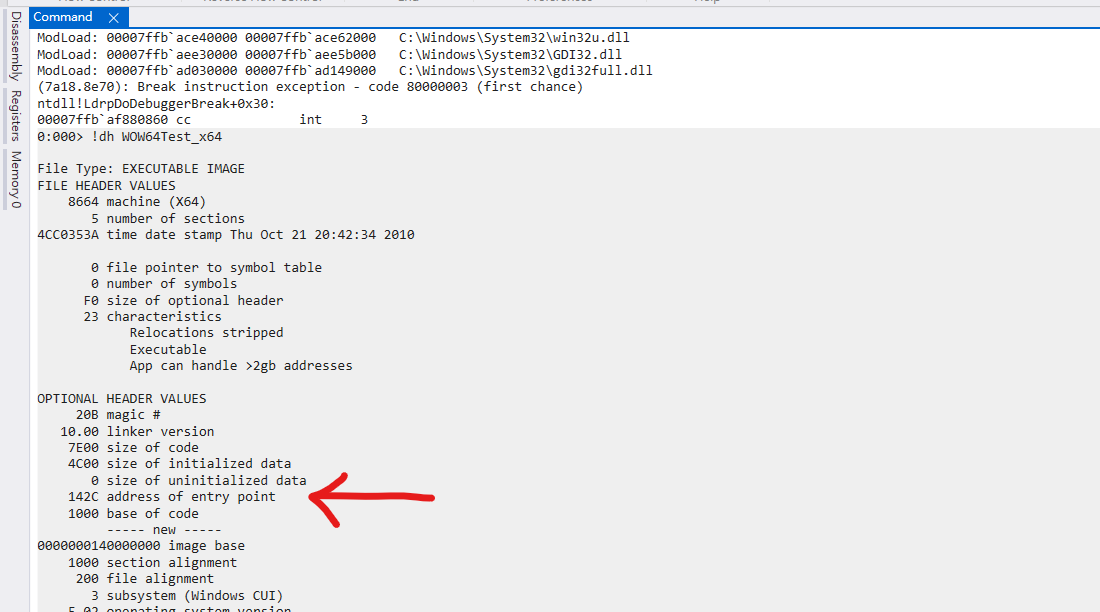
Firstly, we need to obtain the EP address.1
> !dh WOW64Test_x64
Go into EP:1
> g WOW64Test_x64 + 142C

Show more instructions:1
> u eip L10
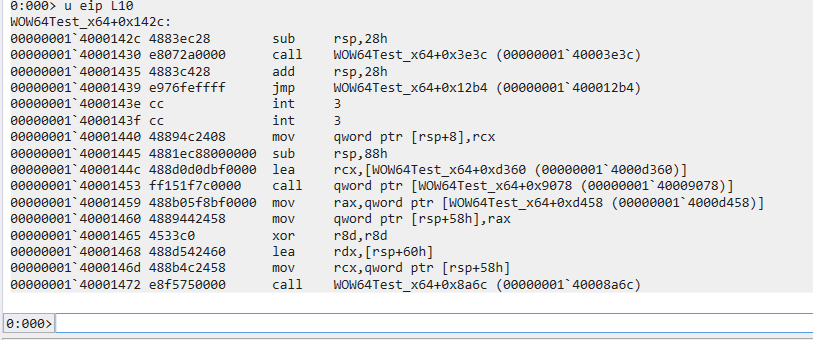
Trace the jmp instruction at 00000001 400014391
2> g WOW64Test_x64 + 12b4
> u eip L60
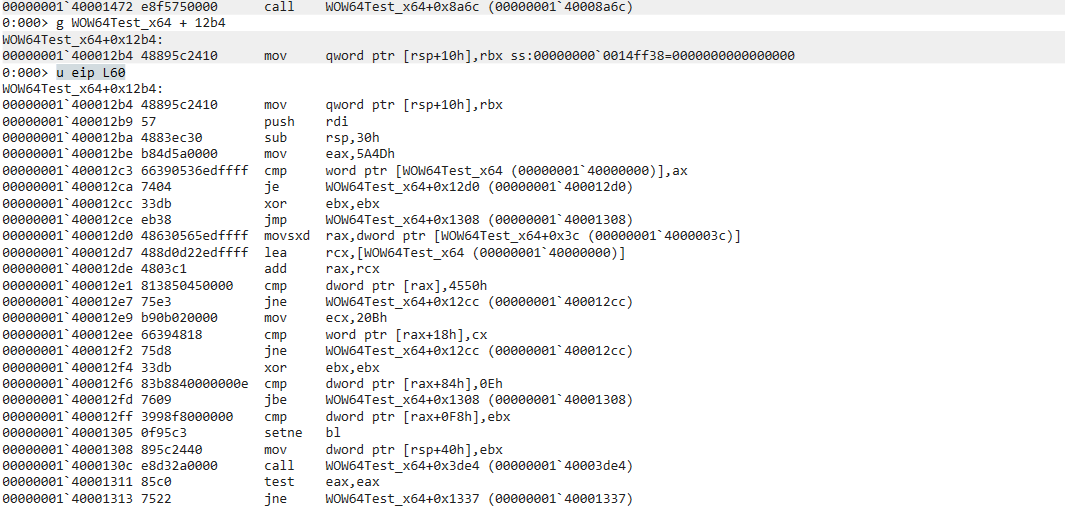
main() function1
2> bp KERNEL32!GetCommandLineW
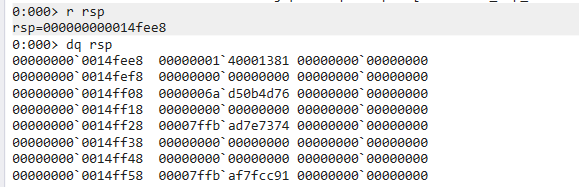
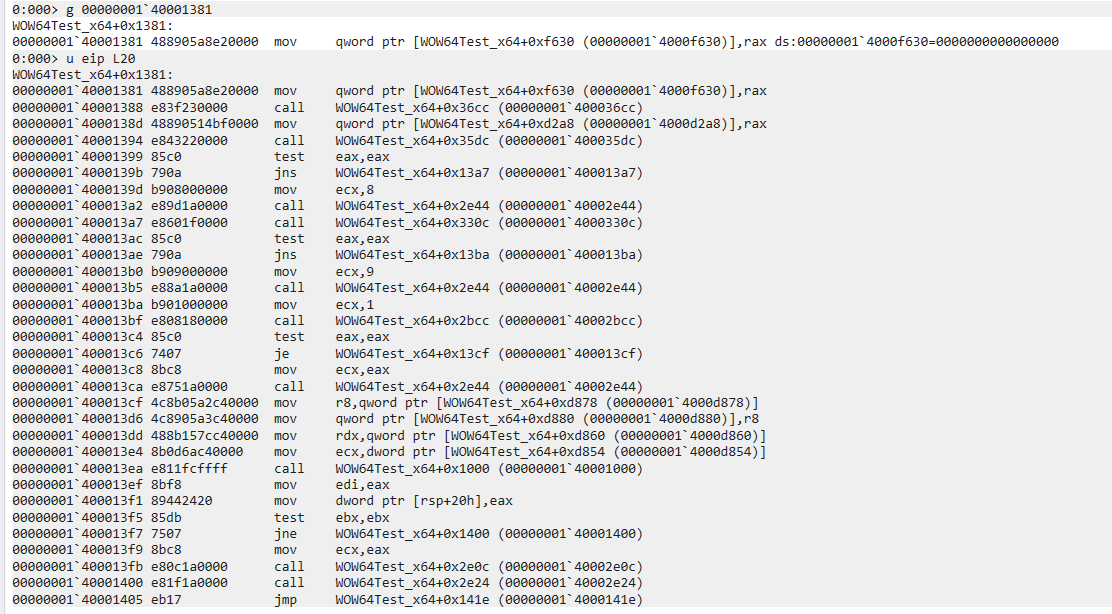
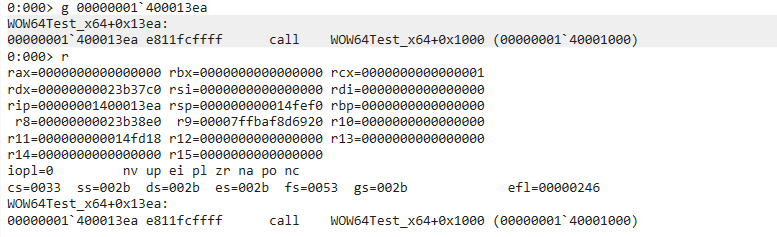
> g

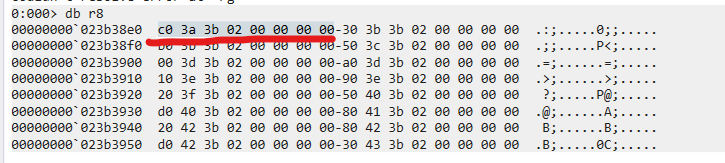
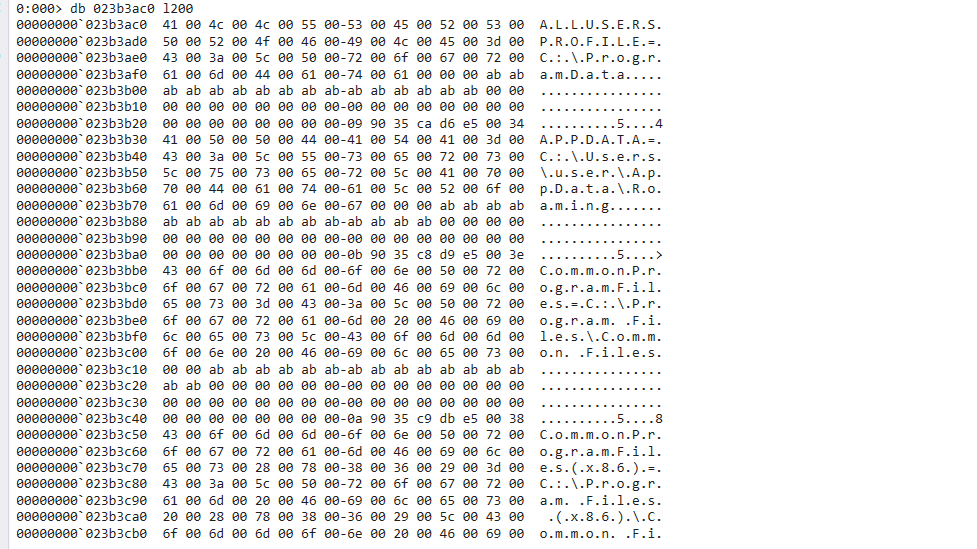
Obtain the return address from stack1
2> r rsp
> dq rsp
1 | |
1 | |
1 | |
1 | |
1 | |
Chapter 41 - ASLR
ASLR stands for Address Space Layout Randomization.
Windows OS that apply ASLR:
| OS | Kernal Version |
|---|---|
| Windows 2000 | 5.0 |
| Windows XP | 5.1 |
| Windows Server 2003 | 5.2 |
| Windows Vista | 6.0 |
| Windows Server 2008 | 6.0 |
| Windows Server 2008 R2 | 6.1 |
| Windows 7 | 6.1 |
IMAGE_FILE_HEADER\Characteristics
IMAGE_FILE_RELOCS_STRIPPED
Chapter 42 - Session of Kernel 6
Session 0 Isolation
Chapter 43 - DLL Injection in Kernel 6
Chapter 44 - InjDll.exe——A Tool for DLL Injection
Chapter 45 - TLS Callback Function
From this point on, this book will introduce more advanced topics in reverse engineering.
Here, TLS stands for Thread Local Storage, instead of Transport Layer Security used in networking.
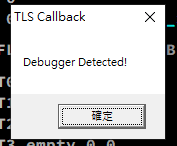
TLS Callback Function is commonly used in anti-debugging.
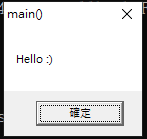
45.1 - Practice#1 HelloTls.exe
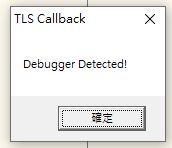
45.2 - TLS
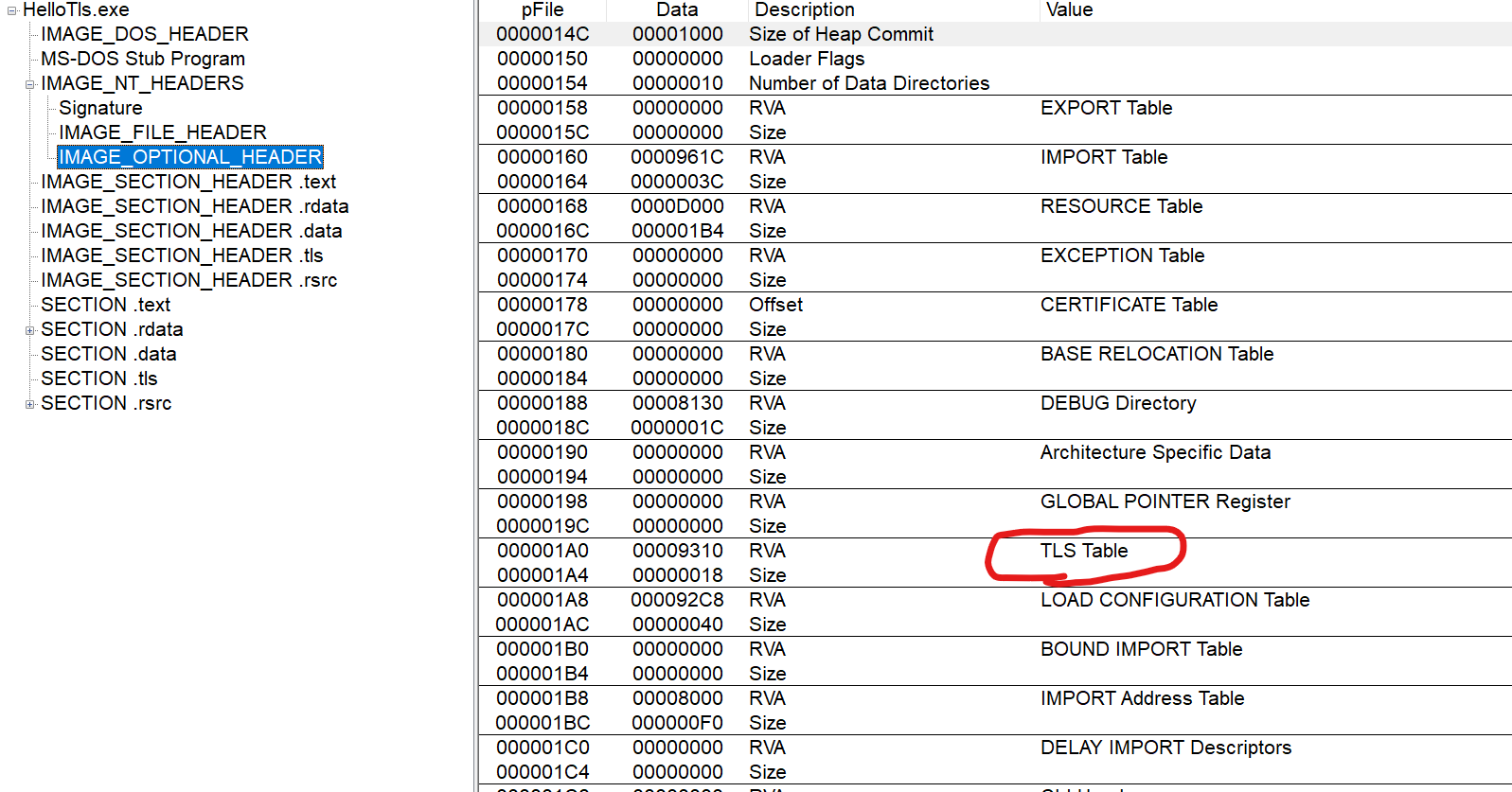
1 | |
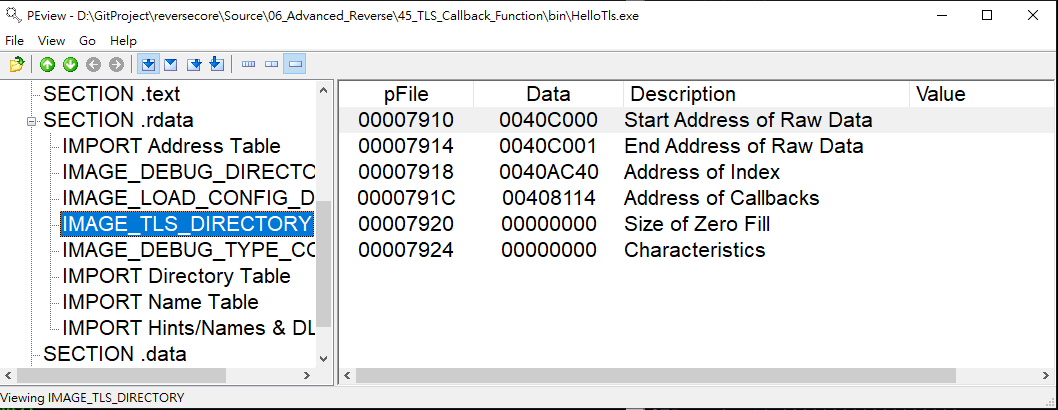
AddressOfCallbacks stores an array of pointers which point to callback functions. It is a significant member in structure IMAGE_TLS_DIRECTORY. The array is ended with NULL value.
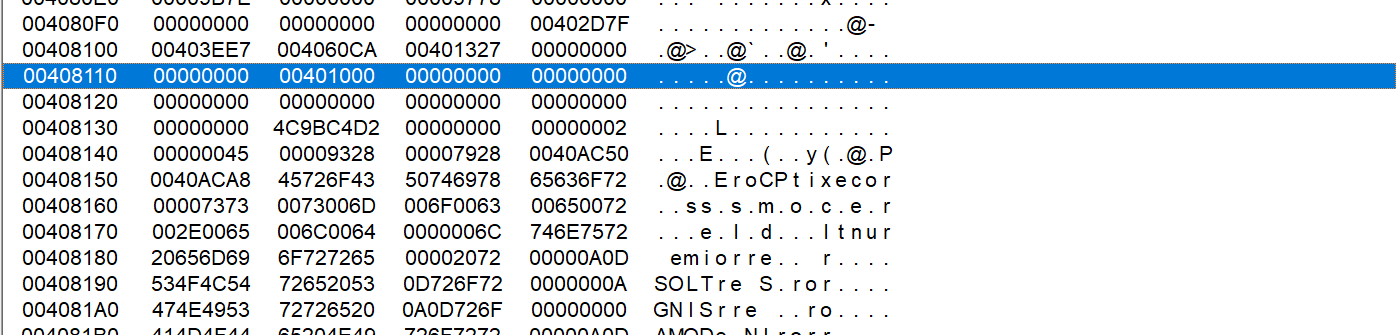
Notice that we can register multiple TLS callback functions by modifying the program, even though the original program contains only one TLS callback.
45.3 - TLS Callback Function
A TLS callback function is invoked whenever a process thread is created or terminated.
When the main thread is created, the TLS callback is executed before the program’s entry point (EP).
This behavior can be leveraged for anti-debugging purposes.
Notice that the TLS callback function is invoked when the program is terminated.
IMAGE_TLS_CALLBACK
1 | |
Notice that the definition of TLS callback function is similar to DllMain():1
2
3
4
5
6
7BOOL WINAPI DllMain(
_In_ HINSTANCE hinstDLL,
_In_ DWORD fdwReason,
_In_ LPVOID lpvReserved
);
//Source: https://learn.microsoft.com/en-us/windows/win32/dlls/dllmain
The TLS callback function and DllMain() have the same parameter order.
For a callback function, DllHandle is the address of the module (its load address), and Reason indicates why the callback function is being invoked.
There are four possible values for Reason:1
2
3
4
5
6
7/* Argument 1 passed to the DllEntryProc. */
#define DLL_PROCESS_DETACH 0 /* detach process (unload library) */
#define DLL_PROCESS_ATTACH 1 /* attach process (load library) */
#define DLL_THREAD_ATTACH 2 /* attach new thread */
#define DLL_THREAD_DETACH 3 /* detach thread */
//Source: https://github.com/wine-mirror/wine/blob/master/include/winnt.h
45.4 - Practice#2 TlsTest.exe
1 | |
The calling order of TLS function:
- DLL_PROCESS_ATTACH
- DLL_THREAD_ATTACH
- DLL_THREAD_DETACH
- DLL_PROCESS_DETACH
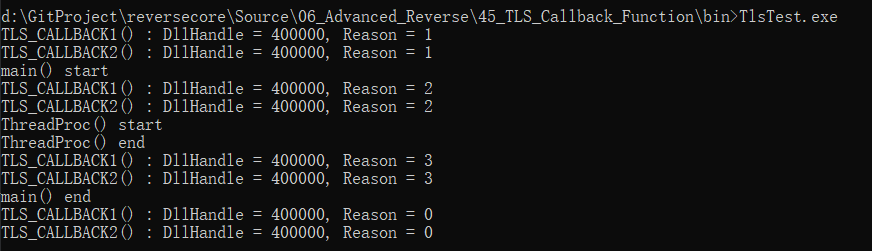
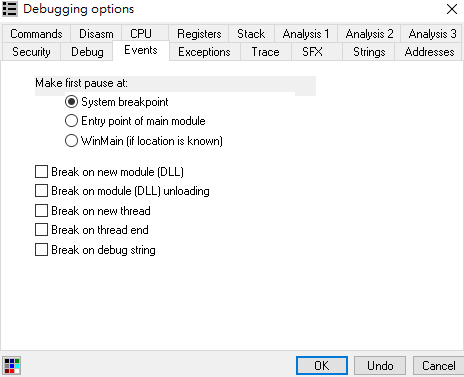
45.5 - Debugging TLS Callback Function
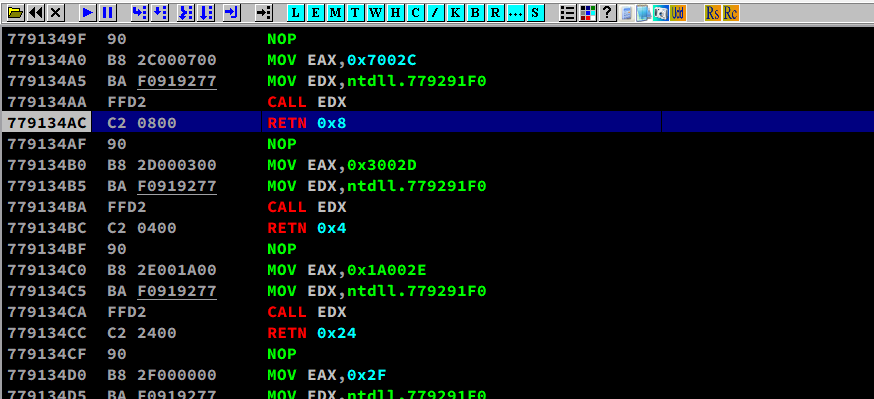
Enable “System breakpoint”:
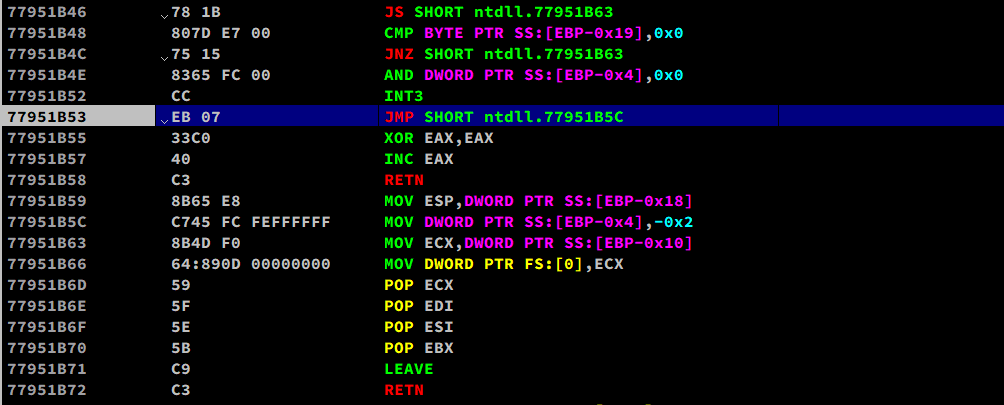
Or using Olly Advanced:
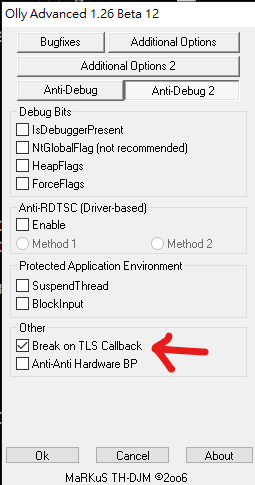
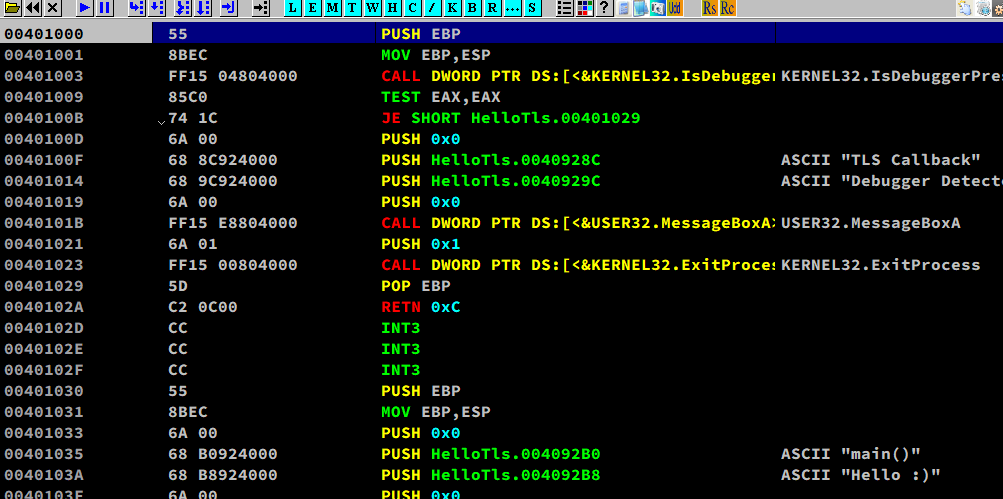
45.6 - Manually Add TLS Callback Function.
Before modification:
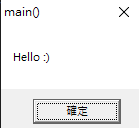
Modification:

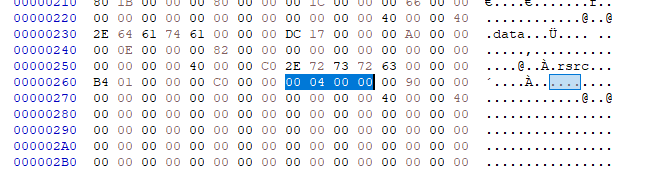
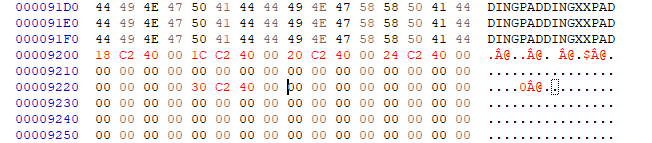
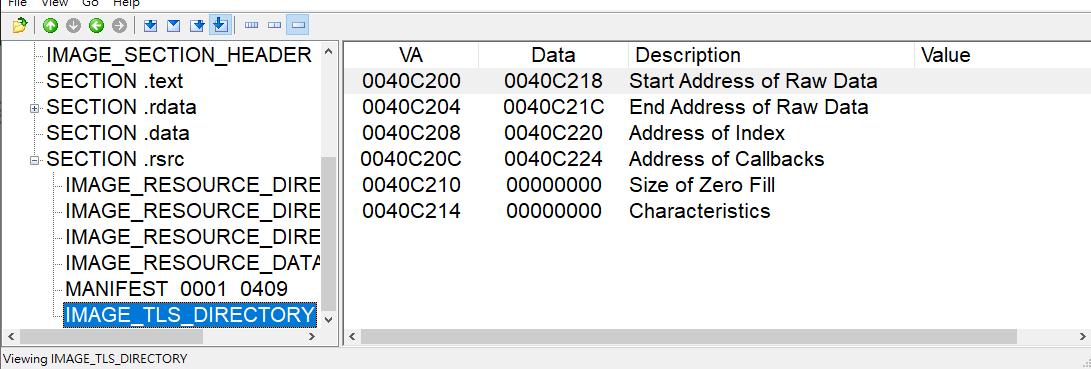
Write the assembly code:
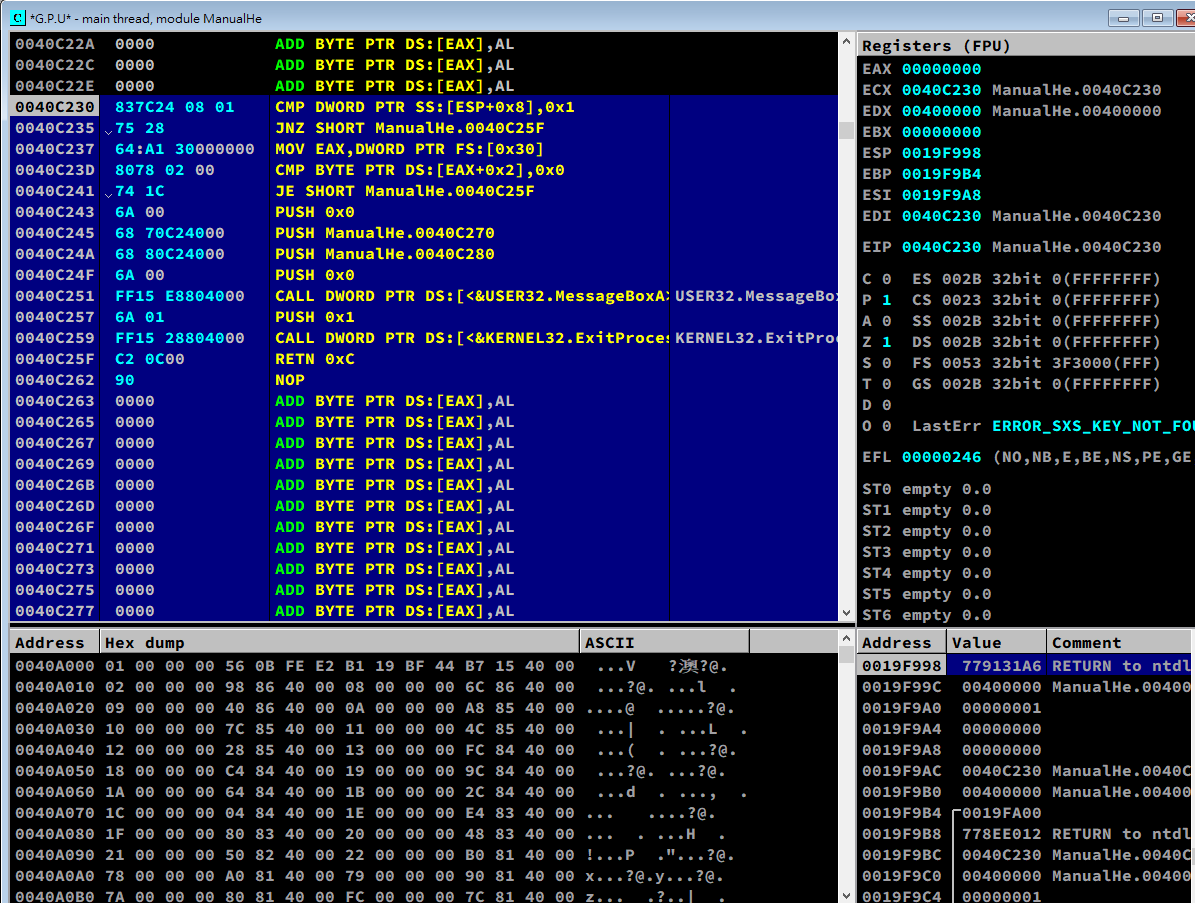
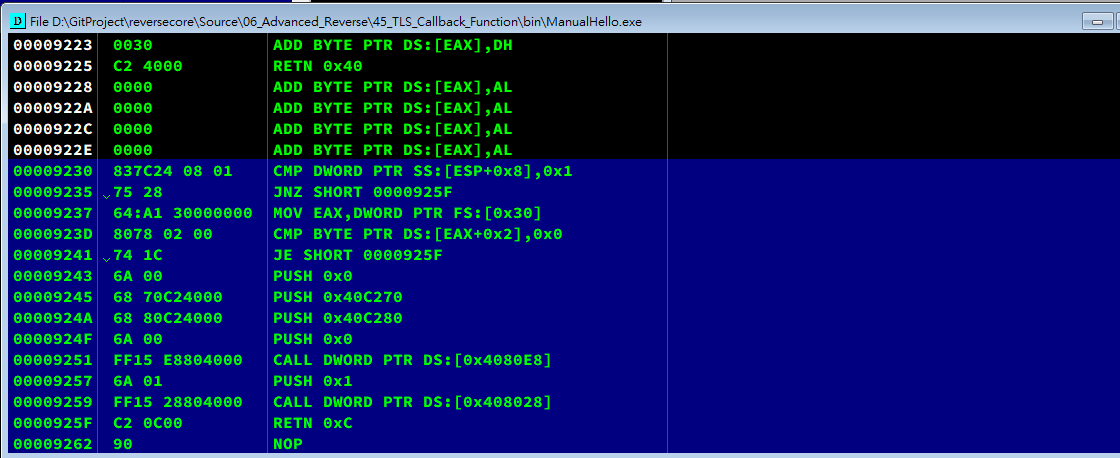
Chapter 46 - TEB
TEB stands for Thread Environment Block.
We can view TEB structure using the following command in WinDbg:1
> dt _TEB
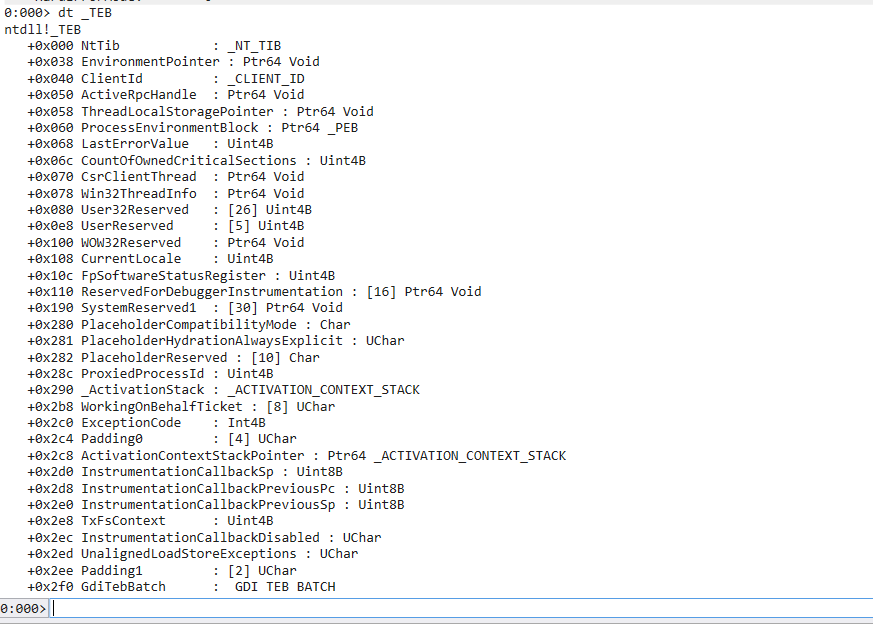
There are two important members:
- +0x030 ProcessEnvironmentBlock: Ptr32 _PEB\
This pointer points to PEB (Introduces in next chapter) . - NtTib\
TIB stands for Thread Information Block, this is the definition of TIB:1
2
3
4
5
6
7
8
9
10
11
12
13typedef struct _NT_TIB
{
struct _EXCEPTION_REGISTRATION_RECORD *ExceptionList;
PVOID StackBase;
PVOID StackLimit;
PVOID SubSystemTib;
union {
PVOID FiberData;
DWORD Version;
} DUMMYUNIONNAME;
PVOID ArbitraryUserPointer;
struct _NT_TIB *Self;
} NT_TIB, *PNT_TIB;
46.2 - Accessing TEB
Ntdll.NtCurrentTeb()
FS Segment Register
FS segment register indicates the TEB structure of the current thread.
- FS:[0x18] = start address of TEB
- FS:[0X30] = start address of PEB
- FS:[0] = start address of SEH
Chapter 47 - PEB
47.1 - PEB
Accessing PEB
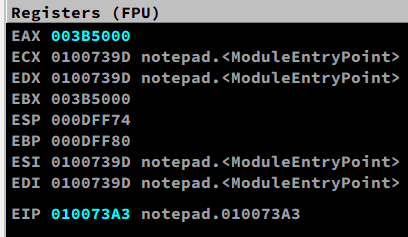
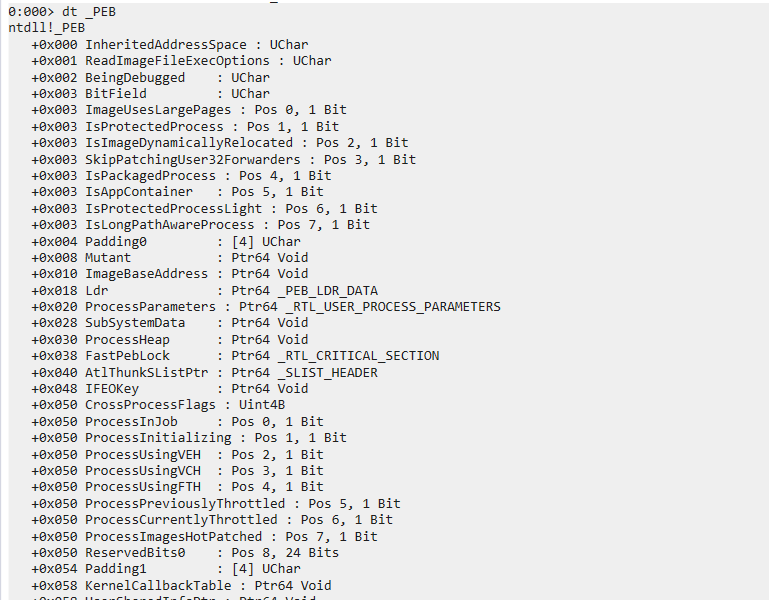
PEB stands for Process Environment Block.
PEB structure stores information of process.
We execute the following instruction in OllyDby (F7 or F8) at EP:1
MOV EAX,DWORD PTR FS:[0x30]
Definition of PEB
1 | |
Members of PEB
Windows 10
47.2 - Important Members
1 | |
- PEB.BeginDebugged:\
This value is commonly used in anti-debugging. - PEB.ImageBaseAddress:\
This value indicates the ImageBase of the process. We use GetModuleHandle() to obtain ImageBase. - PEB.Ldr:\
This member is a pointer that points to _PEB_LDR_DATA structure. After a DLL has been loaded into a process, we can obtain the ImageBase of the module throughPEB.Ldr. - PEB.ProcessHeap & PEB.NtGlobalFlag:\
These two values are commonly used in anti-debugging.
Chapter 48 - SEH
48.1 - SEH
SEH stands for Structured Exception Handling.
SEH is the exception handling mechanism used in Windows. In practice, we use keywords such as __try, __except, __finally to implement exception handling. Additionally, this mechanism is widely used in anti-debugging techniques.
Notice that the structure of SEH is different from the try / catch mechanism in C++. Windows introduced the SEH mechanism first, and it was later integrated into Visual C++. In other words, SEH is a low-level exception handling mechanism supported by the Windows operating system and the Visual C++ compiler.
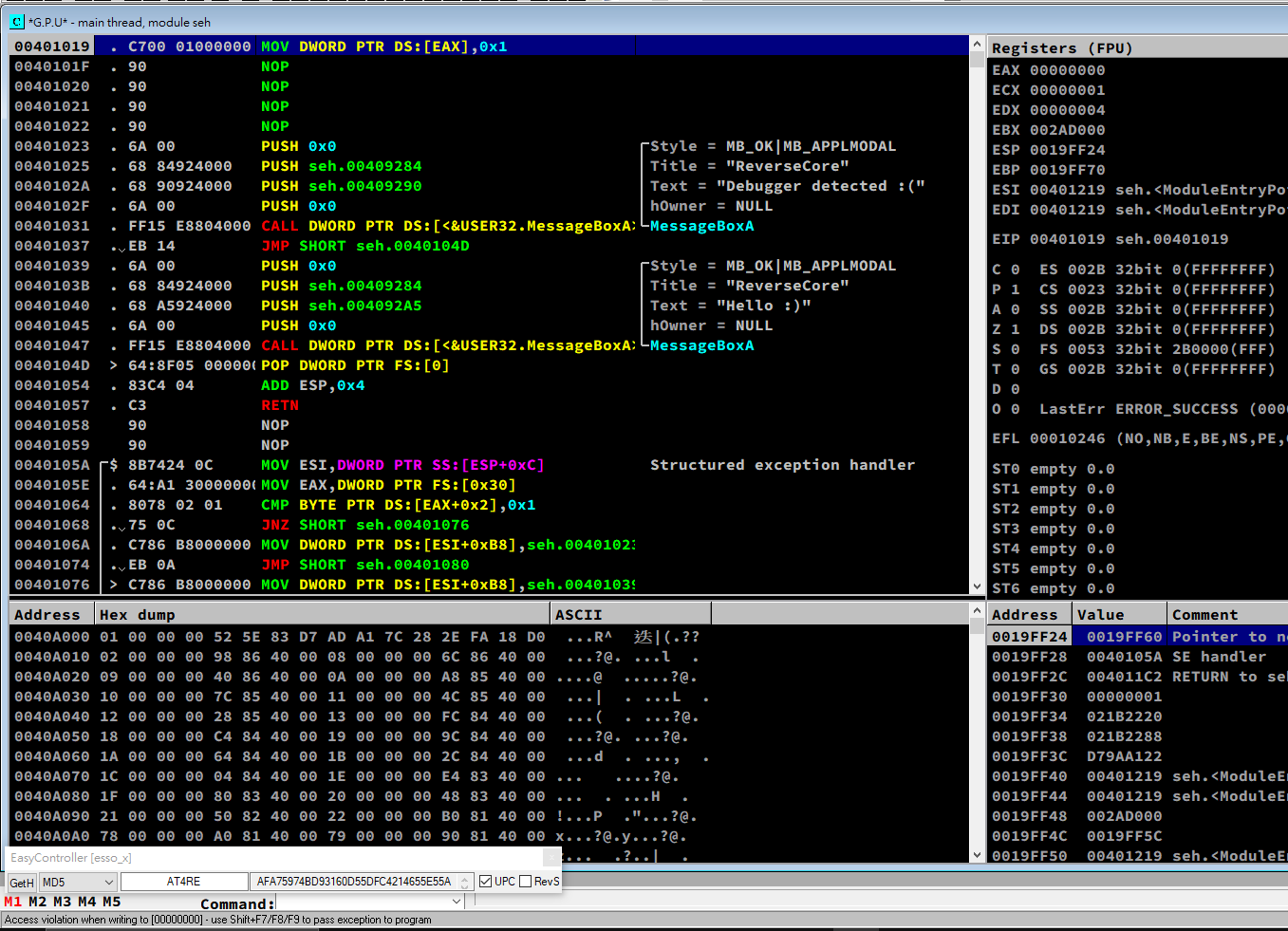
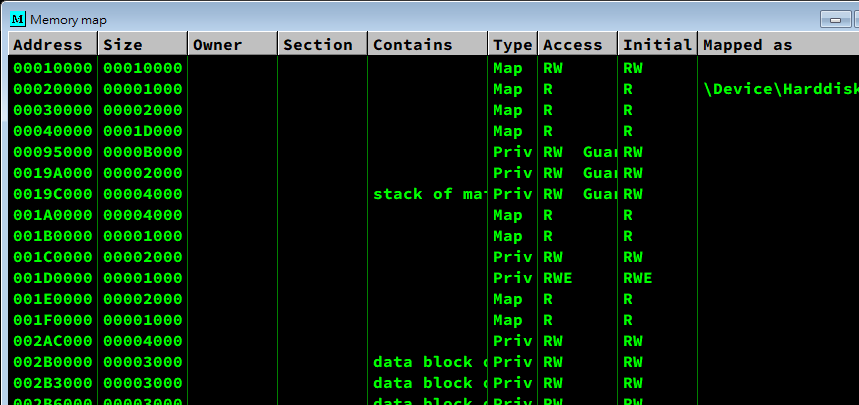
48.4 - Exception
There are 5 types of common exceptions:
- EXCEPTION_ACCESS_VIOLATION(C0000005)
- EXCEPTION_BREAKPOINT(80000003)
- EXCEPTION_ILLEGAL_INSTRUCTION(C000001D)
- EXCEPTION_INT_DIVIDE_BY_ZERO(C0000094)
- EXCEPTION_SINGLE_STEP(80000004)
48.5 - Details of SEH
SEH Chain
1 | |
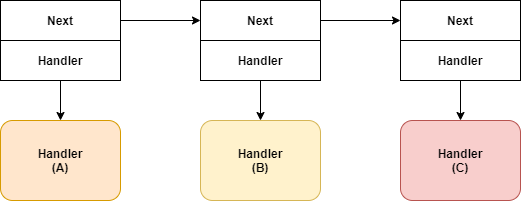
Definition of Exception Handler
TEB.NtTib.ExceptionList
Using SEH
48.6 - Practice#2 - seh.exe
Chapter 49 - IA-32 Instruction
49.2 - Terminology
| Terminology | Description |
|---|---|
| Machine Language | |
| Instruction | |
| OpCode | |
| Assembly | |
| Assemble | |
| Assembler | |
| Disassemble | |
| Disassembler | |
| Disassembly | |
| *Compile | |
| *Link |
49.3 - IA-32 Instruction Format
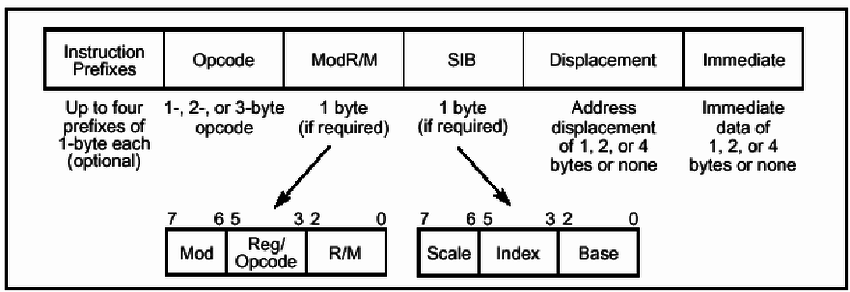
Instruction Prefix
Opcode
ModR/M
SIB
SIB (Scale-Index-Base) is also an optional field.
Deplacement
Immediate
49.4 - Instruction Analyzing
49.5 - Practice
Chapter 50 - Anti-Debugging
50.1 Anti-Debugging
Anti-Debugging techniques are strongly dependent to OS and debugger.
50.2 - Anti-Anti-Debugging
50.3 - Types of Anti-Debugging
Static Anti-Debugging
Static anti-debugging is used to detect a debugger. If a debugger is detected, the process cannot execute normally. Once the static anti-debugging technique is cracked, the program can execute normally.
Dynamic Anti-Debugging
Even though we have cracked the static anti-debugging technique, we may still encounter difficulties. If a dynamic anti-debugging technique is applied, it becomes difficult to trace instructions because this technique interferes with the debugger.
Chapter 51 - Static Anti-Debugging Techniques
51.2 - PEB
PEB is used for detecting a debugger. It provides reliable and convenient information. This technique is commonly used in anti-debugging.
BeingDebugged (+0x2)
Ldr (+0xC)
Process Heap (+0x18)
- GetPocessHeap()
- Flags (+0xC) & Force Flags (+0x10)
NtGlobalFlag (+0x68)
51.3 - NtQueryInformationProcess()
1 | |
1 | |
ProcessDebugPort(0x7)
1 | |
CheckRemoteDebuggerPresent()
ProcessDebugObjectHandle(0x1E)
ProcessDebugFlags(0x1F)
51.4 - NtQuerySystemInformation()
51.5 - NtQueryObject()
51.6 - ZwSetInformationThread()
51.7 - TLS Callback Function
51.8 - ETC
Chapter 52 - Dynamic Anti-Debugging Techniques
52.2 - Exception
SEH
SetUnhandledExceptionFilter()
52.3 - Time Checking
Interval
- COunter based method
- Time based method
RDTSC
52.4 - Trap Flag
52.5 - 0xCC
Chapter 53 - Advanced Anti-Debugging
53.1 - Advanced Anti-Debugging
53.2 - Garbage Code
53.3 - Breaking Code Alignment
53.4 - Encryption/Decription
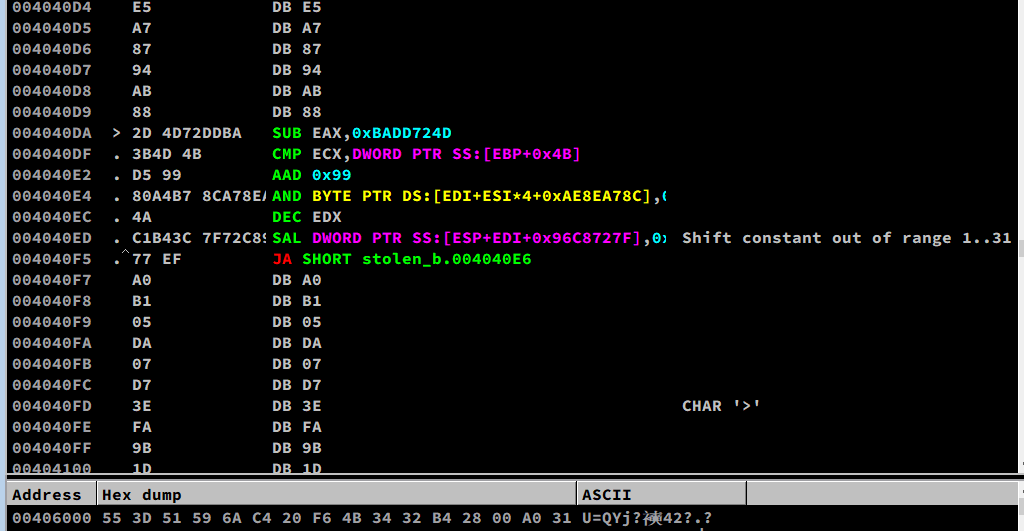
53.5 - Stolen Bytes (Remove OEP)
53.6 - API Relocation
53.7 - Debug Blocker (Self Debugging)
Chapter 54 - Practice#1: Service
Chapter 55 - Practice#2: Self Creation
Chapter 56 - Practice#3: PE Image Switching
Chapter 57 - Practice#4: Debug Blocker
THANKS FOR READING