[Book] Privilege Escalation - Offensive and Defensive Tactics and Techniques
First Post: Last Update: Word Count:
1.7k
Read Time:
10 min
El libro
Introduction
This article is used to keep notes and summaries of the book “Privilege Escalation - Offensive and Defensive Tactics and Techniques”. The content will be continuously updated as I read through the book.
Reflection
Chapter.1 - Fundamentals
1.2 - Windows Privilege Escalation
Local User And Local Group
cmd:
1
2
3
4
5
6
7
8
> net user

User accounts for \\DESKTOP-NKNBEK2

-------------------------------------------------------------------------------
Administrator            DefaultAccount           Guest
sdksdk                   WDAGUtilityAccount
The command completed successfully.
PowerShell
1
2
3
4
5
6
7
8
9
PS > Get-LocalUser

Name               Enabled Description
----               ------- -----------
Administrator      False   Built-in account for administering the computer/domain
DefaultAccount     False   A user account managed by the system.
Guest              False   Built-in account for guest access to the computer/domain
sdksdk             True
WDAGUtilityAccount False   A user account managed and used by the system for Windows Defender Application Guard scen...
lusrmgr.msc
1
2
> net user <Username> <Password> /add
> net user <Username> /del
Name Description ---- ----------- Access Control Assistance Operators Members of this group can remotely query authorization attributes and permission... Administrators Administrators have complete and unrestricted access to the computer/domain Backup Operators Backup Operators can override security restrictions for the sole purpose of back... Cryptographic Operators Members are authorized to perform cryptographic operations. Device Owners Members of this group can change system-wide settings. Distributed COM Users Members are allowed to launch, activate and use Distributed COM objects on this ... Event Log Readers Members of this group can read event logs from local machine Guests Guests have the same access as members of the Users group by default, except for... Hyper-V Administrators Members of this group have complete and unrestricted access to all features of H... IIS_IUSRS Built-in group used by Internet Information Services. Network Configuration Operators Members in this group can have some administrative privileges to manage configur... Performance Log Users Members of this group may schedule logging of performance counters, enable trace... Performance Monitor Users Members of this group can access performance counter data locally and remotely Power Users Power Users are included for backwards compatibility and possess limited adminis... Remote Desktop Users Members in this group are granted the right to logon remotely Remote Management Users Members of this group can access WMI resources over management protocols (such a... Replicator Supports file replication in a domain System Managed Accounts Group Members of this group are managed by the system. Users Users are prevented from making accidental or intentional system-wide changes an...
Useful group during penetration testing:
Administrators
Power Users
Users
Guests
TrustedInstaller
Authenticated Users
Built-in Account
Local System: This account has the greatest power before Windows XP, it is able to modify file system, registry, task, Windows Installer, Windows Update, etc. However, Microsoft separated it, nowadays, the account with greatest pwoer is TrustedInstaller.
Local Service
Network Service
Useful Command: | cmd | PowerShell | Description | | —- | —- | —- | | net user | Get-LocalUser | View local users. | | net localgroup | Get-LocalGroup | View local groups. | | net user | Get-LocalGroup -Name | Select-Object * | View user’s properties. | | net localgroup | Get-LocalGroupMember | View users in the group. | | net user /add | $password=Read-Host -AsSecureString New-LocalUser “username” -Password $password | Add new user. | | net localgroup /add | Add-LocalGroupMember - Group ‘‘ -Member (‘‘) | Add user into the group. | | net user /del | Remove-LocalUser -Name | Delete user. | | net user | $password=Read-Host -AsSecureString Set-LocalUser -Name -Password $password | Change user’s password |
ACL (Access Control List)
Term
Meaning
Security Descriptor
Describe the information of Security Object, like SID, DACL, SACL, etc.
Security Object
Object with Security Descriptor, like file, directory, registry, process, thread, pipe, etc.
ACL
Access Control List
ACE
Access Control Entries
DACL
Discretionary Access Control List
SACL
System Access Control List
trustees
Account, group, login session, etc.
Security Descriptor
View SID of current user:
1
> whoami /user
View SID of all users:
1
> wmic useraccount get name,sid
S-R-X-Y1-Y2-Yn-1-Yn:
S: Indicates that the string is a Security Identifier(SID).
R: Indicates the revision level.
X: Indicates the identifier authority value.
Y: Represents a series of subauthority values, where n is the number of values.
The first part of the series(-Y1-Y2-Yn-1) is the domain identifier. This element of the SID becomes significant in an enterprise with several domains. No two domains in an enterprise share the same domain identifier.
The last item in the series of subauthority values(-Yn) is the RID. It distinguishes one account or group from all other accounts and groups in the domain. Now two accounts or groups in any domain share the same RID.
An access token is an object that represents the security context of a process or thread.
A session is created after the user is successfully authenticated and logs in. The Windows system then determines the user’s SID and the SIDs of the groups to which the user belongs. Subsequently, the Local Security Authority (LSA) creates an access token for the user.
An access token contains the user’s SID, group SIDs, session ID, privileges, the default DACL, the token type, and other attributes.
The access token is assigned to userinit.exe, whose path is stored in the registry key HKLM\SOFTWARE\Microsoft\Windows NT\CurrentVersion\Winlogon.
userinit.exe is responsible for initializing the user’s environment, such as executing logon scripts, establishing network connections, and launching startup applications. It then reads the value of Shell, which is explorer.exe by default, and launches it as the Windows graphical user interface.
After that, all child processes and threads inherit the access token of their parent process—explorer.exe—unless a process explicitly specifies a different token. Initially, most processes share the same access token.
Token has two types:
Primary Token
Impersonation Token
Separation of Privilege
1
> whoami /priv
1
> gpedit.msc
1
PS> Enable-Privilege -Privilege SeBackupPrivilege
Command
Function
Enable-Privilege -Privilege <Privilege’s name>
Enable privilege
Disable-Privilege -Privilege <Privilege’s name>
Disable privilege
Add-Privilege -Privilege <Privilege’s name>
Add privilege
Remove-Privilege -Privilege <Privilege’s name>
Remove privilege
Get-Privilege -CurrentUser
View privilege of current user
Windows Hash
LM Hash
NTLM Hash
UAC
UAC (User Account Control)
Windows Service
Registry
Data type:
REG_SZ
REG_MULTI_SZ
REG_BINARY
REG_DWORD
Hive
Abbreviation
Description
HKEY_CLASSES_ROOT
HKCR
File associations and COM object registration.
HKEY_CURRENT_USER
HKCU
Settings for the currently logged-in user.
HKEY_LOCAL_MACHINE
HKLM
System-wide configuration for the entire machine.
HKEY_USERS
HKU
All user registry hives currently loaded.
HKEY_CURRENT_CONFIG
HKCC
Current hardware profile.
1.3 - Linux Privilege Escalation
User
Root User(Super User)
Regular User
System User
User Group
User Configuration Files
File
Meaning
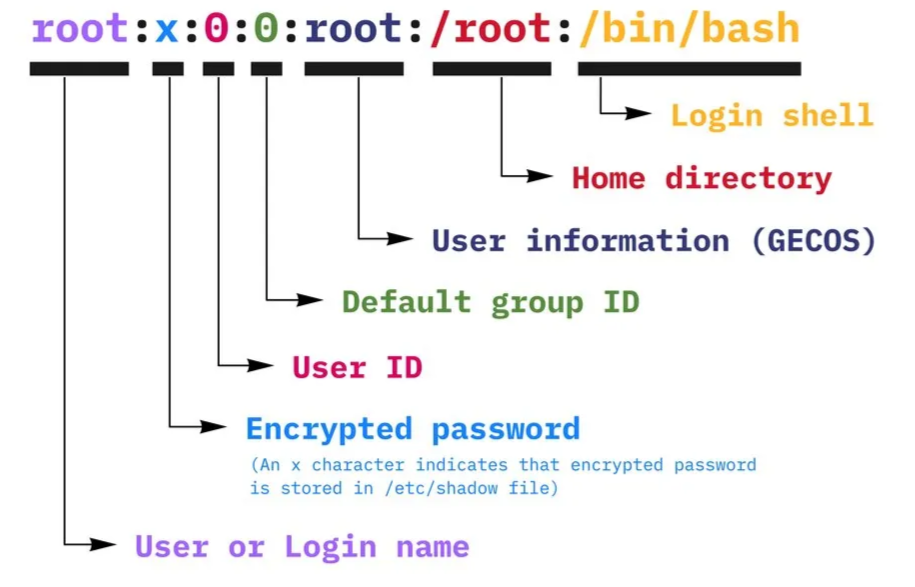
/etc/passwd
Users and their properties (such as, name, uid, group id).